Preliminary
miniDSP Ltd, Hong Kong / www.minidsp.com / Features and specifications subject to change without prior notice 29
6 THE MINIDSP-2X4-HD AND DDRC-24 PLUGINS
The miniDSP Flex is configured with an application known as a plugin. A plugin provides the primary user
interface to the processor, and manages key parameters of the DSP such as its sample rate. There are two
plugins that can be used with the Flex:
• The miniDSP-2x4-HD plugin is used if the Flex is in standard mode – that is, without Dirac Live.
• The DDRC-24 plugin is used when the Flex is in Dirac Live mode. The Flex will need to be activated with Dirac
Live to be able to use this plugin.
The two plugins are very similar, and the description in this manual applies to both except where differences are
specifically noted.
6.1 PLUGIN WINDOW
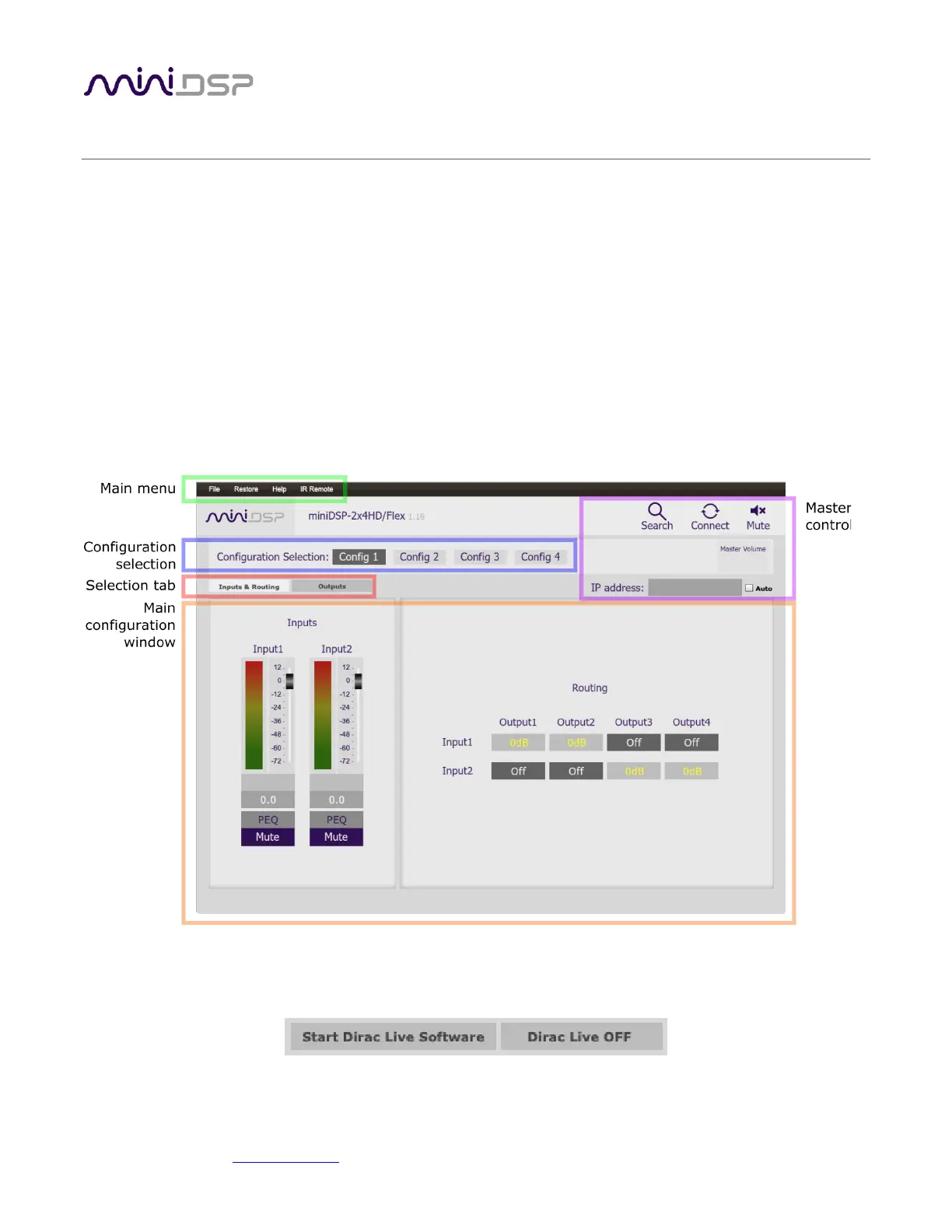
This screenshot shows the miniDSP-2x4-HD plugin with the key areas highlighted:
The DDRC-24 plugin is very similar, but the Master Control area has an additional two buttons for Dirac Live as
shown in the screenshot below. In addition, the Inputs section is slightly different.



 To Next Page