Preliminary
miniDSP Ltd, Hong Kong / www.minidsp.com / Features and specifications subject to change without prior notice 38
6.4.5 Dual subwoofers
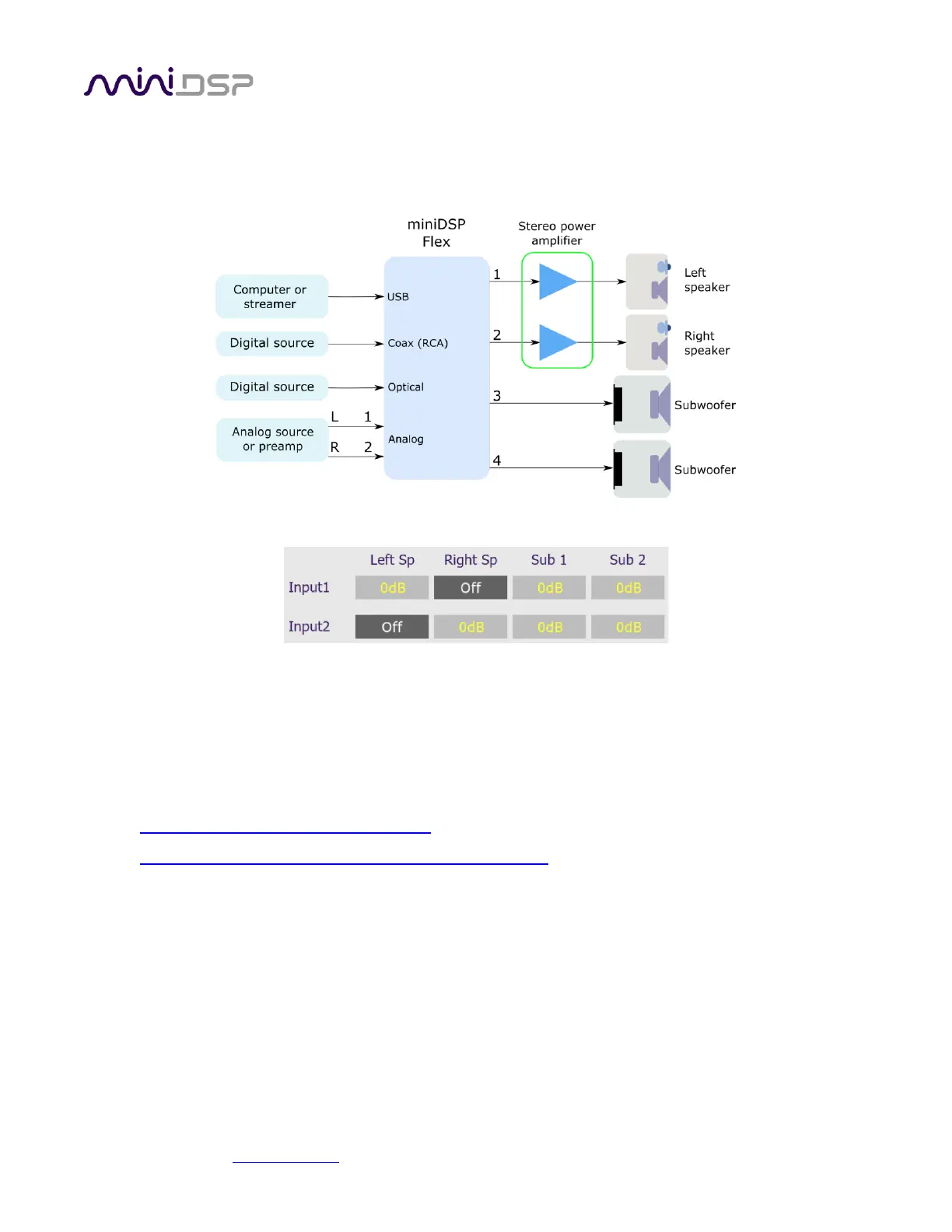
The configuration for dual subwoofers is a simple extension of that for a single subwoofer. Connect the
additional subwoofer to output 4:
The main change is to the Routing tab, which will now look like this:
That is, left and right channels are being summed together and sent to channels 3 and 4. You will also need to
set the low pass filter on output channel 4.
From there, proceed as described for the single subwoofer configuration.
A more advanced approach is to use the signal processing blocks on each output channel to change the signal
sent to each subwoofer. For guidance, see these application notes on our website:
• Tuning multiple subwoofers with miniDSP
• Dual-sub integration with miniDSP and MultiSub Optimizer
The first application note is focussed on home theater, but the techniques can be applied to a stereo system
with dual subwoofers. The second application note is more advanced and uses a program called Multi-sub
Optimizer to generate optimizations for the two subwoofers.
Note: If you intend to use “stereo subwoofers,” see Stereo supporting woofers below instead.



 To Next Page