StakMax Microplate Handling System User Guide
5016072 A 95
Using StakMax Software
This section describes the main elements of the StakMax Software
interface. You can use the StakMax Software to manually control basic
stacker functions, for example, starting and stopping plate reads,
moving plates from the reader to the input or output stacks, and
moving plates within the stacker. You can use more advanced functions,
such as scripting, if you want to create and run your own scripts with
automation instead of running plates from the main window.
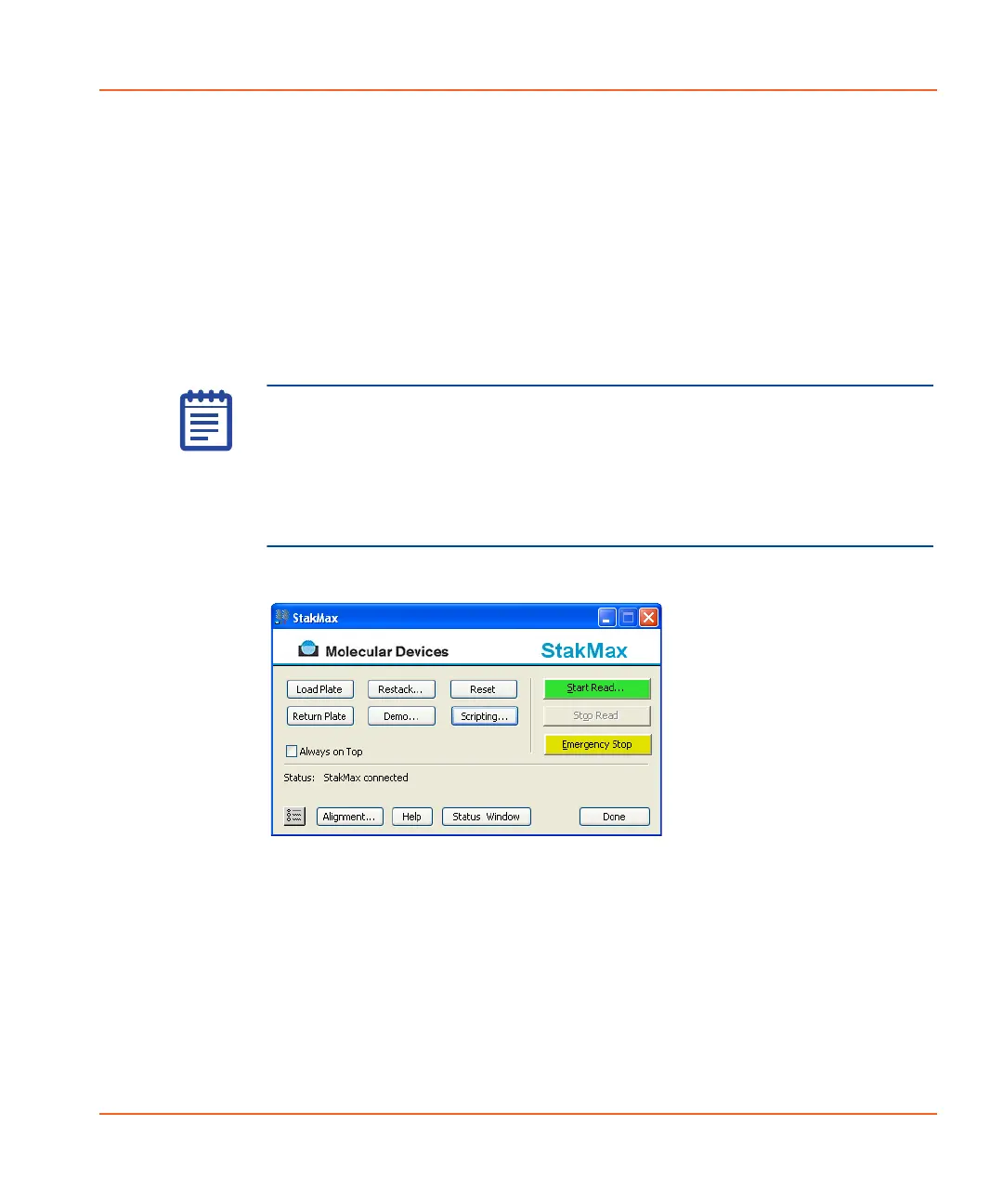
Use the main StakMax Software interface (see Figure 3-17) to control
the StakMax microplate handler. Each of the available functions is
described in this section.
Figure 3-17 The StakMax Software interface.
Note: When processing plates, the StakMax Software interface is
operating the StakMax microplate handler as well as
remote-controlling the SoftMax Pro Software. We recommend that you
do not perform data analysis or other operations in SoftMax Pro
Software until the process is complete. As with any robotic plate
handling system, it is best to perform data analysis on a separate
computer while running the robot.
StakMax-UG-5016072A.book Page 95 Friday, October 21, 2011 3:51 PM














 To Next Page