MAINTENANCE AND OPERATING MANUAL
Electronic controller
HAS T 070÷140
49
ENGLISH
EN
The data in this manual are not binding and they can be modified by the manufacturer without notice. Reproduction of this manual is strictly prohibited.
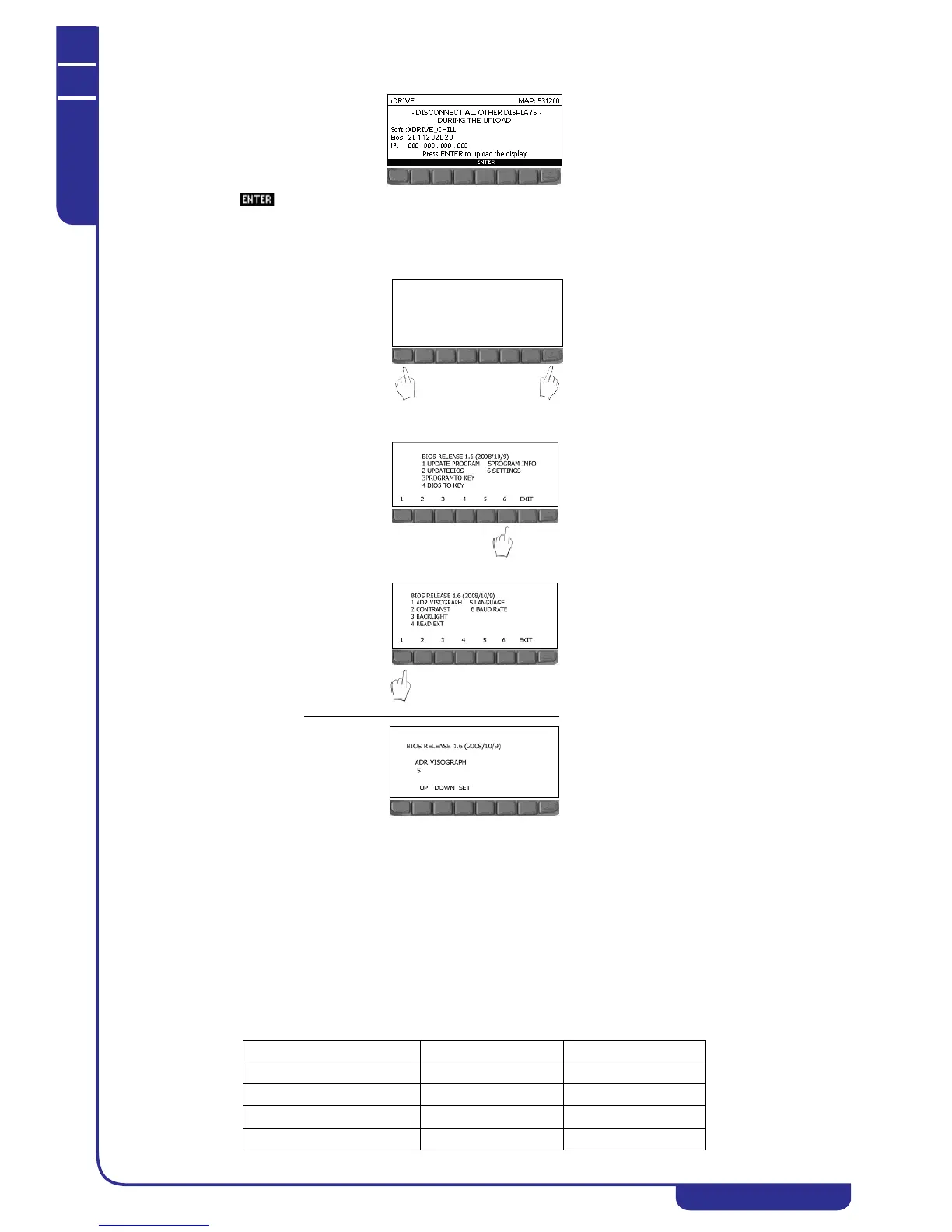
• Check that the following mask is shown on the display:
• Press to perform the display upload procedure
• Wait for the procedure to be completed (approximately 5 minutes)
• Check that the mask of the unit's main menu appears on the remote display (see "6.2.2 Main menu")
• Set the remote display address. To connect both displays to the electronic controller they must have different
addresses. Hold down the outermost keys on the remote display for 5 seconds:
• Enter the BIOS menu of the display by entering password 1:
• Press key 6 to open the SETTINGS menu:
• Press key 1 to open the ADR VISOGRAPH menu:
• Insert an address
other than 2 and different from the address of the local display then press SET:
• Exit the BIOS menu and connect both displays to the electronic controller.
6.1.3 Auxiliary hardware
In addition to the electronic controller and the display, the unit may incorporate the following auxiliary hardware devices:
• Driver: to control the electronic thermostatic valves (EEV)
• Auxiliary IOs: to increase the number of electronic controller inputs-outputs
Auxiliary hardware devices are present in accordance with the type of unit and they are connected on the CANbus network to
the electronic controller.
6.1.3.1IPEX 60D (IPX 106D) and IPEX 70D (IPX 125D)
The IPEX 60D (IPX 106D) and IPEX 70D (IPX 125D) expansion modules, which are installed when necessary, make it
possible to increase the number of available I/Os in the electronic controller.
The following table lists the main features of the expansions:
IPEX 60D (IPX 106D) IPEX 70D (IPX 125D)
Digital inputs 320
Digital outputs 625
Analog inputs 710
Analog outputs 36



 To Next Page