MAINTENANCE AND OPERATING MANUAL
Electronic controller
HAS T 070÷140
55
ENGLISH
EN
The data in this manual are not binding and they can be modified by the manufacturer without notice. Reproduction of this manual is strictly prohibited.
6.3.1 EX/MD auxiliary I/Os
When expansion cards are installed, pressing the key in any mask of the I/O menu provides access to the menu for
display of auxiliary I/Os.
Auxiliary I/Os are:
• Digital I/Os on expansion modules (see "6.1.3.1 IPEX 60D (IPX 106D) and IPEX 70D (IPX 125D)")
• I/Os on external free-cooling modules (see "6.7.21 Free-cooling")
• Modular system slave unit I/O (see "6.7.17 Modularity")
• Special functions I/O (see "6.7.20 Special functions")
• Evaporator outlet water dual temperature probe
• Condenser water inlet and outlet probes
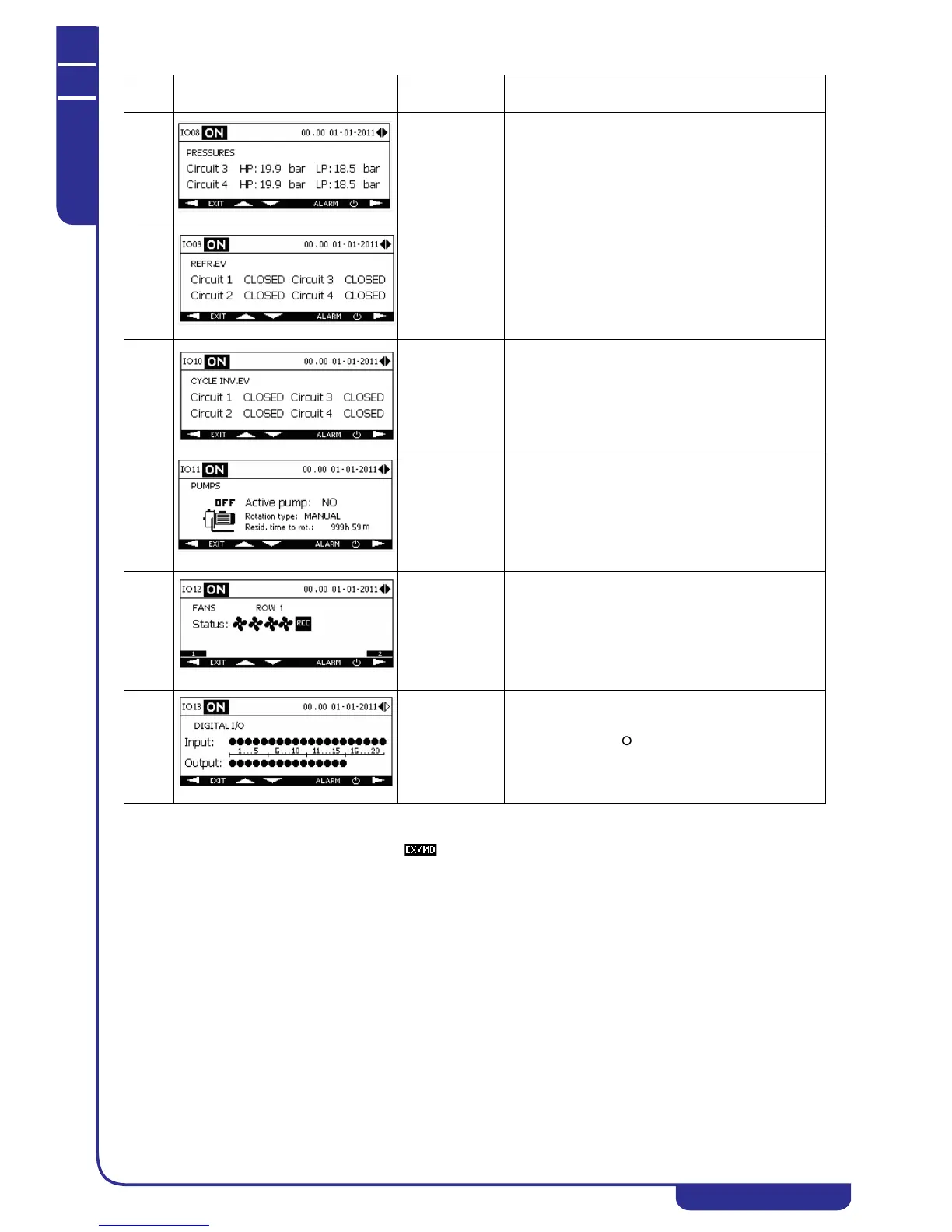
IO08 On units with
more than two
circuits
Displays condensing pressures (HP) and evaporation
pressures (LP) of circuits 3-4 (if present)
IO09 Displays the status of the refrigerant valves in the
unit's circuits.
IO10 Displays the status of the cycle inversion valves in the
unit's circuits.
IO11 Displays the status of the pumps installed in the unit
(see "6.7.14 Pumps").
The rotation type appears only when the unit is
equipped with two pumps (see "6.7.14.1 Pumps
rotation").
The residual rotation time appears only if the rotation
type between pumps is HOURS or STARTS+HOURS.
IO12 On units with
rows of fans
shared between
circuits
Displays the status of fans and the heat recovery
exchanger in units with rows of fans shared between
several circuits (see "6.7.5 Fans").
In units with step control fans the icons correspond to
the number of active steps; in units with speed
controlled fans the percentage rpm value is displayed
(see "6.7.5 Fans").
IO13 Displays the status of the unit's digital inputs and
digital outputs. The icon denotes a digital signal at
logical level 1, the icon at logical level 0.
Ref. Mask
Display
conditions
Description



 To Next Page