MAINTENANCE AND OPERATING MANUAL
Electronic controller
HAS T 070÷140
57
ENGLISH
EN
The data in this manual are not binding and they can be modified by the manufacturer without notice. Reproduction of this manual is strictly prohibited.
The IP menu is accessible from the ME menu, selecting the icon corresponding to free-cooling in mask ME01 (see
"6.7.21 Free-cooling").
The MO menu is accessible from the ME menu, selecting the icon corresponding to modularity (see "6.7.17 Modularity").
For a description of the masks of the MO menu relative to a modular system, consult the dedicated xCONNECT manual.
6.4 Setpoints Menu
Pressing the key in the main menu provides access to the menu in which the setpoint can be edited.
The setpoint defines the reference temperature for unit thermoregulation (see "6.7.8 Regulation" ).
Modification of the type of setpoint is possible only in the menu of the reserved menu (see "6.7.8 Regulation")
Ref. Mask
Display
conditions
Description
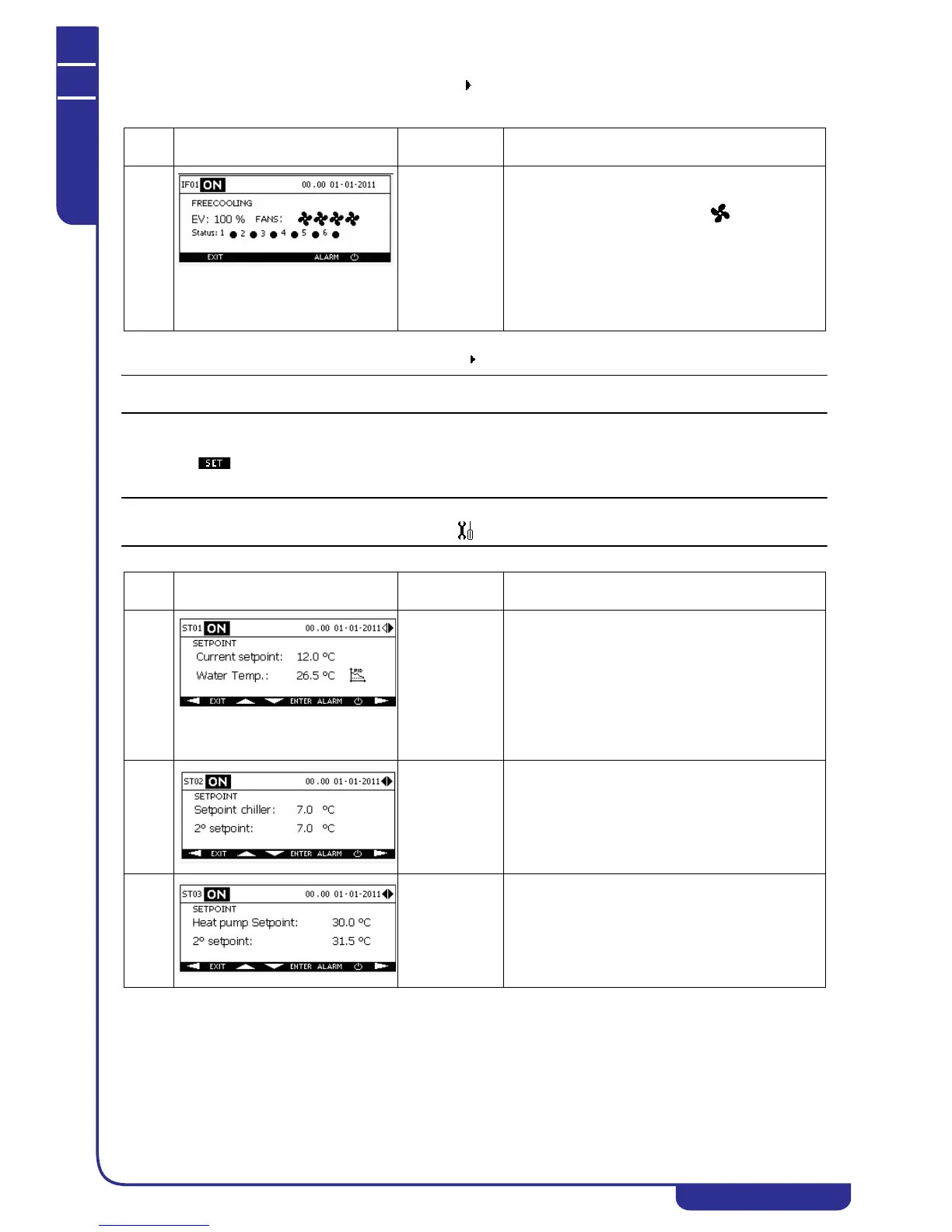
IF01 With free-
cooling enabled
Displays the opening percentage of the three-way
valve and the status of the free-cooling fans.
In units with step control fans the icons
correspond to the number of active steps; in units with
speed controlled fans the percentage rpm value is
displayed.
For each module, flashing of the corresponding
icon indicates correct communication between module
and unit.
Ref. Mask
Display
conditions
Description
ST01 Displays the current setpoint. Depends on the type of
setpoint programmed (see "6.7.8.1 Setpoint types" )
and the unit operating mode.
Displays the outlet water temperature in accordance
with the selected control probe (see "6.7.8
Regulation").
Displays an icon to indicate the control type, set at
either neutral zone or PID. With modularity enabled the
icon will not appear.
ST02 Makes it possible to edit the fixed setpoint for chiller
mode.
Makes it possible to edit the second setpoint for chiller
mode, (see "6.7.8.1 Setpoint types").
ST03 Makes it possible to edit the fixed setpoint for heat
pump mode.
Makes it possible to edit the second setpoint for heat
pump mode, if enabled (see "6.7.8.1 Setpoint types").



 To Next Page