OPERATING AND MAINTENANCE MANUAL
Chapter 7 - Electronic controller
TAEevo Tech 015÷802 60 Hz UL
67
The data in this manual are not binding and they can be modified by the manufacturer without notice. Reproduction of this manual is strictly prohibited
EN
ENGLISH
7.32 Circuit maintenance
Press to disable the circuit for maintenance; all the compressor will be switched off after disabling the circuit.
7.33 Alarm visualization and reset
Pressing or it is possible to visualize the alarms; the alarm status can be:
• Active: the alarm is still active and it is not possible to reset it
• Reset: the alarm is not active and it is possible to reset it
With this procedure you can reset all the alarms except for the compressor thermal cut-out alarms for which the
password will be required: 14.
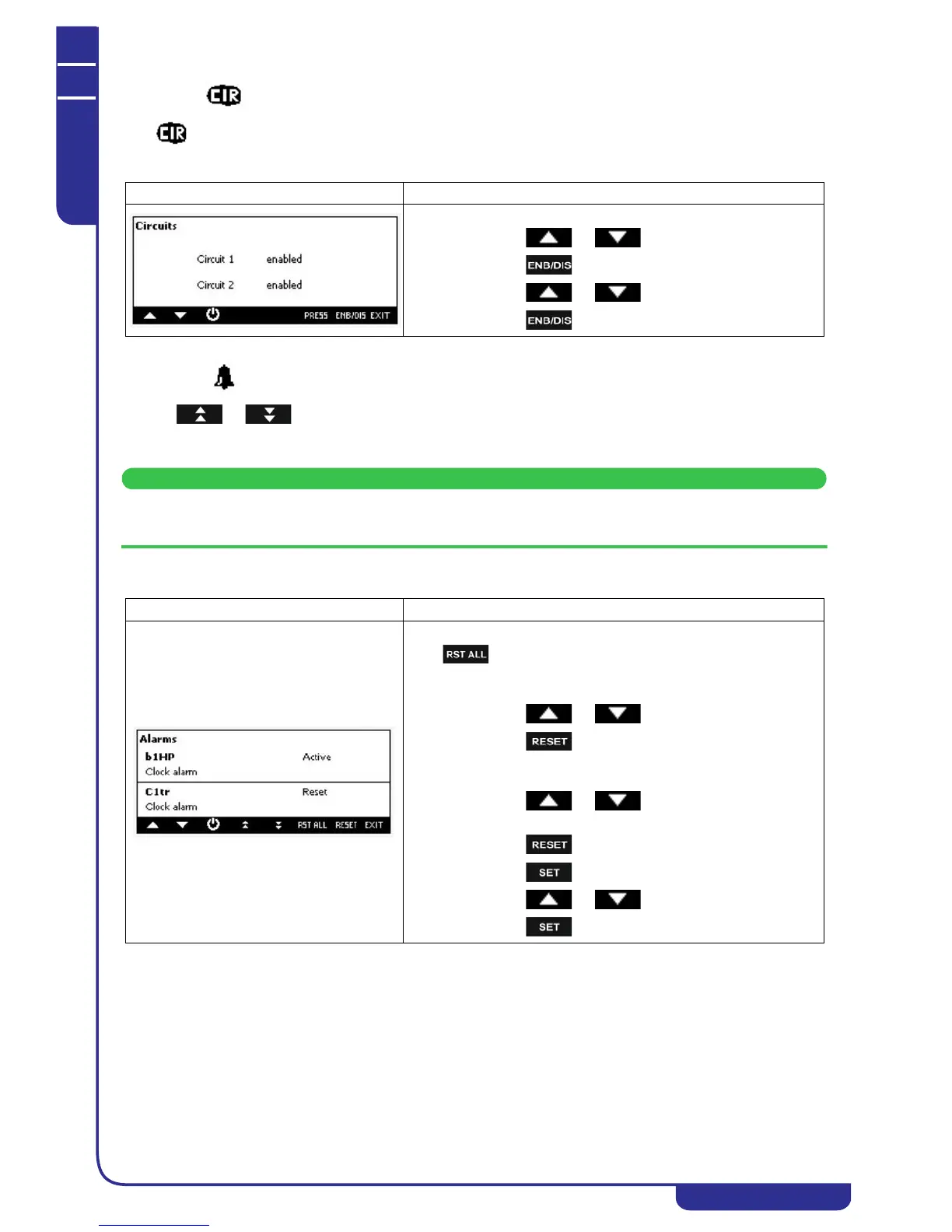
Mask Description
How to disable a circuit:
• press or to select the circuit to disable
• press for 5 seconds
• press or to select the status "Disabled"
• press for 5 seconds to confirm the operation
Mask Description
Manual reset of all alarms:
press to reset all the alarms (only the alarms that are not active)
Manual reset procedure:
• press or to select the alarm;
• press to reset the alarm.
In case of compressor overload alarm when the password is requested,
operate in this way:
• press or to select the compressor
overload alarm
• press
• press
• press or to insert the password value
• press to confirm the operation




 To Next Page