OPERATING AND MAINTENANCE MANUAL
Chapter 7 - Electronic controller
TAEevo Tech 015÷802 60 Hz UL
71
The data in this manual are not binding and they can be modified by the manufacturer without notice. Reproduction of this manual is strictly prohibited
EN
ENGLISH
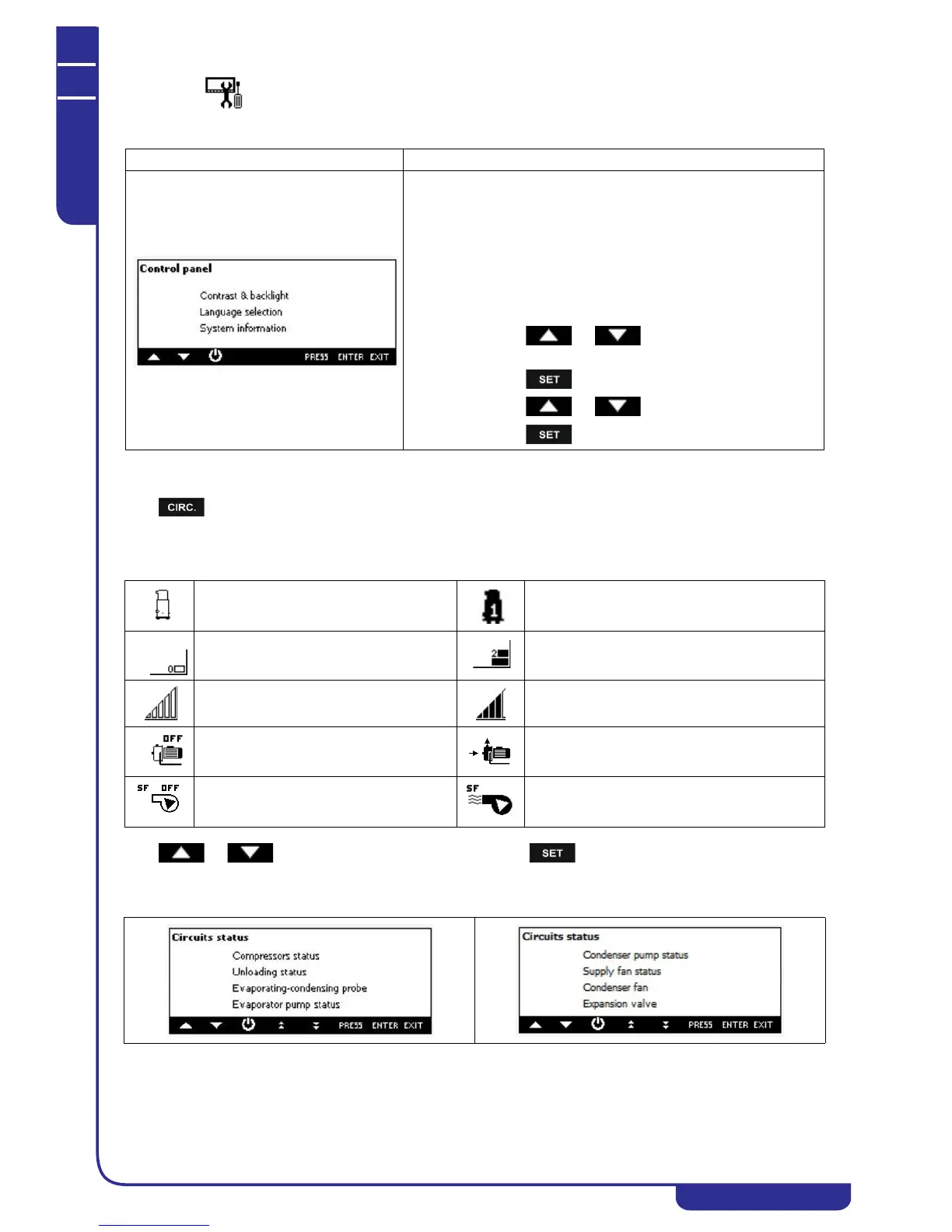
7.39 Keyboard configuration
7.40 Circuit Information
Press to read the main information about the circuit of the compressor status, unloading status, evaporating -
condensing probes, water pump, condenser fan/valve status
Load status visualization:
Press or to select the information to read then press .
Circuits status
Mask Description
It is possible to set:
• contrast and backlight (it is strongly recommended to
reduce as possible the activation time of the backlight)
• language selection
• Ichill firmware release (to verify the compatibility control
Visograph keyboard)
• Visograph keyboard firmware release / Visograph
keyboard bin release.
How to modify the configuration:
• press or to select the configuration to
change
• press
• press or to change the configuration
• press to confirm.
Compressor OFF Compressor ON
Condenser fan OFF (step regulation)
(Function not available)
Condenser fan ON (step regulation) (Function not
available)
Condenser fan OFF (proportional regulation)
or condensation valve OFF
Condenser fan ON (proportional regulation) or
condensation valve OFF
Water pump OFF Water pump ON
Supply fan OFF (Function not available) Supply fan ON (Function not available)




 To Next Page