NG-MB1/NG-MB2 User Manual
Page | 40 Copyright©2022 NGTeco. All rights reserved.
6.2.2 New Wi-Fi Connection
To add a new Wi-Fi connection, perform the following steps:
1. Go to [Comm.] then [Wireless Network].
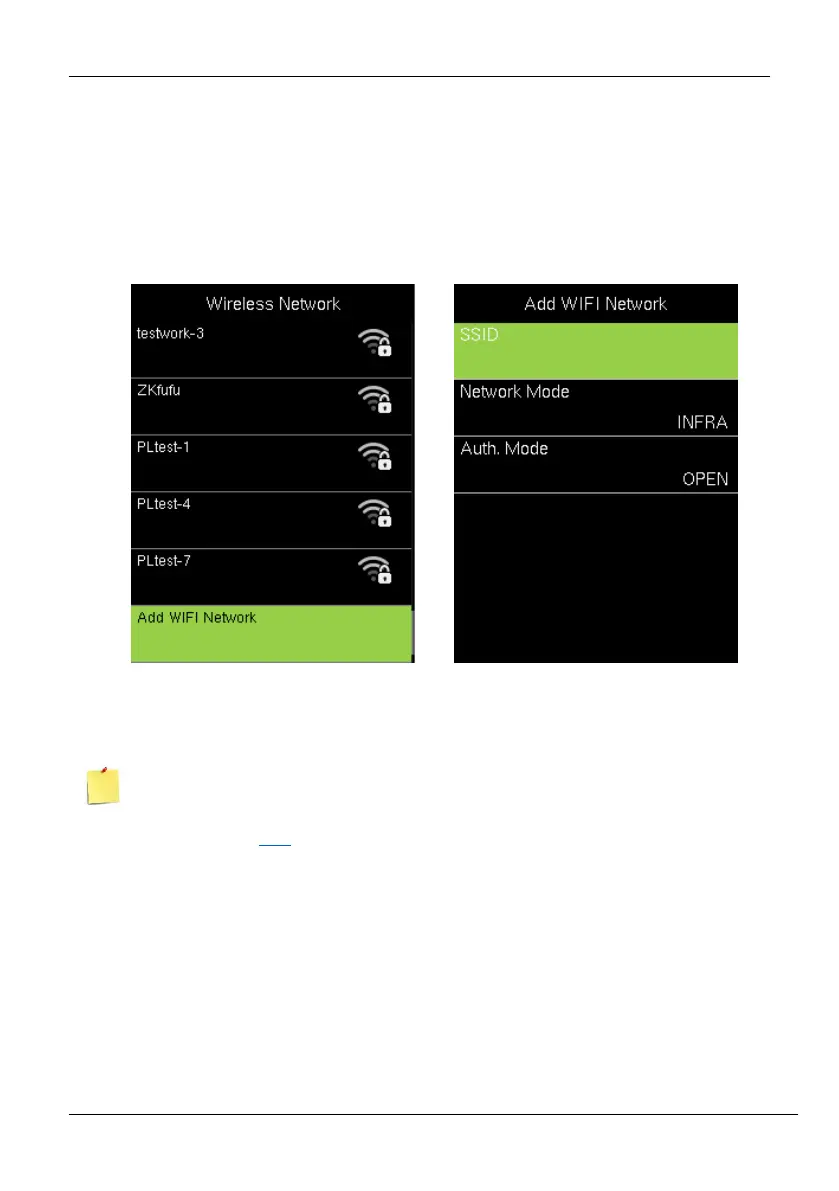
2. Press [Add WIFI Network] to add a new connection. The interface to add a new
connection will be displayed as shown below:
3. Press Add Wi-Fi Network to add the Wi-Fi manually.
4. On this interface, enter the Wi-Fi network parameters. (The added network must exist.)
After successfully adding the Wi-Fi manually, follow the same process to search for the
added Wi-Fi name. Click here to view the process to search the Wi-Fi network.
6.2.3 Enable/Disable DHCP
To enable/disable DHCP, perform the following steps:
1. Go to [Comm.] then [Wireless Network].
2. Press [Advanced] to view the DHCP settings.
3. Turn on DHCP if unable to connect to WI-FI.



 To Next Page