ENGLISH – 19
4.5 “SLAVE” MODE
a
Compatibility guaranteed with two products of the current generation or with one of the current generation and one of the
previous generation (not prior to January 2019).
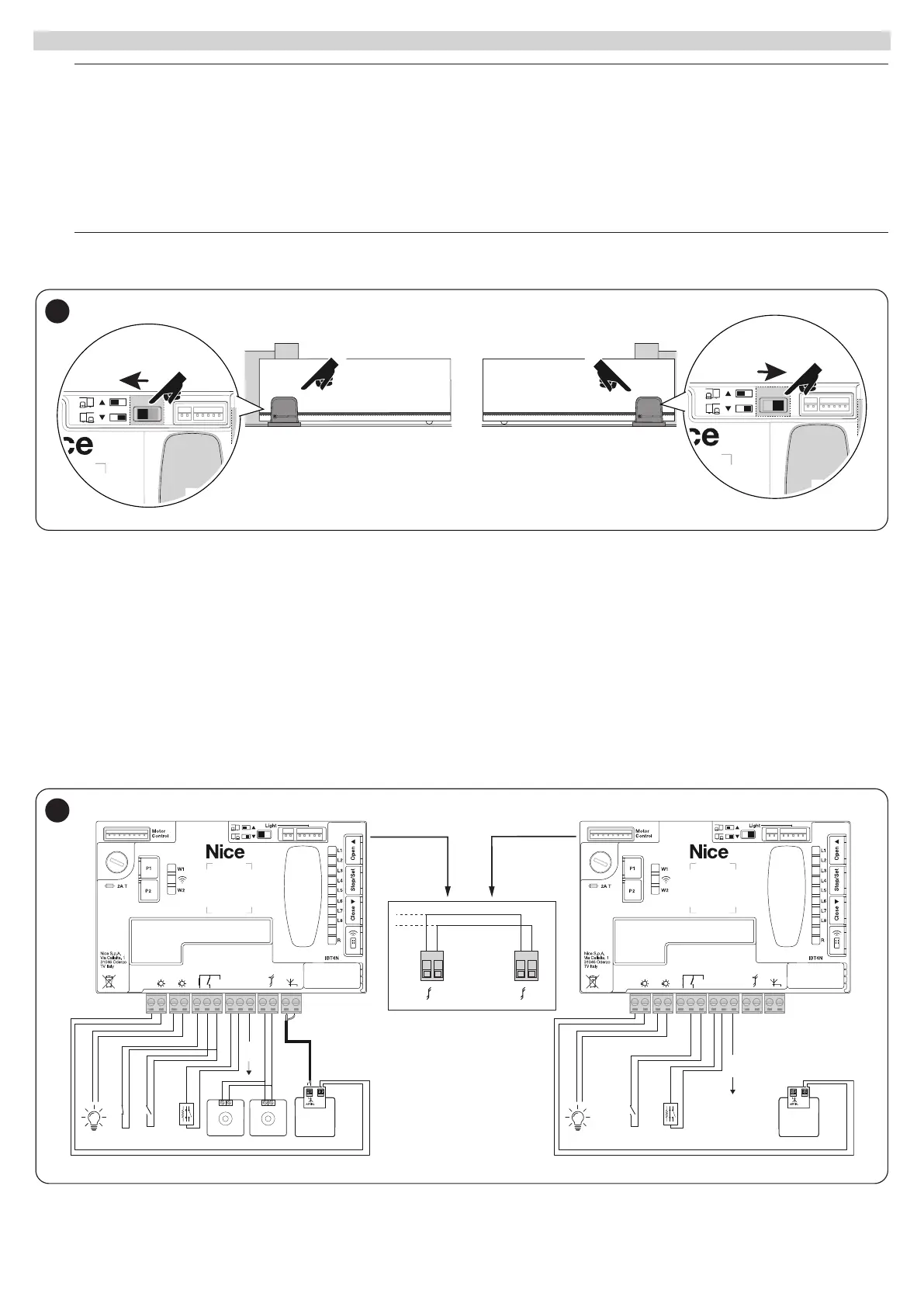
When properly programmed and connected, ROBUS can function in “Slave” mode; this type of function is used when 2 opposing gate leaves must be
automated with the synchronised movement of the two gate leaves. In this mode, one ROBUS functions as a Master and commands the manoeuvres,
while the second ROBUS functions as a Slave, executing the commands transmitted by the Master (all ROBUS are Masters by default).
To congure ROBUS as a Slave, level one “Slave mode” must be activated (see “Level 1 programming procedure”.)
The connection between the Master ROBUS and the Slave ROBUS is made via BlueBus.
a
In this case it is necessary to observe the polarities when connecting the two ROBUS as illustrated. (“Figure 36”) (The other
devices continue not to have polarity)
35
Follow the operations below to install 2 ROBUS in Master and Slave mode:
– Mechanically install the 2 motors
It is not important which motor must function as Slave or Master; the choice must take into account the convenience of the connections and the fact
that the Step-by-Step command of the Slave only allows the Slave leaf to be opened fully
Preamble: Slave (S) and Master (M) full deletion.
1. (S) Select the direction of the opening manoeuvre (using the direction selector);
2. (S) On the Slave automation, run the device learning and the leaf length learning procedures (see paragraphs “Device learning” and “Leaf
length learning”.) If the direction is inverted, repeat point 1.
3. (S) On the Slave automation, programme the “Slave Mode” function (slave mode = on, see “Level 1 programming procedure”.)
4. (S+M) Connect the two automations as shown in the diagram in “Figure a28fe501-89c2-4bde-809e-6e9e652fb6a3"
5. (M) Select the direction of the opening manoeuvre (using the direction selector);
6. (M) On the Master automation, run the device learning and the leaf length learning procedures (see paragraphs “Device learning” and “Leaf
length learning”.)
During the door leaf learning procedure, the Slave automation will also move.
If the direction is inverted, repeat point 5.
24V 10W
OGI
STOP
NO
NC
8K2
SBS
NO
FLASH
24V 10W
OGI
TX
BluebusBluebus
RX
NC
STOP
NO
NC
8K2
SBS
NO
FLASH
Bluebus
MASTER
Bluebus
SLAVE
Bluebus
Bluebus
2 21 1
+ 12V
+ 12V
24V
+ -
12V OSE
Bluebus
Aerial
GND
Stop
Flash
Photo
OGI
SbS
24V
+ -
12V OSE
Bluebus
Aerial
GND
Stop
Flash
Photo
OGI
SbS
36



 To Next Page