44 – ENGLISH
9.7 ANOMALY LOG
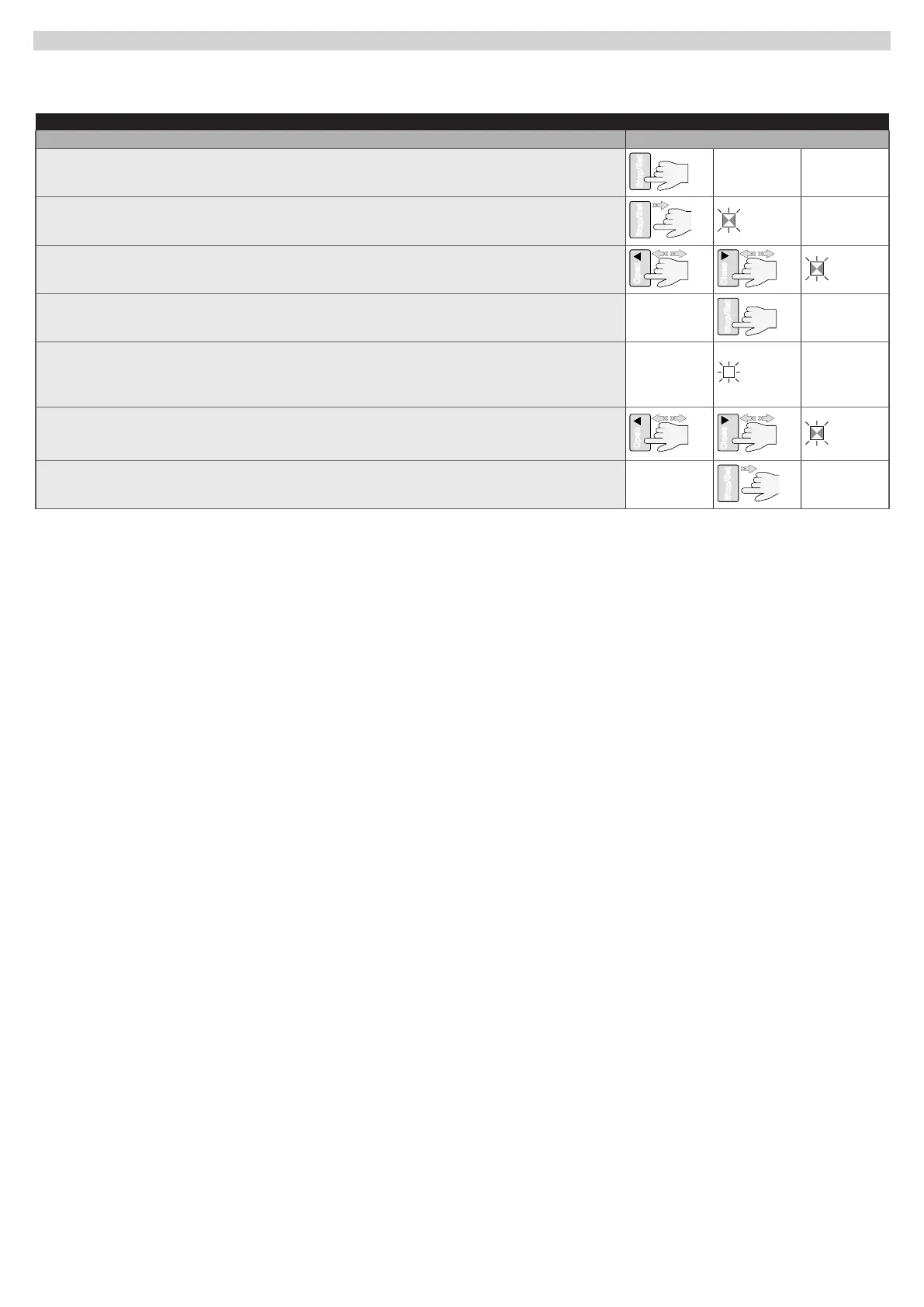
ROBUS can display any faults that have occurred in the last 8 manoeuvres, for example interruption of a manoeuvre due to activation of a photocell or
sensitive edge. To check the list of anomalies, proceed as indicated in “Table 30”.
Table 30
FAULT LOG
Description Symbols used
Press and hold the
g
button for roughly 3s
3s
Release the
g
button when LED L1 starts ashing
L1
Press and release the
f
or
h
button to shift ashing of the LED to L8 for the
“Anomaly list” parameter
OpenOpen
Press and hold the
g
button, which must be kept pressed throughout next steps
Wait roughly 3 seconds after which the LEDs corresponding to the faulty manoeuvres will light
up. LED L1 indicates the result of the last manoeuvre and LED L8 indicates the result of the
eighth manoeuvre. If the LED is on, this means that faults occurred during the manoeuvre; if the
LED is off, this means that no fault occurred during the manoeuvre
Press and release the
f
and
h
buttons to select the desired manoeuvre:
The corresponding LED emits a number of ashes equal to those normally emitted by the
ashing light after an anomaly
OpenOpen
Release the
g
button



 To Next Page