MCTRL660 PRO Independent Controller
User Manual
8 Operations on PC
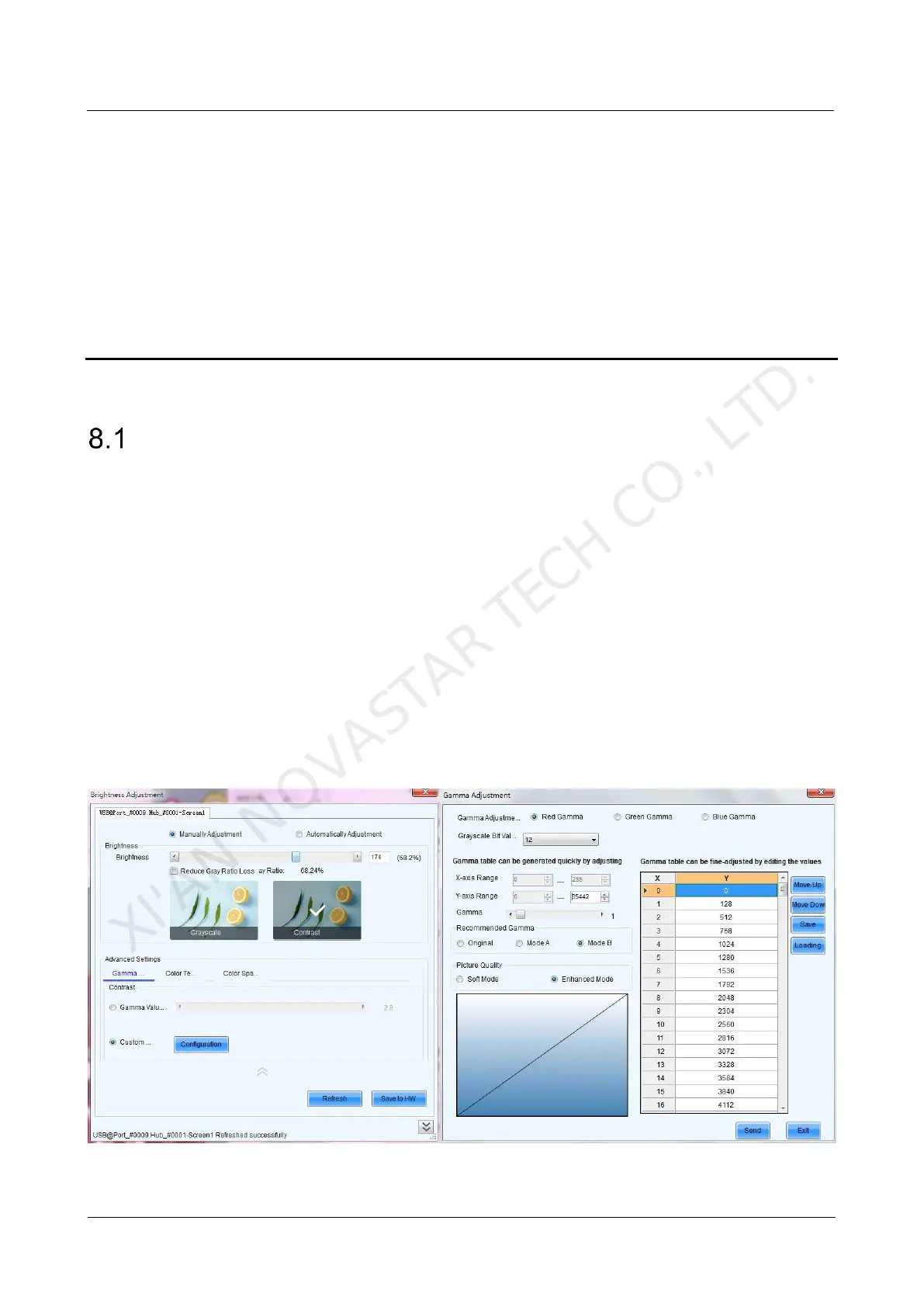
Individual Gamma Adjustment for RGB
The MCTRL660 PRO supports individual Gamma adjustment for RGB when the color
depth of input source is 10-bit or 12-bit, which effectively controls image non-
uniformity under low grayscale and white balance offset to improve image quality.
Step 1 Run NovaLCT, click Screen Configuration, choose the current operation
communication port and click Next.
Step 2 On the Sending Card tab page, select the corresponding input source bit depth and
click Set.
Step 3 On the home page of NovaLCT, choose Brightness > Manually Adjustment.
Step 4 Under Advanced Settings, choose Gamma > Custom Gamma Adjustment and
click Configuration to enter the Gamma Adjustment page.
Step 5 Adjust Red Gamma, Green Gamma and Blue Gamma, respectively.
Step 6 Click Send.
XI'AN NOVASTAR TECH CO., LTD.



 To Next Page