MCTRL660 PRO Independent Controller
User Manual
Step 2 Choose Display Control to enter its submenu.
Step 3 Select a control mode and press the knob to apply it.
Image Mirroring
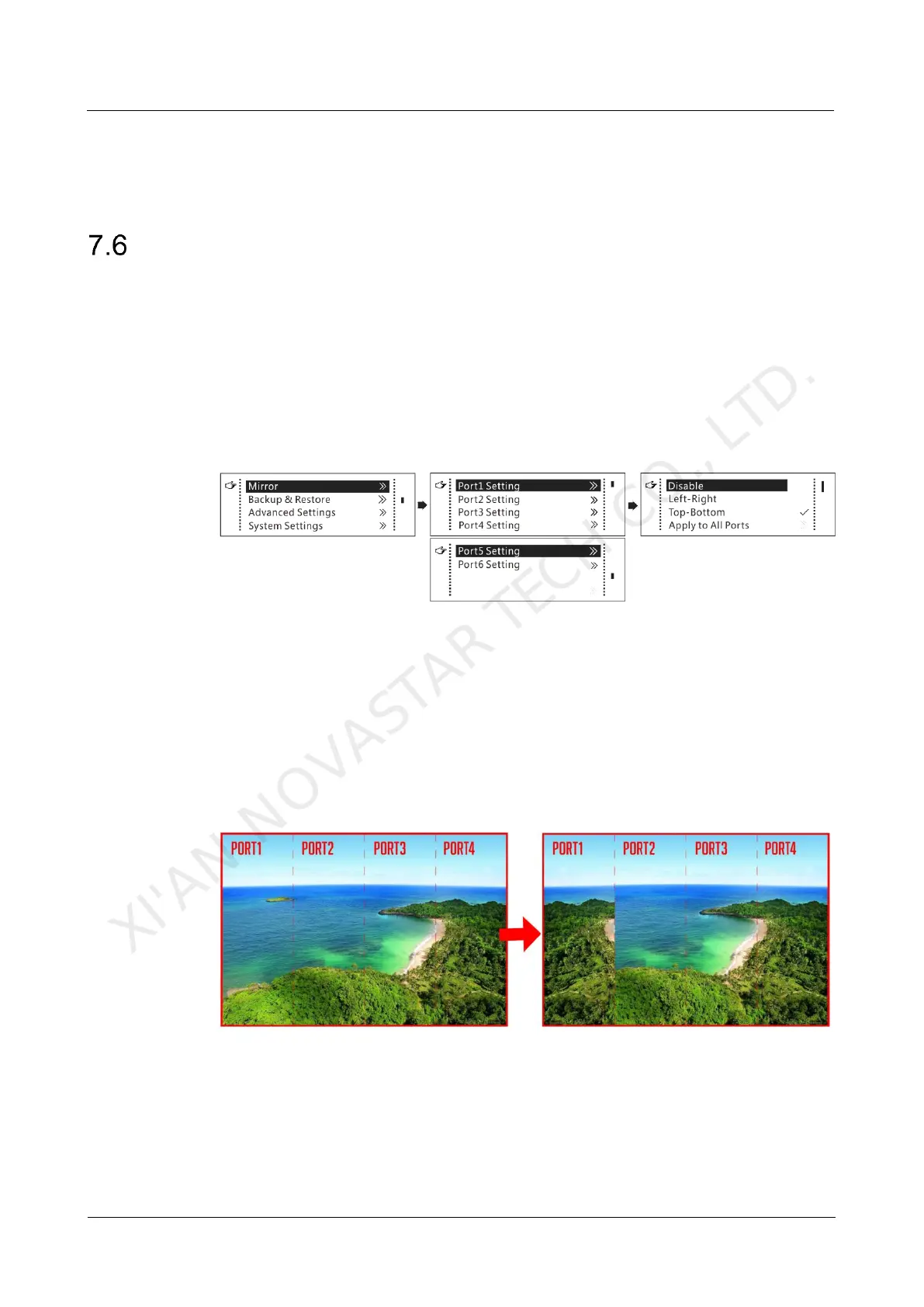
Mirror images displayed on the LED screen. You can disable mirroring, mirror the
image from left to right or from top to bottom. The image mirroring is based on the
entire output image.
Constrains:
This function is disabled when the input source is SDI.
Image mirroring and low latency cannot be enabled at the same time.
Figure 7-13 Image mirroring
Step 1 On the home screen, press the knob to enter the menu.
Step 2 Select Mirror and press the knob to enter its submenu.
Step 3 Set the mirroring mode for the image loaded by current Ethernet port.
Step 4 (Optional) Select Apply to All Ports and press the knob. The mirroring settings will
take effect on all other Ethernet ports automatically.
The mirroring effects are illustrated in the following figures.
Figure 7-14 Left-right mirroring of the image loaded by Ethernet port 1
As shown above, after you set the mirroring mode as left-right for Ethernet port 1, the
entire image is mirrored horizontally, but only the Ethernet port 1 area displays the
partial mirrored image.
XI'AN NOVASTAR TECH CO., LTD.



 To Next Page