EasyManua.ls Logo

Novatech Kronos 2 Series - Output Settings (Online); Figure 16: Display Settings; Table 6: Display Settings

Novatech Kronos 2 Series
72 pages
Print Icon
To Next Page IconTo Next Page
To Previous Page IconTo Previous Page
Loading...
Kronos Series 3
26
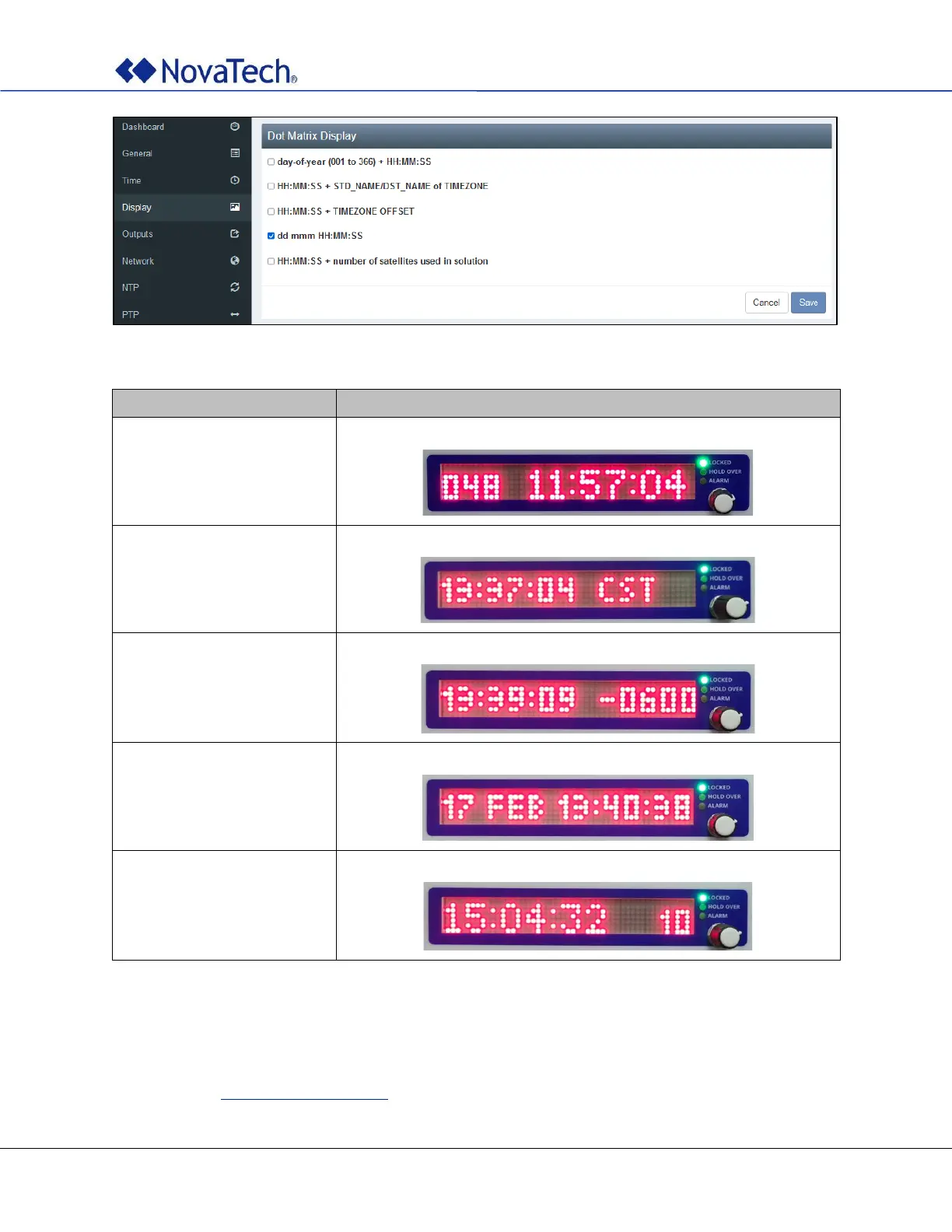
Figure 16: Display settings
Item
Description
day-of-year (001 to
366) + HH:MM:SS
Displays day of year and current time.
HH:MM:SS + TIMEZONE
Displays current time and time zone.
HH:MM:SS + TIMEZONE
OFFSET
Displays current time and time zone offset.
dd mmm HH:MM:SS
Displays day, month, and current time. This is the default setting.
HH:MM:SS + number of
satellites
Displays current time and number of used satellites.
Table 6: Display settings
4.4 Output Settings (Online)
The output settings are configured on the following webpage tab. The same settings can be made offline
as described in Output Settings (Offline).

Table of Contents