EasyManua.ls Logo

NSK iCare+ - User Manual

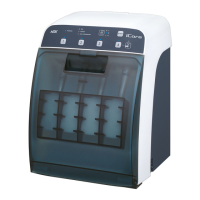
NSK iCare+
139 pages
Print Icon
To Next Page IconTo Next Page
Loading...
iCare+ Operation Manual 10-8-1
0535

Table of Contents

Questions and Answers

  • K
    kimrichardAug 13, 2025
    What to do if n.clean or n.cid indicators are illuminated and NSK iCare+ Dental equipment does not start the reprocessing?
    • D
      davidjonesAug 14, 2025
      If your NSK Dental equipment does not start reprocessing and the n.clean or n.cid indicators are illuminated, change the bottles and prime the cycle.
  • K
    Kevin MorrisonAug 17, 2025
    What to do if NSK Dental equipment does not switch on even when plugged in?
    • A
      Alyssa DiazAug 17, 2025
      If your NSK Dental equipment isn't switching on, make sure the power cord plug is properly inserted into the device's main connector.
  • V
    Vanessa WrightAug 21, 2025
    What to do if NSK iCare+ Dental equipment does not start the reprocessing?
    • T
      Tyler VaughanAug 21, 2025
      If the NSK Dental equipment does not start reprocessing, ensure that the door is properly closed.
  • Y
    yrossAug 25, 2025
    What to do if the Oil indicator is illuminated and NSK iCare+ does not start the reprocessing?
    • C
      Chris PerryAug 26, 2025
      If your NSK Dental equipment does not start reprocessing and the Oil indicator is illuminated, fill the Oil tank.
  • L
    lcampbellAug 29, 2025
    What to do if NSK Dental equipment does not switch on and the fuses are not working?
    • J
      Julia BakerAug 29, 2025
      If your NSK Dental equipment isn't switching on, verify if the fuses are working and replace them with the same model if necessary.
  • B
    burnsjamesSep 1, 2025
    What to do if my NSK Lubrication systems does not clean and/or lubricate correctly?
    • M
      Monica LewisSep 1, 2025
      If your NSK Lubrication system isn't cleaning or lubricating correctly, ensure the air supply tube is properly connected to the device's connector. Also, verify that the air supply pressure is set between 5 and 6 bar. Selecting Long mode instead of Short mode and ensuring the instrument is correctly connected to the connector can also resolve the issue.
  • R
    Rebecca TownsendSep 5, 2025
    How to fix NSK Lubrication systems when it does not switch on?
    • L
      Linda DudleySep 5, 2025
      If your NSK Lubrication system does not switch on, check the following: * Make sure the supply cord is correctly connected to the mains. * Ensure the cord plug is properly inserted into the device's main connector. * Verify the main switch is in the 'ON' position. * Check if the fuses are working and replace them with the same model if necessary.
  • J
    Janice AustinSep 9, 2025
    What to do if my NSK Lubrication systems does not clean and/or lubricate?
    • M
      Michael CaldwellSep 9, 2025
      If your NSK Lubrication system isn't cleaning or lubricating, first, ensure that one of the mode light indicators is lit by pushing one of the selection cycle buttons. Check that the door is properly closed (door LED not lit). Also, verify the n.Clean, n.Cid, and Oil levels; change the corresponding bottle and prime if the n.Clean or n.Cid level LEDs are lit, and fill the Oil tank if the Oil level LED is lit.

Summary

SAFETY INSTRUCTIONS

Intended Use and User

Defines the purpose and authorized users for the iCare+ device operation.

General Safety Measures

Outlines essential safety precautions for the safe operation of the iCare+ device.

Individual Safety Measures

Specific safety actions required for individual users during iCare+ device use.

DEVICE DESCRIPTION

Packaging Contents

Lists all items included in the iCare+ device package upon delivery.

iCare+ Device Components

Details the physical components and features of the iCare+ device.

USING THE iCare+ DEVICE

Setup and Installation

Instructions for installing and connecting the iCare+ device for operation.

Product Implementation

Steps for loading cleaning, disinfection, and lubrication solutions into the device.

Validation Testing

Procedures to validate the correct functioning of the iCare+ device.

Connecting Dental Instruments

Guidance on connecting dental instruments to the iCare+ device.

Programming Treatment Cycles

Instructions for setting up and initiating treatment cycles on the iCare+ device.

USER MAINTENANCE

General Cleaning Guidelines

Procedures for routine cleaning of the iCare+ device and its components.

General Maintenance Guidelines

Schedule and steps for regular maintenance tasks for the iCare+ device.

ERROR MESSAGES

Operating Light Indicators

Explains the meaning of various LED indicators on the iCare+ control panel.

TRACEABILITY

Traceability Software Overview

Information on using software for monitoring handpiece treatment cycles.

TROUBLESHOOTING

Device Not Switching On

Troubleshooting steps for when the iCare+ device does not power on.

Device Not Cleaning or Lubricating

Solutions for issues related to the cleaning and lubrication functions.

BREAK-DOWN GUIDE

Liquid Sensor Errors

Explains errors related to the liquid sensor and their resolution.

Oil Sensor Errors

Explains errors related to the oil sensor and their resolution.

Drawer Sensor Errors

Explains errors related to the drawer sensor and their resolution.

Air Sensor Errors

Explains errors related to the air sensor and their resolution.

Door Sensor Errors

Explains errors related to the door sensor and their resolution.

Fatal Error Handling

Describes the procedure for handling fatal error indications.

SPECIFICATIONS

Technical Specifications

Details the technical parameters and requirements of the iCare+ device.

Device Classification

Information on the regulatory classification of the iCare+ device.

ACCESSORIES AND PART LIST

List of Accessories

Lists available accessories for the iCare+ device.

List of Spare Parts

Lists available spare parts for the iCare+ device.

APPENDICES

CE Certificate of Conformity

Details the CE certification and compliance standards for the iCare+ device.

EMC INFORMATION

Electromagnetic Emissions

Information on the electromagnetic emissions of the iCare+ device.

Electromagnetic Immunity

Information on the electromagnetic immunity of the iCare+ device.

WARRANTY

Warranty Terms and Conditions

Outlines the warranty period and conditions for the iCare+ device.

NSK iCare+ Specifications

General IconGeneral
ApplicationCleaning and Lubrication of Dental Handpieces
Number of Handpieces per Cycle4
Cycle TimeApprox. 2 minutes
Power SupplyAC 100-240V, 50/60Hz
Compatible HandpiecesAir Motor
TypeAutomatic Handpiece Maintenance Unit

Related product manuals