63
Section 10 - Care and maintenance
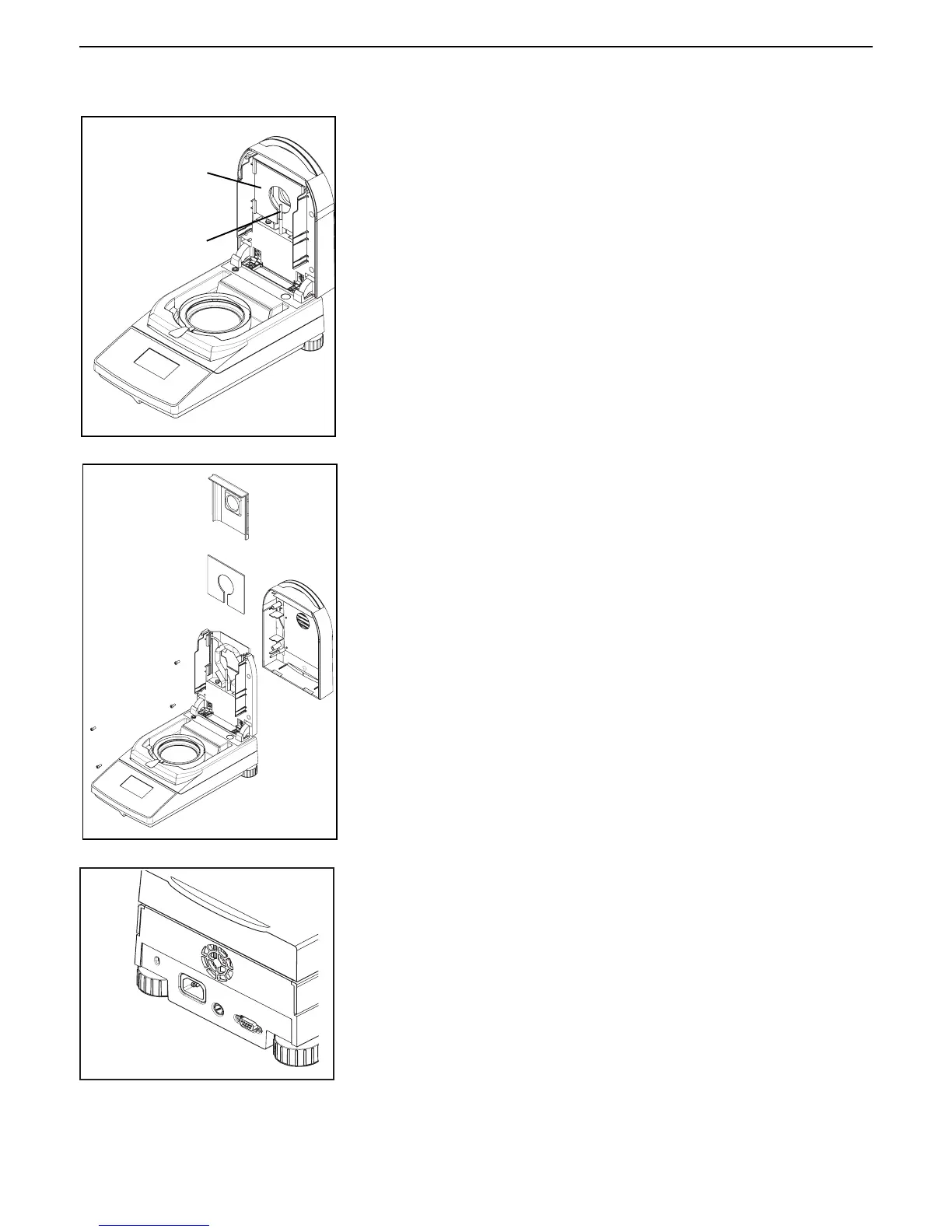
TEMPERATURE
SENSOR
PROTECTIVE
GLASS
Cleaning temperature sensor and protective glass
With the cover open, check the protective glass and the temperature sensor
for debris which could impede the operation. If the glass appears dirty, clean
the surface facing the compartment using a commercial glass cleaner. If the
sensor is dirty, clean using a mild cleaning agent.
Removing glass for cleaning
If the inside of the glass is dirty, open the cover and remove the four cover
screws as shown. Carefully lay the cover down.
Remove the glass holder and glass from the cover.
Put the glass on a flat surface and clean with a commercial glass cleaner on
both sides.
Reassemble after cleaning.
Cleaning air inlet
The air inlet of the fan is located at the rear of the instrument and its exterior
should be cleaned from time to time to free it from any dust deposits.



 To Next Page