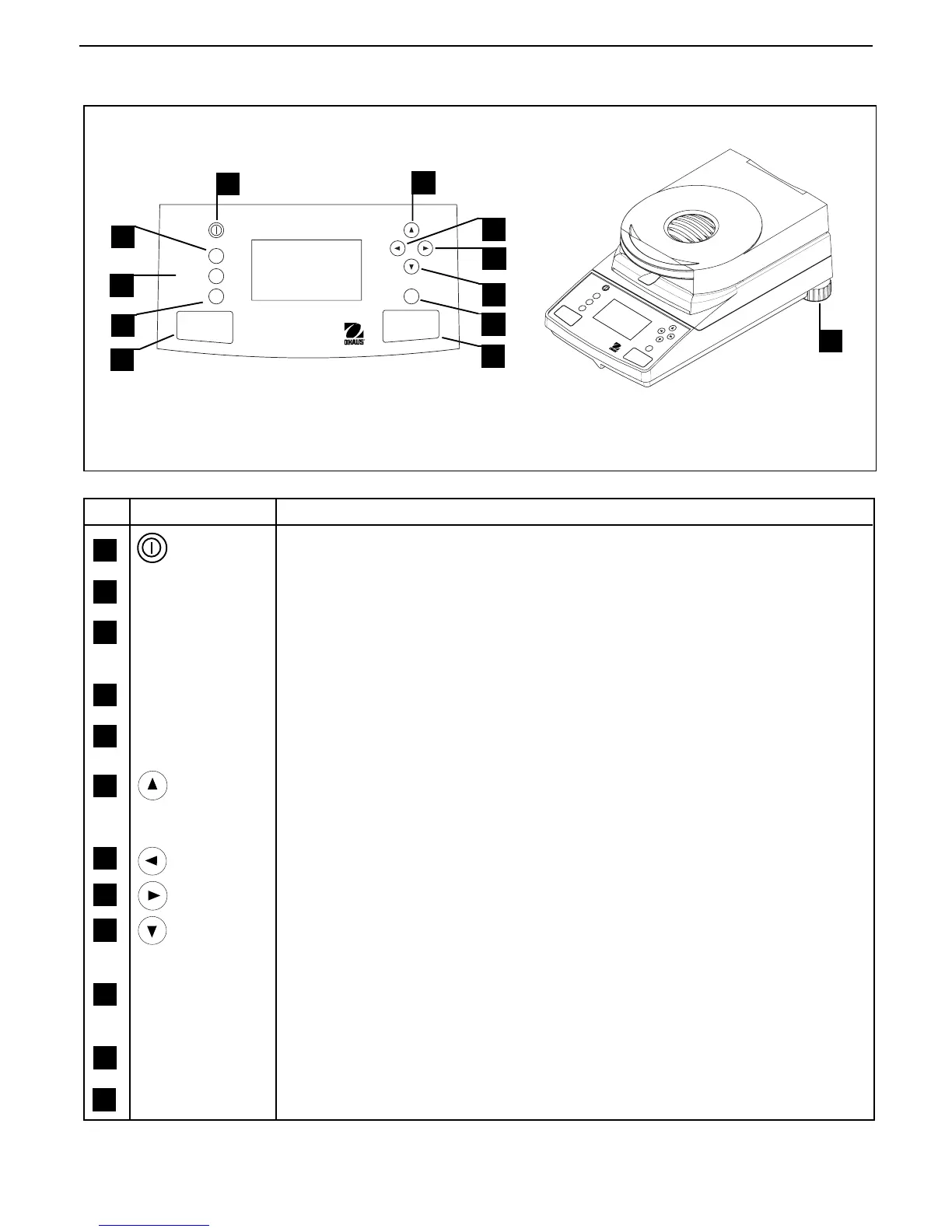
Overview
8
O
n
/O
ff
Te
s
tM
e
n
u
D
is
p
la
y
S
e
tu
p
E
n
t
e
r
Pr
in
t
T
A
RE
S
T
A
R
T/
S
T
O
P
M
B4
5
Overview of controls
4
2
5
10
3
12
7
9
8
6
11
No. Designation Function
1 Turns ON/OFF display and fan. ON returns with last screen. (All modes)
2 Test Menu button When pressed, selects Test Library screen.
3 Display button When pressed, will return to the current test or cycles through several display
screens (run mode).
4 Setup button When pressed, brings up analyzer setup menu.
5
5 Start/Stop button When pressed, either starts or stops drying process.
6
button When pressed, travels up through menu options and selects alphanumeric
characters.
7
button When pressed, travels to the left through displays.
8
button When pressed, travels to the right through displays.
9
button When pressed, travels down through menu options and selects alphanumeric
characters.
110 Enter/Print button When pressed, accepts selection/input (select mode) or sends print command
during a test (run mode).
11 Tare button When pressed, performs a tare function. Pressing during a test has no effect.
12 Leveling feet Used to level the Moisture Analyzer.
1
On/Off
Test Menu
Display
Setup
Enter Print
TARE
START/STOP
MB45
11



 To Next Page