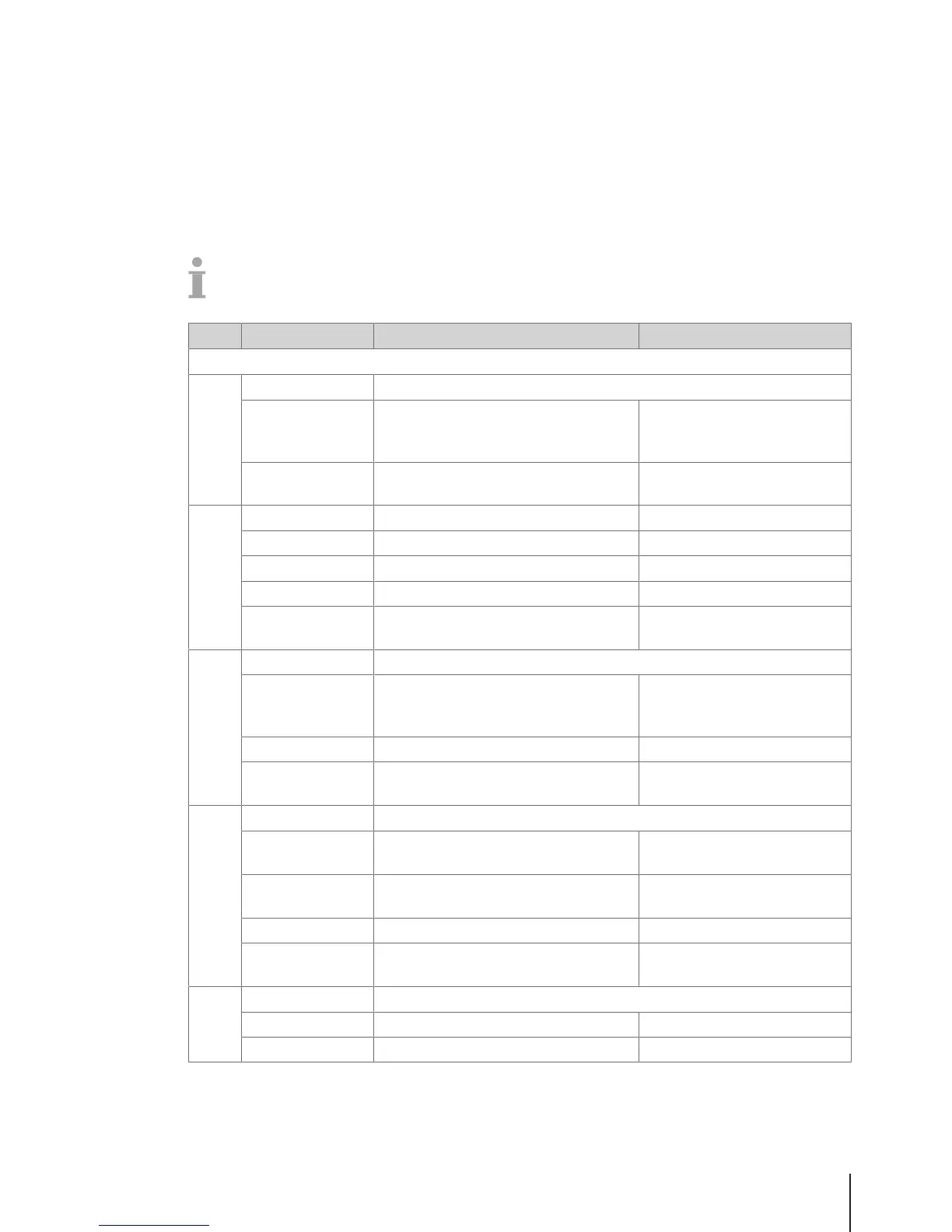
4.2.3 Configuration menu
In the Configuration menu group you are able to enter the following data:
• Operation Center: configure operation (registration, tare, price, discount, VAT, ...)
• General Settings: configure PLU, key mapping, vendors, ...
• Printing: configure printing
• Connectivity: configure connectivity
• Control Panel: configure settings of the control panel (display settings, sound settings)
• System: reset of data base, reset of scale, ...
Some functions not only have to be enabled, but also must have a key assigned to them, refer to
F232.
In the following, these functions are marked with a *.
No. Display Description Possible values
F21 Operation Center
F211 Item Recall Define item recall
Source of PLU Select data source for recalling PLUs 1 Local
2 Remote
3 Remote + Local
Data Sync at
startup
When starting up the scale, synchronize
the PLU data with the server
Enable/Disable
F212 Item Registration Define item registration
Large Sales Enable/disable large sales mode Enable/Disable
Void Enable/disable voiding Enable/Disable
Refund Enable/disable refund mode Enable/Disable
Fix Option Fix tare or both tare and PLU 1 Tare only
2 Tare and PLU
F215 Price Define entering of the price
Overwrite Price* Configuring price overwriting: either
generally or depending on the PLU
settings in sub-menu F231
1 Enable
2 Disable
3 Up to PLU
Direct Price Entry Enable/disable direct price entry Enable/Disable
100g* Enable/disable weighing with 100 g
price unit
Enable/Disable
F217 Discount Define the discount methods on the scale
Discount on Total
Price
Enable/disable discount on the total price Enable/Disable
Discount on Sales
Total
Enable/disable discount on the total
sales
Enable/Disable
Percent Discount Enable/disable discount in percent Enable/Disable
Absolute Discount Enable/disable an absolute discount
(rebate)
Enable/Disable
F218 Payment Define the payment methods on the scale
Reopen ticket Enable/disable ticket reopening Enable/Disable
Multiple Payment Enable/disable multiple payment Enable/Disable
Menu 35Skippper 5000



 To Next Page