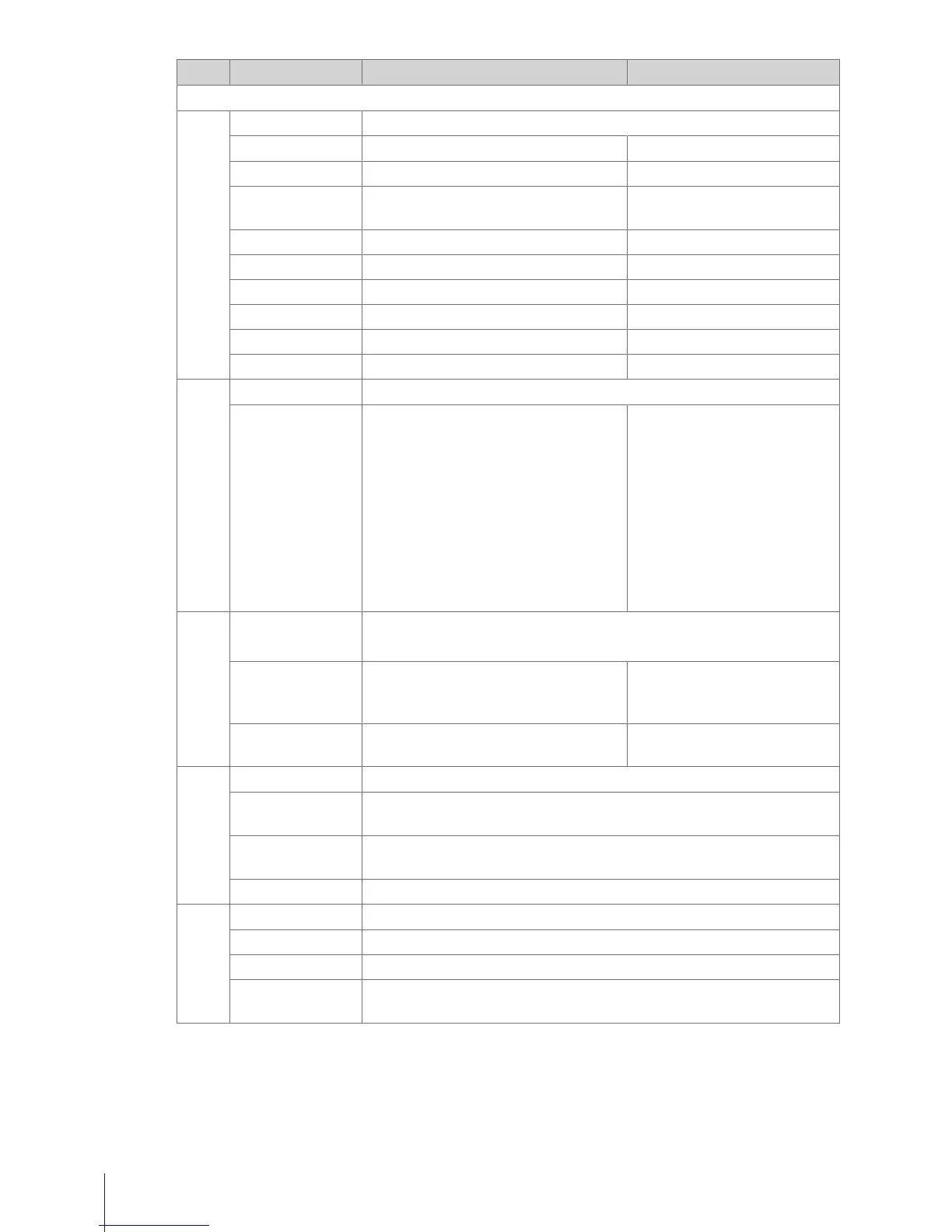
No. Display Description Possible values
F23 General Settings
F231 PLU Editing Fields Configure PLU data
Article Number Switching Article Number on/off On/Off
Article Name Switching Article Name on/off On/Off
Number of Unit
Prices
Select number of unit prices 1 None
2 (1 unit price)
Group Switching Group on/off On/Off
VAT Switching VAT on/off On/Off
Preset Tare Switching Preset Tare on/off On/Off
Unit of Measures Switching unit of measures on/off On/Off
Discount Switching discount on/off On/Off
Price Overwriting Switching price overwriting on/off On/Off
F232 Function key Map the preset key to a function
Key Mapping 1 Select a function.
2 Press the desired preset key until a
beep is heard.
3 For a preset key on the second level,
press the desired preset key until a
second beep is heard.
ð When the function is mapped, the
coordinates of the preset key are
displayed, e.g., L3C1 (Line3,
Column1).
The key mapping list items
depend on the scale configu-
ration
F233 Vendor Define the method of working with vendors
For creating a new vendor and defining Vendor keys refer to F121 and F232
Vendor Mode Select the vendor mode 1 Single Vendor
2 Multi Vendor
3 Floating Vendor
Vendor Key Select the method of calling up the
vendor
1 As V1 key
2 V + Vendor ID
F235 Licenses Configuring options
Input license Input the license number.
For more information on your options call your local sales representative.
Printout Licence
State
Select to print licence state
Input LID Enter licence ID
Training Configuring training function
Disable Training function disabled
Enable by Scale Training function enabled on the scale
Enable by Vendor Training function only for an individual vendor
Menu36 Skippper 5000



 To Next Page