45850101TH Rev.1
4-39
4.2.20 Relay board (P6Z) / contact Assy. / Sensor
Assy. Fuser-A
(1) Remove the image drum unit/belt unit. (Refer to section 4.2.1)
(2) Detach the cover side-L Assy. (Refer to section 4.2.3)
(3) Detach the cover side-R. (Refer to section 4.2.4)
(4) Detach the rear cover Assy. (Refer to section 4.2.5)
(5) Detach the top cover Assy. (Refer to 4.2.13)
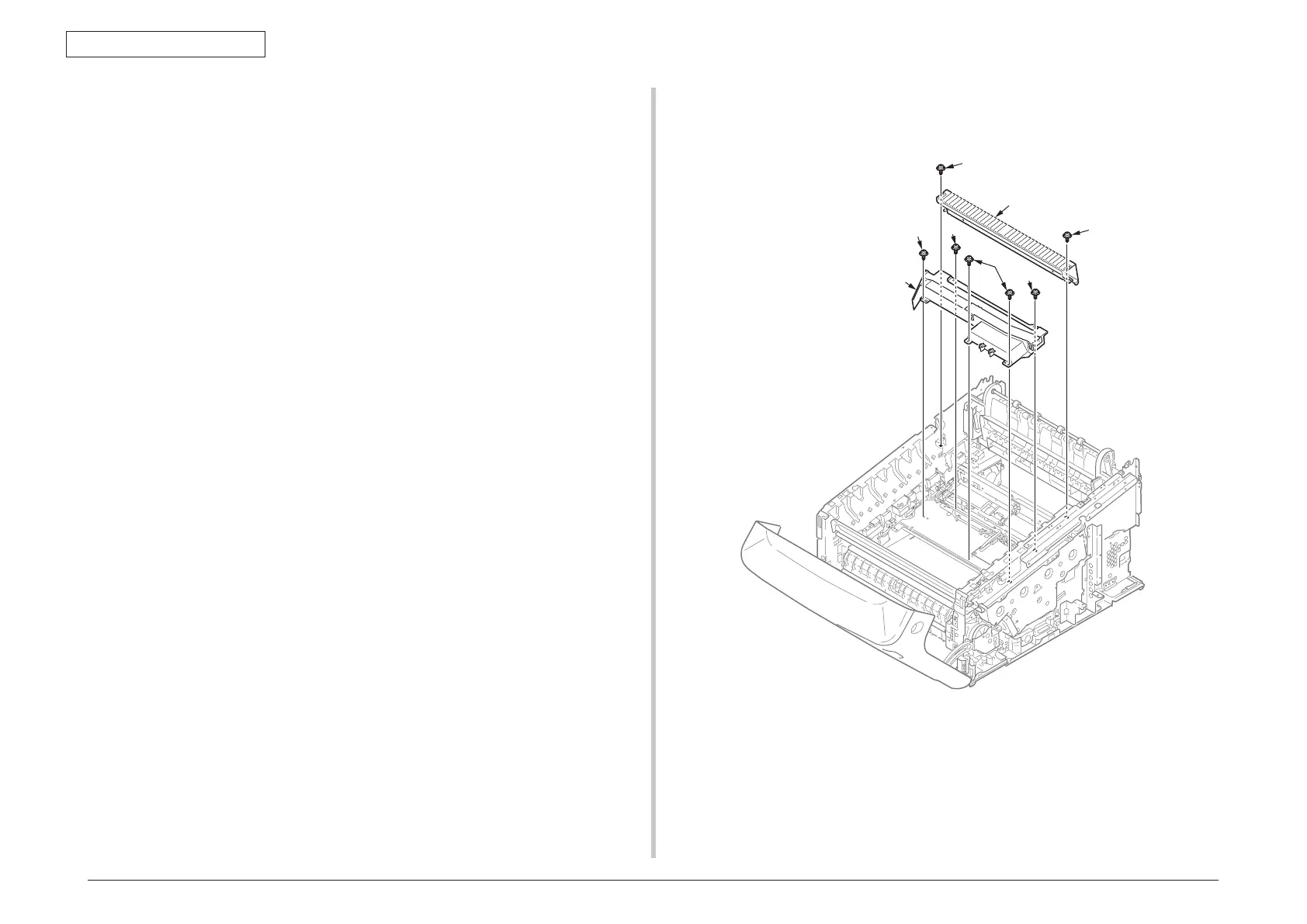
(6) Remove the two screws (silver)
①
and the plate beam FU
②
.
(7) Remove the two screws (silver)
③
, the three round-head screws (black)
④
and the
cover Assy.-registration
⑤
.
Notes on attaching:
The metal plate retaining the cover Assy.-registration
⑤
is only 0.6mm thick,
therefore, tighten the screw carefully.
②
③
④
④
⑤
①
③


 To Next Page