20
AutoBalance
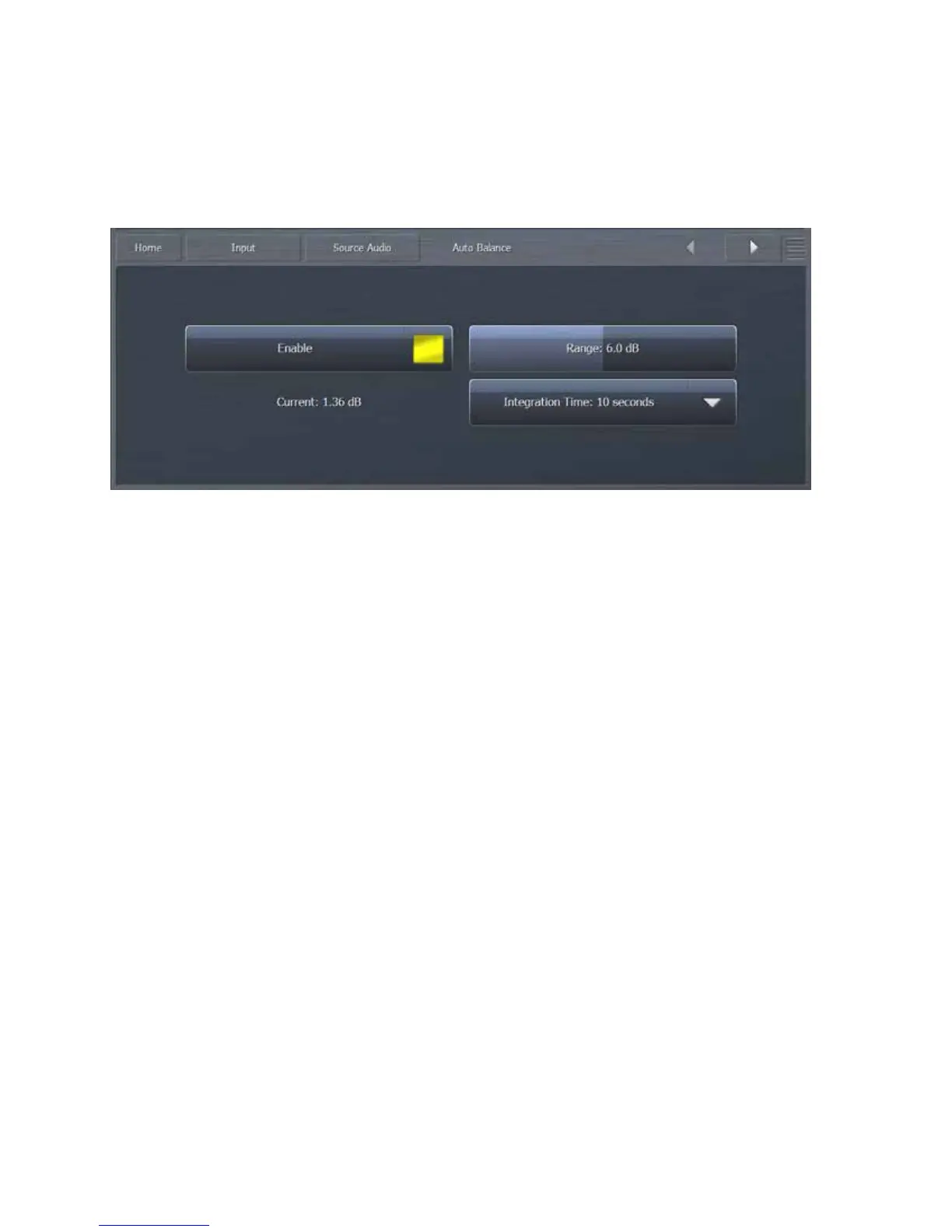
WhenAutoBalanceisenabled,Omnia.9willautomaticallybalancetheleftandrightchannelsofthe
incoming audio, compensating for any level discrepancies that may be present in an audio stage
precedingtheprocessor(suchastheoutputofaconsoleoranSTL).
SelectingtheEnablebuttontogglesAutoBalanceonandoff.
TheRangeslidersetsthemaximumtotalamountofgainthatcanbeincreasedordecreased
ineachchannel.Forexample,withtheRangecontrolsetat6.0dB,thegainineachchannel
canbeboostedbyupto3dBandattenuatedbyupto3dB.
EachchannelcontainsanITUBS1770loudnessmonitorwhichmeasuresandcomparesthe
frequencyshapedRMSlevelineachchannel.TheIntegrationTimecontroldetermineshow
quicklyAutoBalancecorrectsanydiscrepanciesbetweentheleftandrightchannel.Shorter
integration times correct channeltochannel imbalances more quickly and provide more
consistent levels between the left and right channels. Reducing the integrationtime too
much may cause an undesirable or unnatural effect as the channels rebalance, and
thereforethedefaultsettingof10secondsisrecommendedformostsituations.


 To Next Page