75
MP2EncoderMenu
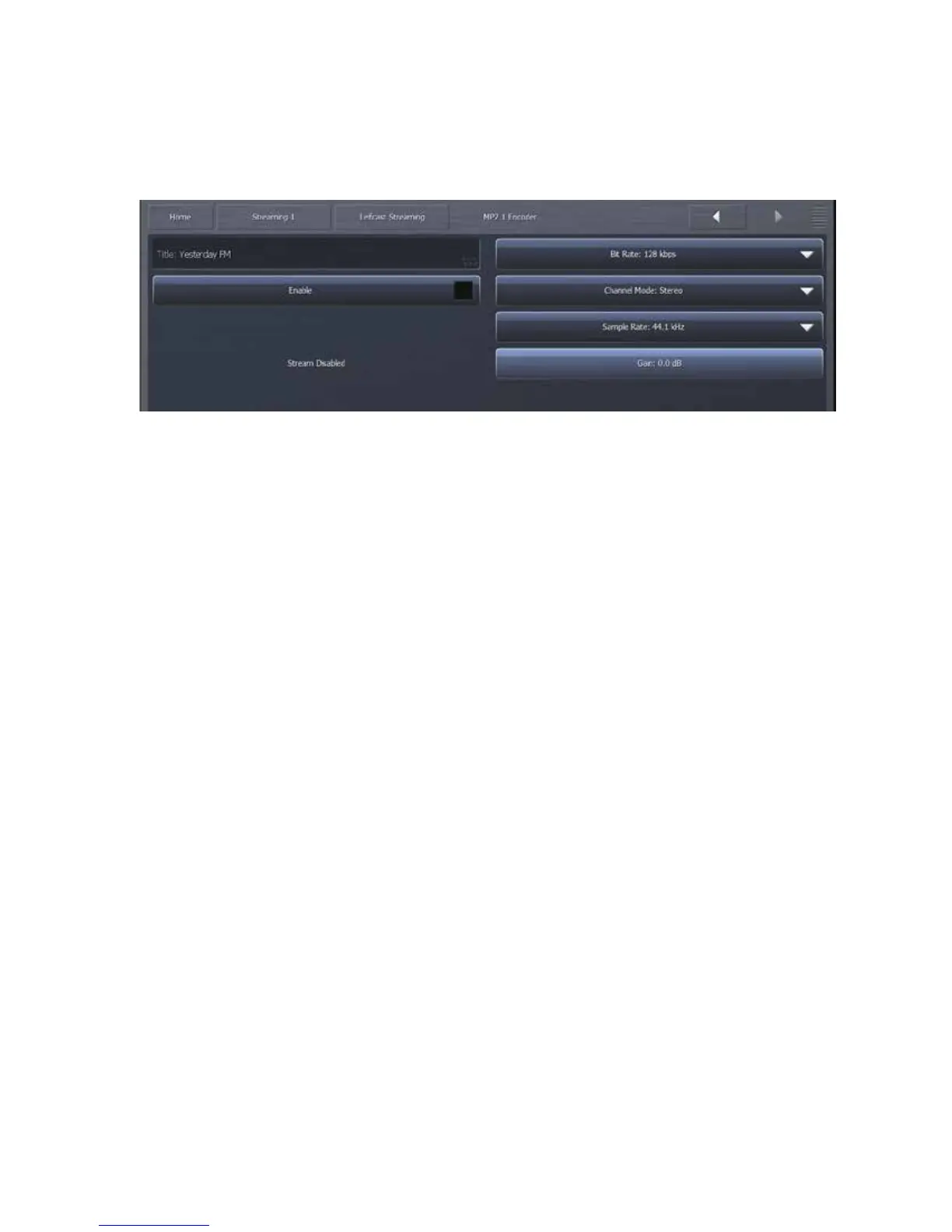
TheMP2Encodermenuallowsyoutoenableordisablethestream,adjustitsoutputgain,enterthe
stream’stitle,andselectthechannelmode,samplerate,andbitrate.
The Title field allows you to enter the stream title displayed to listeners and on public
listings,suchasshoutcast.com.
The Enable control enables or disables the stream. When enabled, the encoder will
continuallytrytoconnecttothespecifiedserver.
TheChannelModemenuprovidesachoicebetweenMono,Stereo,JointStereo,andDual
Channel.
TheBit ratemenuallowsyoutochooseencodingbitratesbetween 64kbpsand384kbps.
Yourchoiceofbitratesettingswillsignificantlyinfluencetheaudioqualityofyourstream.
However, you will also need to take other factors into consideration, such as the total
amount of bandwidth available for the stream, the anticipated number of users, your
maximumuploadspeed,andthedownloadspeedlimitsofyourintendedusers.
TheSampleRatemenuwilleithermaintainOmnia.9’ssamplerateof48kHzintheencoder,
orconvertitto8,11.025,16,22.05,24,32,or44.1kHz.
TheGaincontroldeterminesthefinaloutputleveloftheencoder.


 To Next Page