52 The Information Company
3.3.6.1 Volatile HPA removal
HPA can be disabled without making a permanent modification to the drive. This is
known as volatile, or temporary, removal of the HPA configuration. When a drive that has
had its HPA removed in this manner is removed from TX1 (or is otherwise powered
down) and then re-powered, it will always come back in its original state (with the original
HPA configured and enabled). Since this is a temporary drive configuration change only
(not a change to the data stored on the drive), TX1 automatically disables HPA on any
drive connected to one of its source ports. Since DCO and AMA settings can only be
disabled on a permanent basis, TX1 does not automatically disable them on connected
source drives.
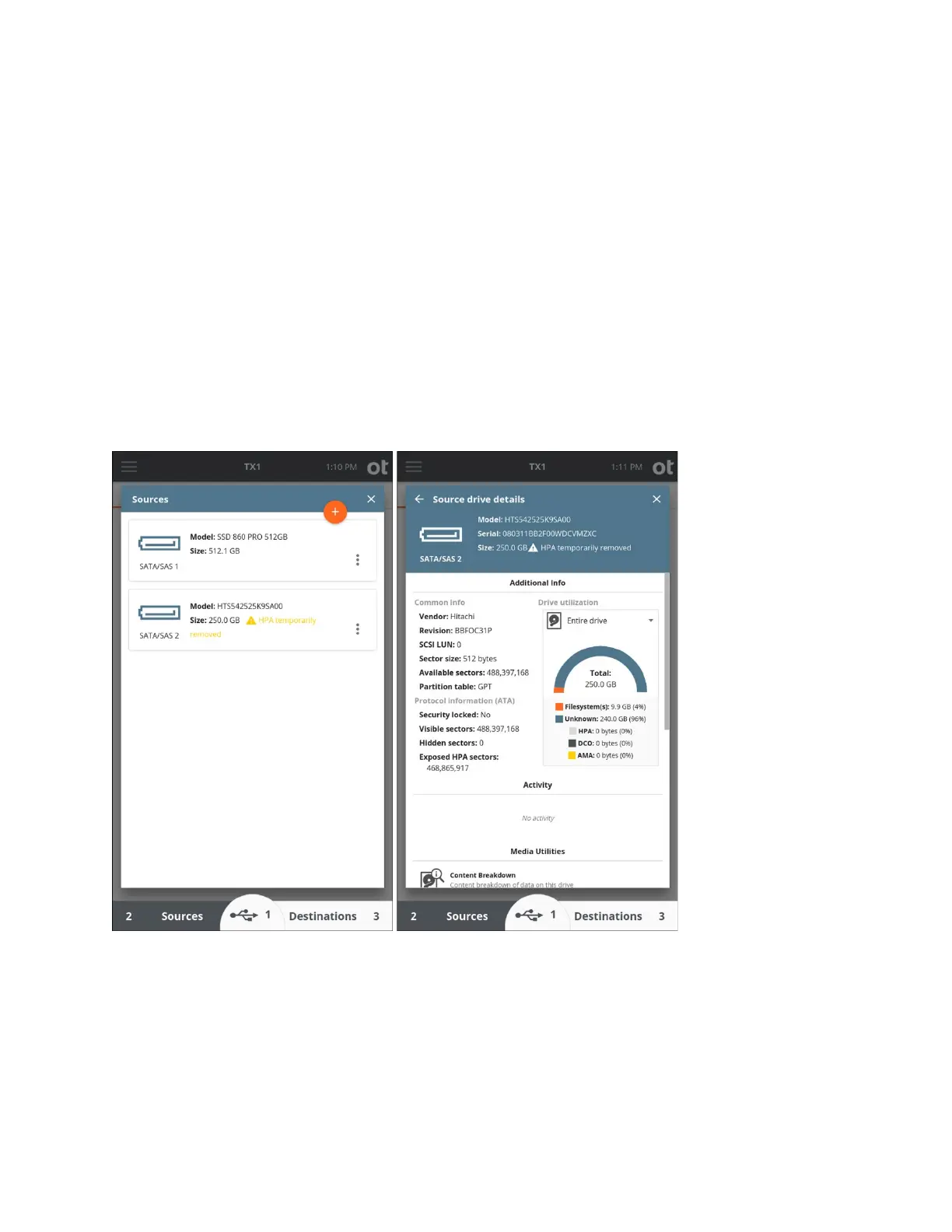
In the case of an automatic, volatile HPA removal from a connected source drive, the
TX1 user interface makes it obvious what has occurred, as shown in the following
screenshots.
Referr
ing to the drive details screenshot above, the fact that the HPA has been removed
is reflected in the following areas on this screen:
• The Size field in the header reflects the full capacity of the drive (with HPA removed),
along with a warning to draw attention to the HPA removal event.
• The drive utilization data on the right side accurately reflects the existence of 0 bytes
of HPA (since the HPA was removed).
Copyright © 2022 Open Text. All rights reserved. Trademarks owned by Open Text.



 To Next Page