EasyManua.ls Logo

Panasonic NV-RX37A - Setting the Date and Time

Panasonic NV-RX37A
79 pages
Print Icon
To Next Page IconTo Next Page
To Previous Page IconTo Previous Page
Loading...
r
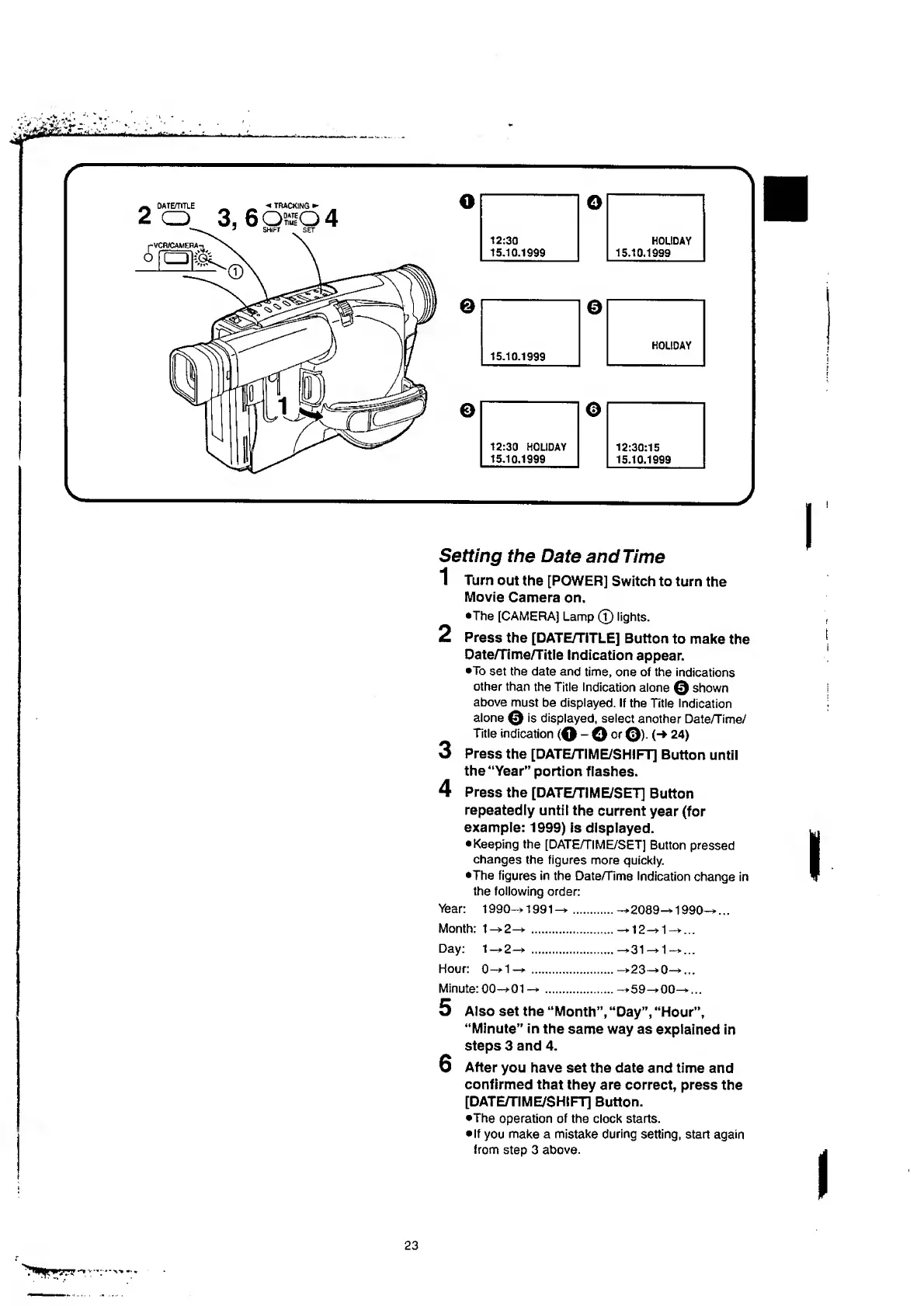
Setting
the
Date
and
Time
1
Turn
out
the
[POWER]
Switch
to
turn
the
Movie
Camera
on.
•The
[CAMERA]
Lamp
(T)
fights.
2
Press
the
[DATE/TITLE]
Button
to
make
the
Date/Time/Title
Indication
appear.
•To
set
the
date
and
time,
one
of
the
indications
other
than
the
Title
Indication
alone
©
shown
above
must
be
displayed.
If
the
Title
Indication
alone
©
is
displayed,
select
another
Date/Time/
Title
indication
-
©
or
©).
(->
24)
3
Press
the
[DATE/TIME/SHIFT]
Button
until
the
“Year”
portion
flashes.
4
Press
the
[DATE/TIME/SET]
Button
repeatedly
until
the
current
year
(for
example:
1999
)
is
displayed.
Keeping
the
[DATE/TIME/SET]
Button
pressed
changes
the
figures
more
quickly.
•The
figures
in
the
Date/Time
Indication
change
in
the
following
order:
Year:
1990->1991^
Month:
1—>2—*
.
Day:
1—*2—>
.
Hour:
0—*1
—*
.
Minute:
00—>01
—*.
2
089
—*
1
2
*
—*31
—*
—*23—*
—*59—*
—*1990-*...
1
^
.
.
.
1
-
*...
0
^
.
.
.
00^...
5
Also
set
the
“Month”,
“Day”,
“Hour”,
“Minute”
in
the
same
way
as
explained
in
steps
3
and
4
.
6
After
you
have
set
the
date
and
time
and
confirmed
that
they
are
correct,
press
the
[DATE/TIME/SHIFT]
Button.
•The
operation
of
the
clock
starts.
If
you
make
a
mistake
during
setting,
start
again
from
step
3
above.
23

Table of Contents

Related product manuals