EasyManua.ls Logo

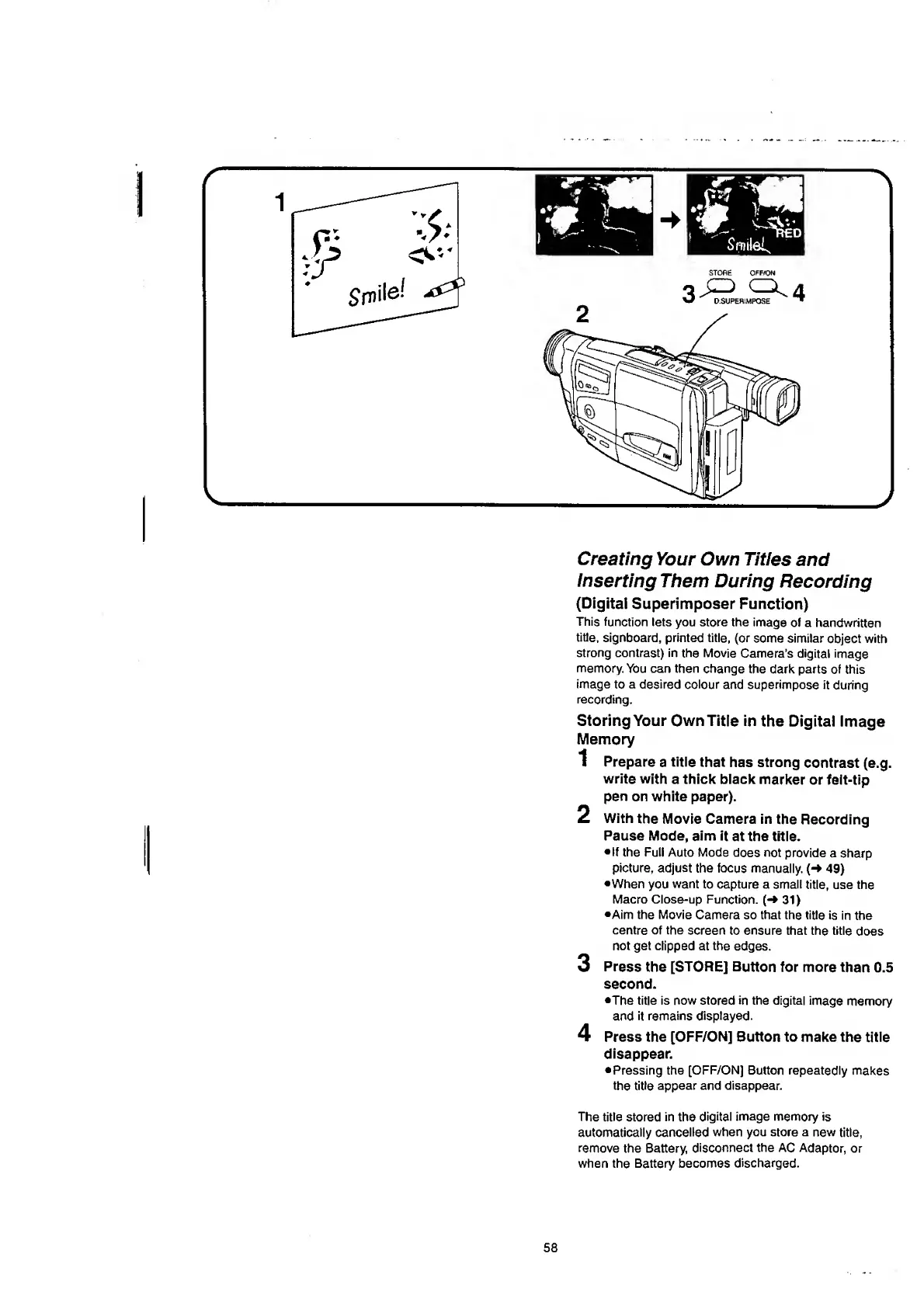
Panasonic NV-RX37A - Creating Your Own Titles and Inserting Them During Recording (Digital Superimposer Function).58; Storing Your Own Title in the Digital Image; Memory

Panasonic NV-RX37A
79 pages
Print Icon
To Next Page IconTo Next Page
To Previous Page IconTo Previous Page
Loading...
Creating
Your
Own
Titles
and
Inserting
Them
During
Recording
(Digital
Superimposer
Function)
This
function
lets
you
store
the
image
of
a
handwritten
title,
signboard,
printed
title,
(or
some
similar
object
with
strong
contrast)
in
the
Movie
Camera's
digital
image
memory.
You
can
then
change
the
dark
parts
of
this
image
to
a
desired
colour
and
superimpose
it
during
recording.
Storing
Your
Own
Title
in
the
Digitai
image
Memory
1
Prepare
a
title
that
has
strong
contrast
(e.g.
write
with
a
thick
black
marker
or
felt-tip
pen
on
white
paper).
2
With
the
Movie
Camera
in
the
Recording
Pause
Mode,
aim
it
at
the
title.
•If
the
Full
Auto
Mode
does
not
provide
a
sharp
picture,
adjust
the
focus
manually.
49)
•When
you
want
to
capture
a
small
title,
use
the
Macro
Close-up
Function.
(-»
31)
•Aim
the
Movie
Camera
so
that
the
title
is
in
the
centre
of
the
screen
to
ensure
that
the
title
does
not
get
clipped
at
the
edges.
3
Press
the
[STORE]
Button
for
more
than
0.5
second.
•The
title
is
now
stored
in
the
digital
image
memory
and
it
remains
displayed.
4
Press
the
[OFF/ON]
Button
to
make
the
title
disappear.
Pressing
the
[OFF/ON]
Button
repeatedly
makes
the
title
appear
and
disappear.
The
title
stored
in
the
digital
image
memory
is
automatically
cancelled
when
you
store
a
new
title,
remove
the
Battery,
disconnect
the
AC
Adaptor,
or
when
the
Battery
becomes
discharged.
58

Table of Contents

Related product manuals