EasyManua.ls Logo

Panasonic NV-RX37A - Dubbing (Copying)

Panasonic NV-RX37A
79 pages
Print Icon
To Next Page IconTo Next Page
To Previous Page IconTo Previous Page
Loading...
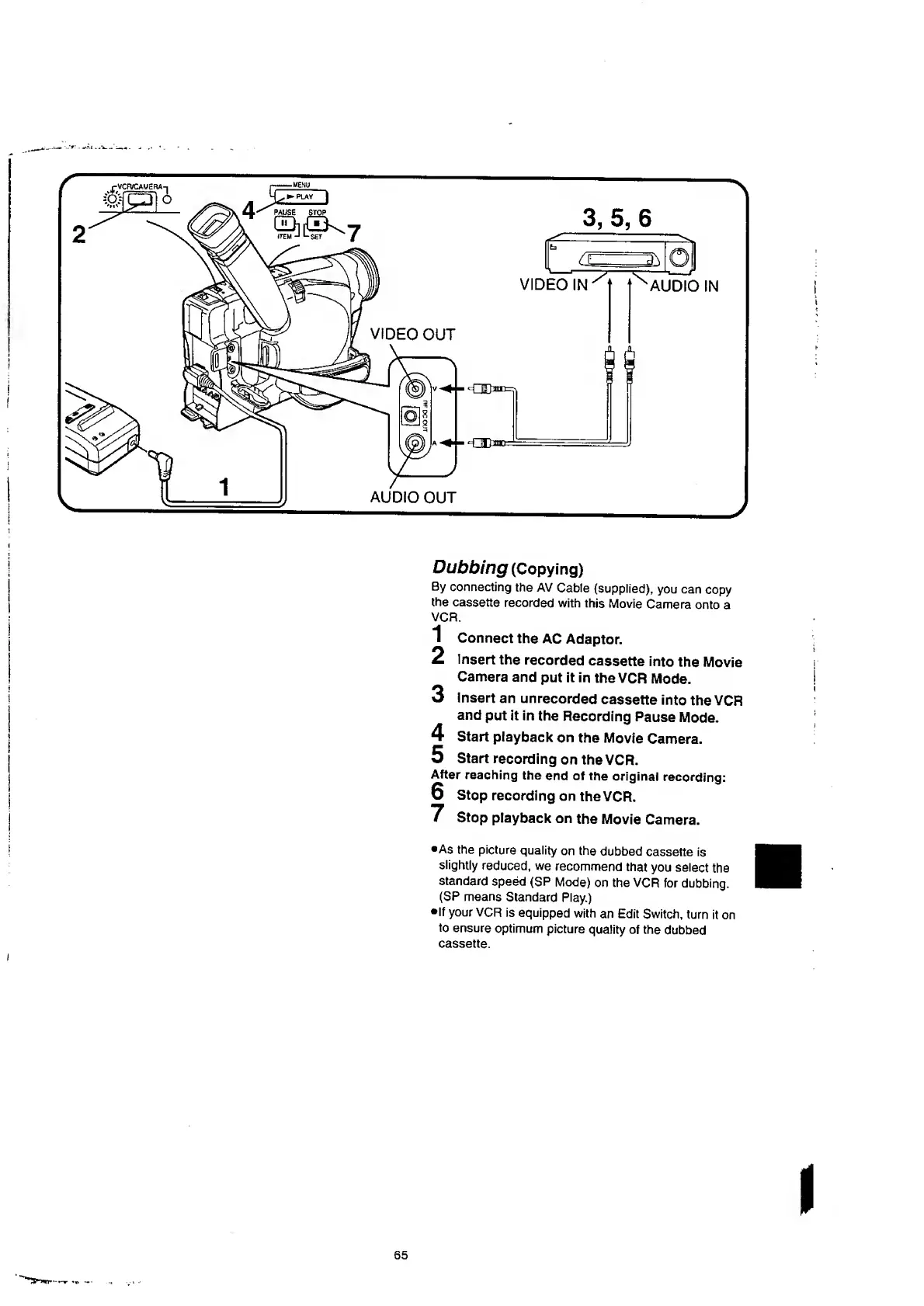
VCR.
1
Connect
the
AC
Adaptor.
2
Insert
the
recorded
cassette
into
the
Movie
Camera
and
put
it
in
the
VCR
Mode.
3
insert
an
unrecorded
cassette
into
the
VCR
and
put
it
in
the
Recording
Pause
Mode.
Start
playback
on
the
Movie
Camera.
Start
recording
on
the
VCR.
After
reaching
the
end
of
the
original
recording:
6
Stop
recording
on
the
VCR.
7
Stop
playback
on
the
Movie
Camera.
4
5
•As
the
picture
quality
on
the
dubbed
cassette
is
slightly
reduced,
we
recommend
that
you
select
the
standard
speed
(SP
Mode)
on
the
VCR
for
dubbing.
(SP
means
Standard
Play.)
•If
your
VCR
is
equipped
with
an
Edit
Switch,
turn
it
on
to
ensure
optimum
picture
quality
of
the
dubbed
cassette.
I
65

Table of Contents

Related product manuals