EasyManua.ls Logo

Panasonic NV-RX37A - Recording with the Time And;Or Date Superimposed in the Picture.24

Panasonic NV-RX37A
79 pages
Print Icon
To Next Page IconTo Next Page
To Previous Page IconTo Previous Page
Loading...
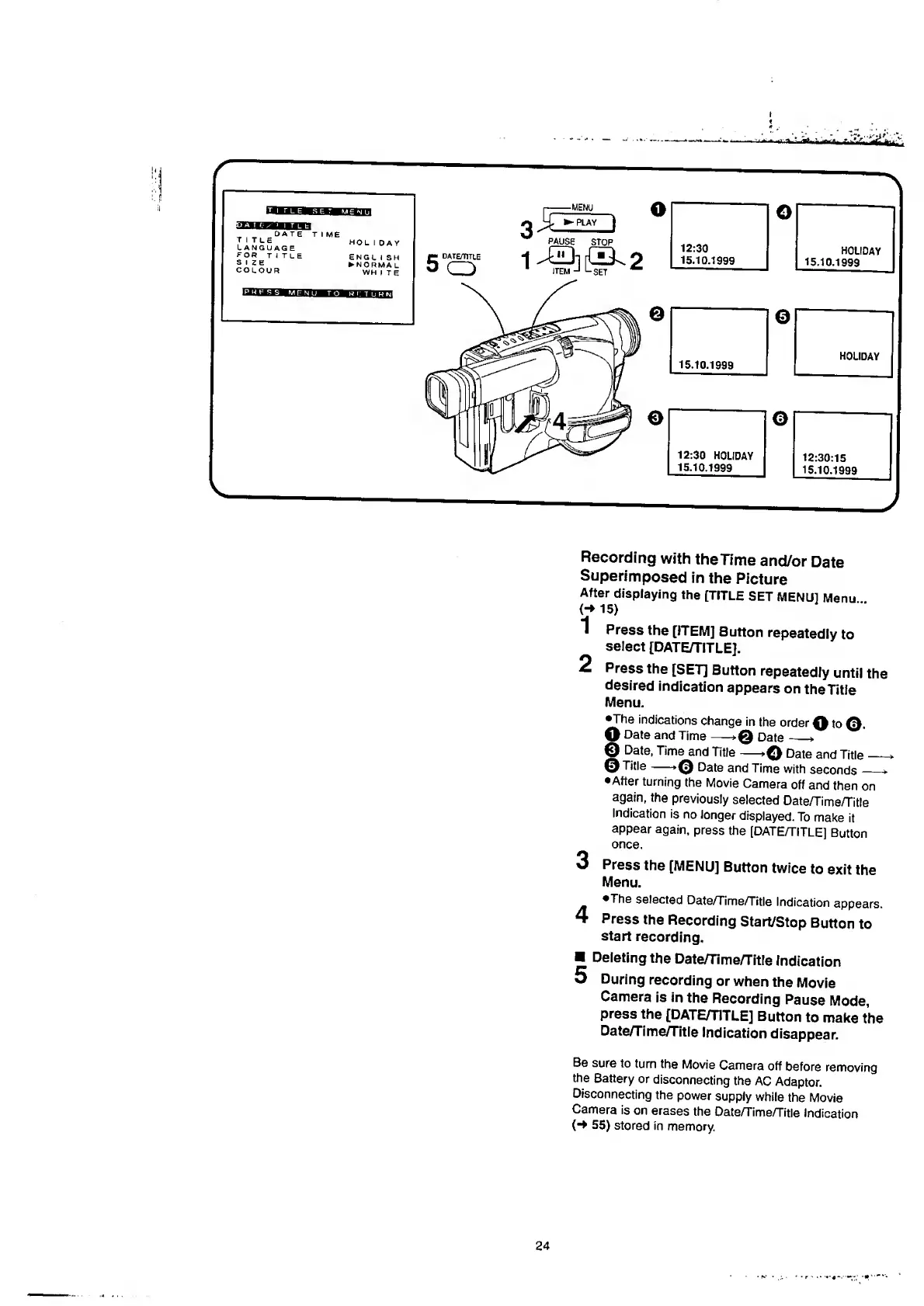
Recording
with
the
Time
and/or
Date
Superimposed
in
the
Picture
After
displaying
the
[TITLE
SET
MENU]
Menu
(-M5)
"I
Press
the
[ITEM]
Button
repeatedly
to
select
[DATE/TITLE].
2
Press
the
[SET]
Button
repeatedly
until
the
desired
indication
appears
on
the
Title
Menu.
•The
indications
change
in
the
order
0
to
0.
O
Date
and
Time->0
Date_*
©
Date,
Time
and
Title
—>©
Date
and
Title_*
Title
Date
and
Time
with
seconds
—-*
•After
turning
the
Movie
Camera
off
and
then
on
again,
the
previously
selected
Date/Time/Title
Indication
is
no
longer
displayed.
To
make
it
appear
again,
press
the
[DATE/TITLE]
Button
once.
3
Press
the
[MENU]
Button
twice
to
exit
the
Menu.
*The
selected
Date/Time/Title
Indication
appears.
4
Press
the
Recording
Start/Stop
Button
to
start
recording.
Deleting
the
Date/Time/Title
Indication
5
During
recording
or
when
the
Movie
Camera
is
in
the
Recording
Pause
Mode,
press
the
[DATE/TITLE]
Button
to
make
the
Date/Time/Title
Indication
disappear.
Be
sure
to
turn
the
Movie
Camera
off
before
removing
the
Battery
or
disconnecting
the
AC
Adaptor.
Disconnecting
the
power
supply
while
the
Movie
Camera
is
on
erases
the
Date/Time/Title
Indication
55)
stored
in
memory.
24

Table of Contents

Related product manuals