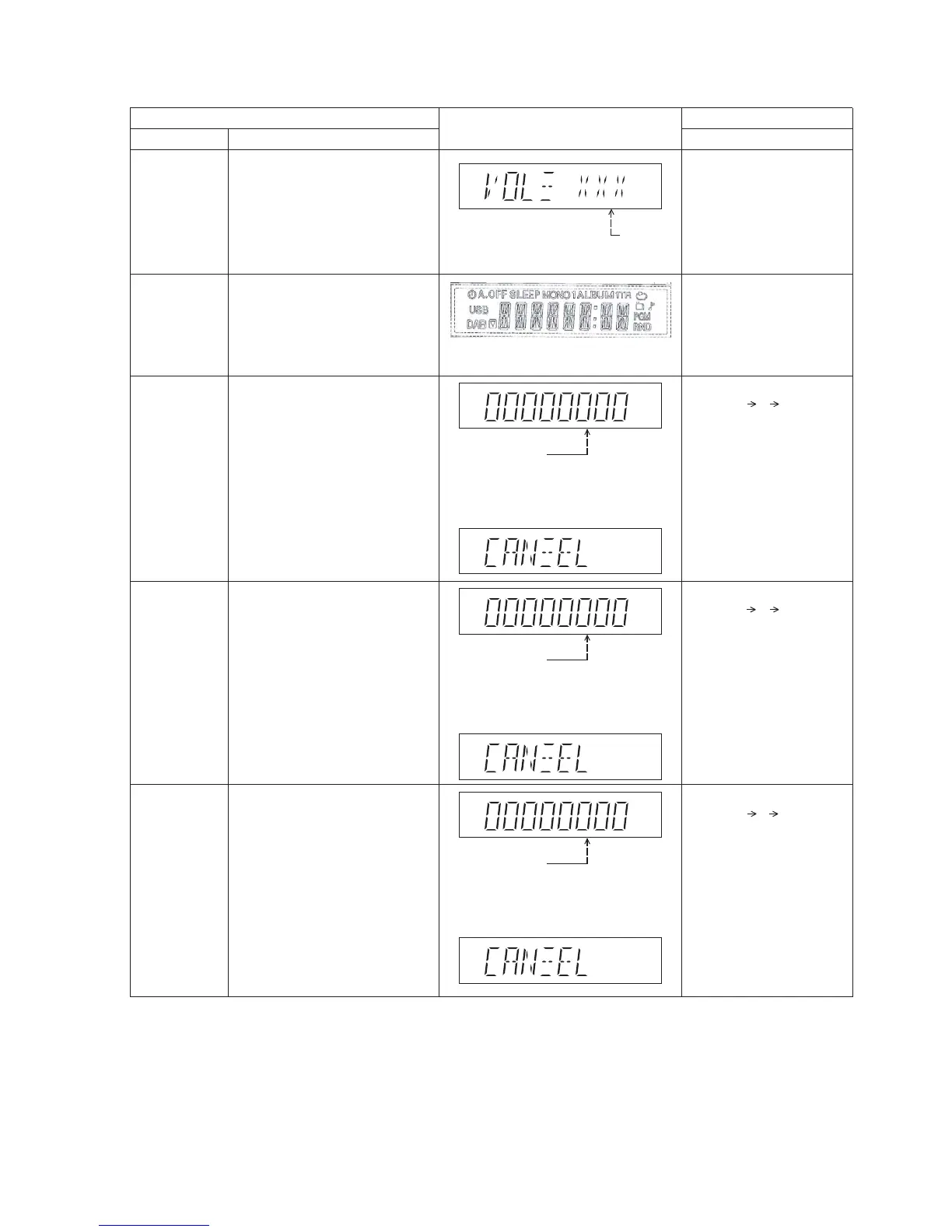
8.2.2. Doctor Mode Table 2
FL Display
Key Operation
Front Key
Item
DescriptionMode Name
Volume Setting
Check
FL Display
Check
To check the volume setting of a main
unit.
To check the FL segment display
All segment will light up while all LED
blink at 0.5s,intervals.(if any)
In Doctor Mode :
1. Press [7], [8], [9] button
on remote control.
In Doctor mode :
1. Press [1] button on
remote control.
Press [7]: VOL50
Press [8]: VOL35
Press [9]: VOL0
Vo lume
In this mode, the tray will open &
close.
Note: Refer to Section 8.3 Fig 1 for
process flow .
The counter will
increment by one .
When reach 9999
will change to 0000
Cancellation Display
BRS11C Reliability
Test (Loading)
To determine CD Mechanism Unit
(BRS11C) Open/Close operation.
Note: Refer to Section 8.3 Fig 2. for
process flow .
The counter will
increment by one .
When reach 9999
will change to 0000
Cancellation Display
BRS11C Reliability
Test (Traverse)
Test
To determine CD Mechanism BRS11C
Access Inner & Outer disc operation.
Note: Refer to Section 8.3 Fig 3. for
process flow .
The counter will
increment by one .
When reach 9999
will change to 0000
Cancellation Display
BRS11C Reliability
(Combination)
In this mode,ensure the CD is in the
main unit.
To determine CD Mechanism Unit
(BRS11C) Open/Close & Access Inner &
Outer Disc Operation.
In this mode,ensure the CD is in the
main unit.
In Doctor Mode :
1. Press [10] [2] [1] button
on remote control.
2. To cancel, press [0]
on remote control.
In Doctor Mode :
1. Press [10] [1] [2] button
on remote control.
2. To cancel, press [0]
on remote control.
2. To cancel, press [0 ]
on remote control.
In Doctor Mode :
1. Press [10] [1] [5] button
on remote control.
2. To cancel, press [0]
on remote control.



 To Next Page