30 Document Number: PD196-103 Rev 1
Sound Control
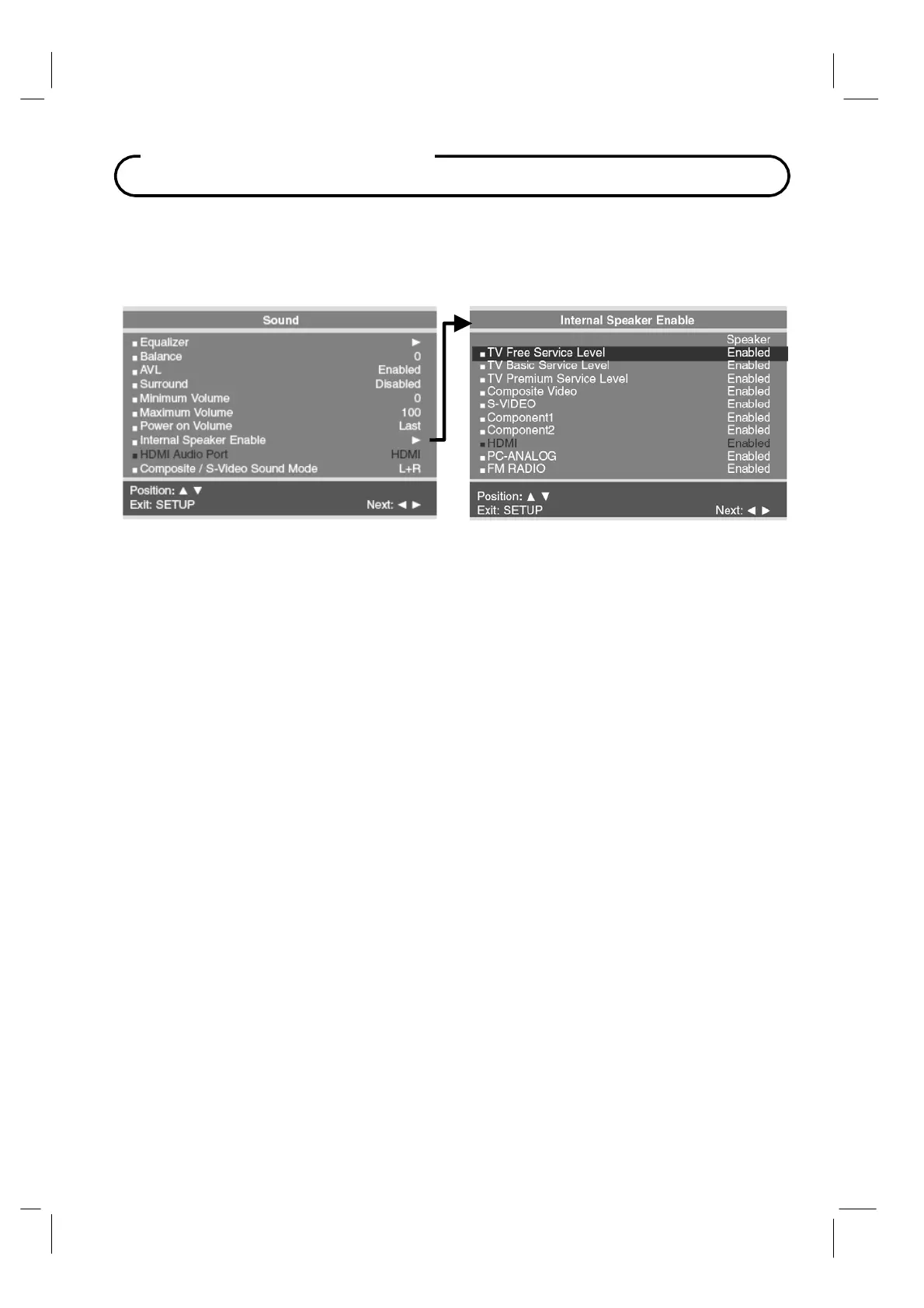
Internal Speaker Enable
The speaker’s inside the TV’s cabinet can be turned on or off for either different TV Service
Level or Source modes. Note: Sound to an attached pillow speaker remains on at all times.
1. In the Sound menu, press CH▲ / CH▼
button to select the Internal Speaker Enable
menu item.
2.
Press the
CH▲ / CH▼
button to select the desired Service Level(s) or Sources.
3.
Press
VOL◄ / VOL► to select Disable or Enabled.
4. Press the SETUP button to return to the preceding menu.
Composite / S-Video Sound Mode
The sound mode for the Component and S-Video sources can be set independently.
1. In Sound menu, press the CH▲ / CH▼ button to select Composite / S-Video Sound
Mode.
2.
Press VOL◄ / VOL► to select L+R, L+L or R+R.
L+R : Audio signal from audio L input is sent to left loudspeaker and audio signal from
audio R input is sent to right loudspeaker.
L+L : Audio signal from audio L input is sent to left and right loudspeakers.
R+R : Audio signal from audio R input is sent to left and right loudspeakers.
3.
Press the SETUP button to return to the preceding menu.



 To Next Page