47 Document Number: PD196-103 Rev 1
FM Radio
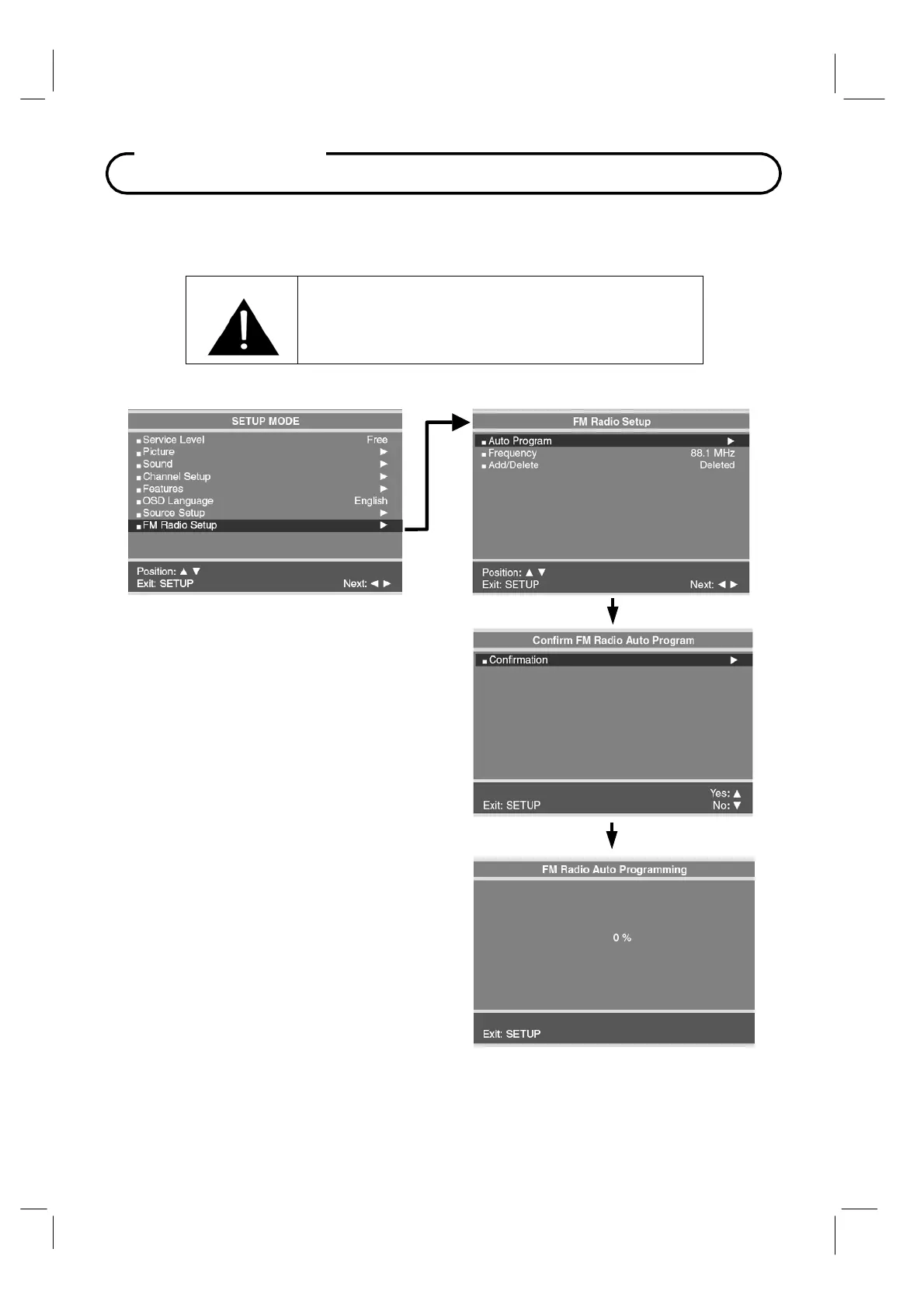
FM Radio Setup
You can listen to FM radio stations that are combined with the cable
TV signals using this
TV.
Auto Program
1. Press the
SETUP
button.
2. Press the
CH▲ / CH▼
button to select the
FM Radio Setup
menu. Then press the
VOL◄ / VOL►
buttons to enter the menu.
3. Press the
VOL◄ / VOL►
button to
automatically scan.
4. Press the
CH▲ / CH▼
button to
Confirm FM
Radio
Auto Program. (CH
▲
=Yes,
CH
▼
=No). The TV will now search all
available radio channels looking for signals
and memorizing those radio channels that ar
active.
5.
Press the
SETUP
button to return to
FM
Radio Setup
menu.
Add/Delete Stations
1. Select the Frequency you wish to Add or
Delete.
2. To delete a frequency from memory, press
the CH▲ / CH▼ button to select Add/Delete.
3. Select off with the VOL◄ / VOL► to Add or
Delete the frequency.
4. Press the Setup button to return to the FM
Radio Setup menu.
IMPORTANT: The FM radio source must be
enabled in the SOURCE SETUP menu before
using the FM Radio setup menu.



 To Next Page