EasyManua.ls Logo

PDi PDI-P20LCDC - Remote Control Functions (Part 2); Volume and Input Selection; Picture and Caption Settings; Timer and Preference Recall

PDi PDI-P20LCDC
51 pages
Print Icon
To Next Page IconTo Next Page
To Previous Page IconTo Previous Page
Loading...
12 Document Number: PD196-103 Rev 1
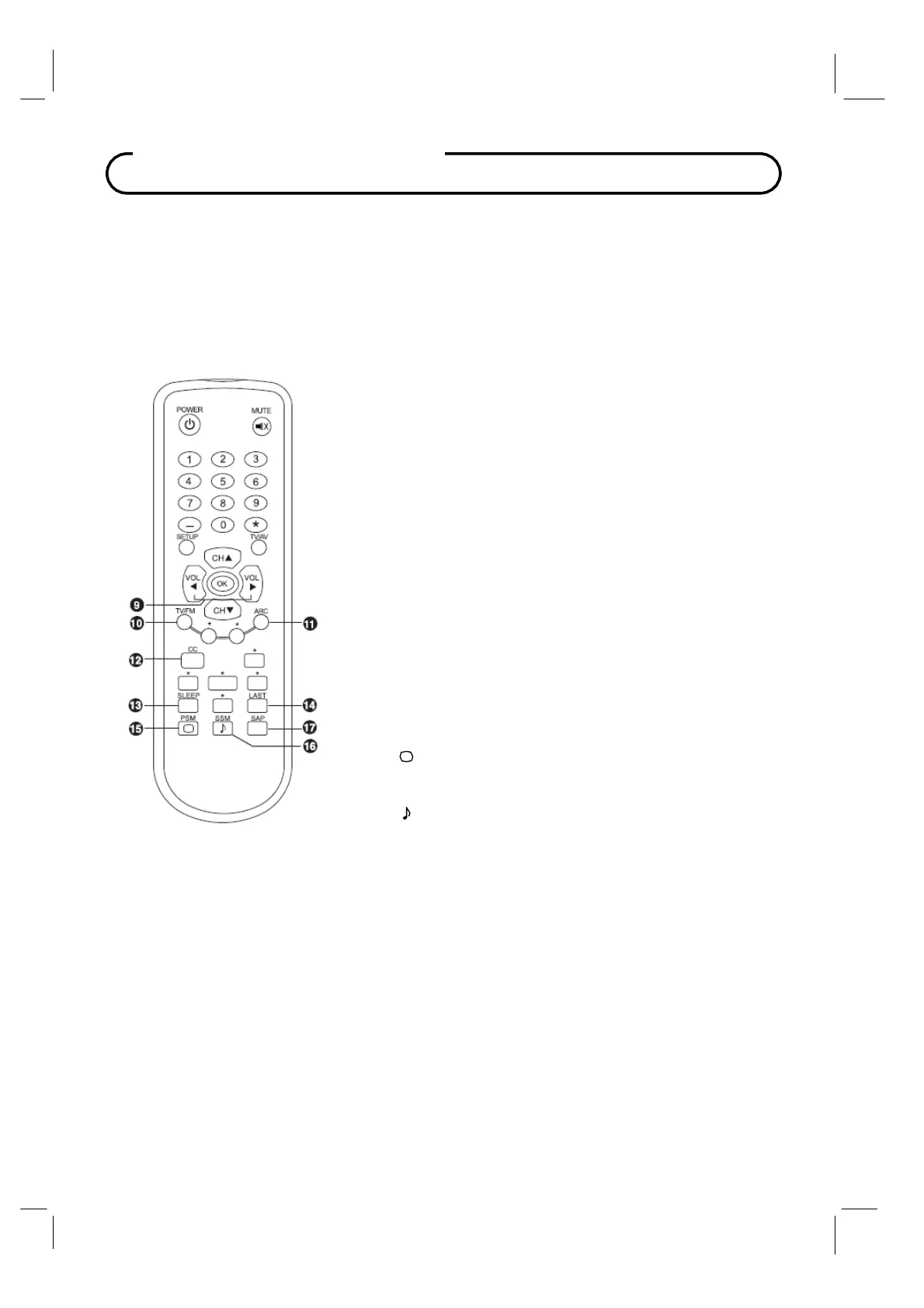
Remote Control
9
VOL
◄►
(Volume Up/Down)
Adjusts the sound level.
Adjusts menu settings.
10
T
V
/ FM
Selects the either TV or FM Radio mode directl
y
.
11
ARC
Changes the aspect ratio.
Repeatedly press the
ARC button to select your desired picture
format.
12
CC
Sets the ca
p
tion function.
13
SLEEP
Sets the slee
p
timer.
14
LAST
Returns to the
p
reviousl
y
viewed channel.
15
PSM ( )
Recalls
y
our
p
referred
p
icture settin
g
.
16
SSM ( )
Recalls
y
our
p
referred sound settin
g
.
17
SAP
Ad
j
usts the
audio mode for either
Stereo
,
Mono
, or
SAP
.

Table of Contents

Related product manuals