Passwords 01
Passwords:
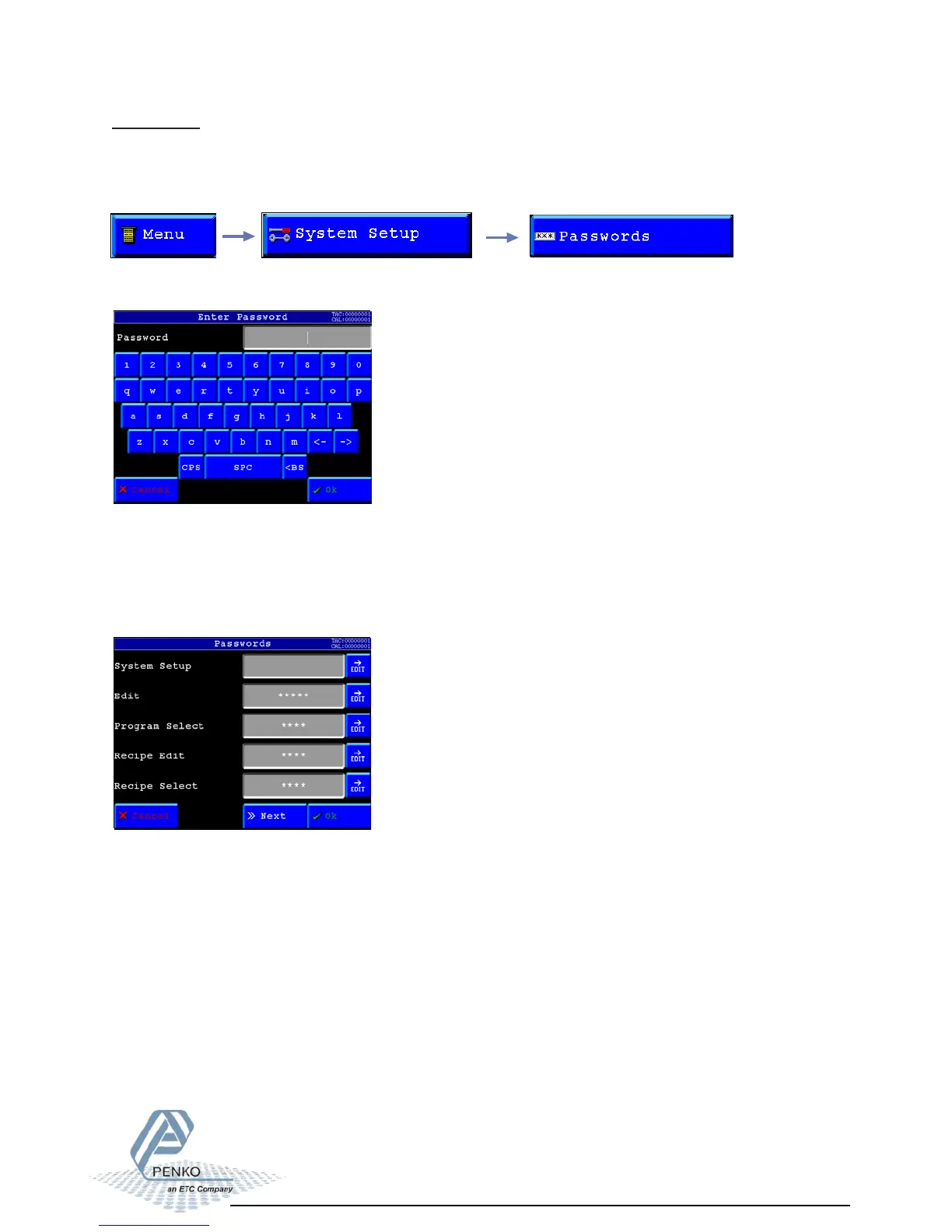
In this menu it is possible to setup passwords to block access to certain parts of the menu.
To go to this menu, select “Passwords” from the System setup menu.
Now you can change (setup) passwords for the following menu options.
- System Setup (This blocks all menu options)
- Edit (This makes the menu read-only)
- Program Select (This blocks the option to select a different program)
- Recipe Edit (This blocks the option to change recipe parameters)
- Recipe Select (This blocks the option to select an other recipe)
- Set Time/Date (This blocks the option to change the time and date)
You are asked for a password. This is default turned off so you can just press “OK”.
If there is a password set up fill it in here, and press “OK”
When changing a password you are asked to fill in a new password twice.
If the two passwords you filled in are not identical, the password will not be changed and
you can try again.



 To Next Page