Indicator set up 01
Indicator setup
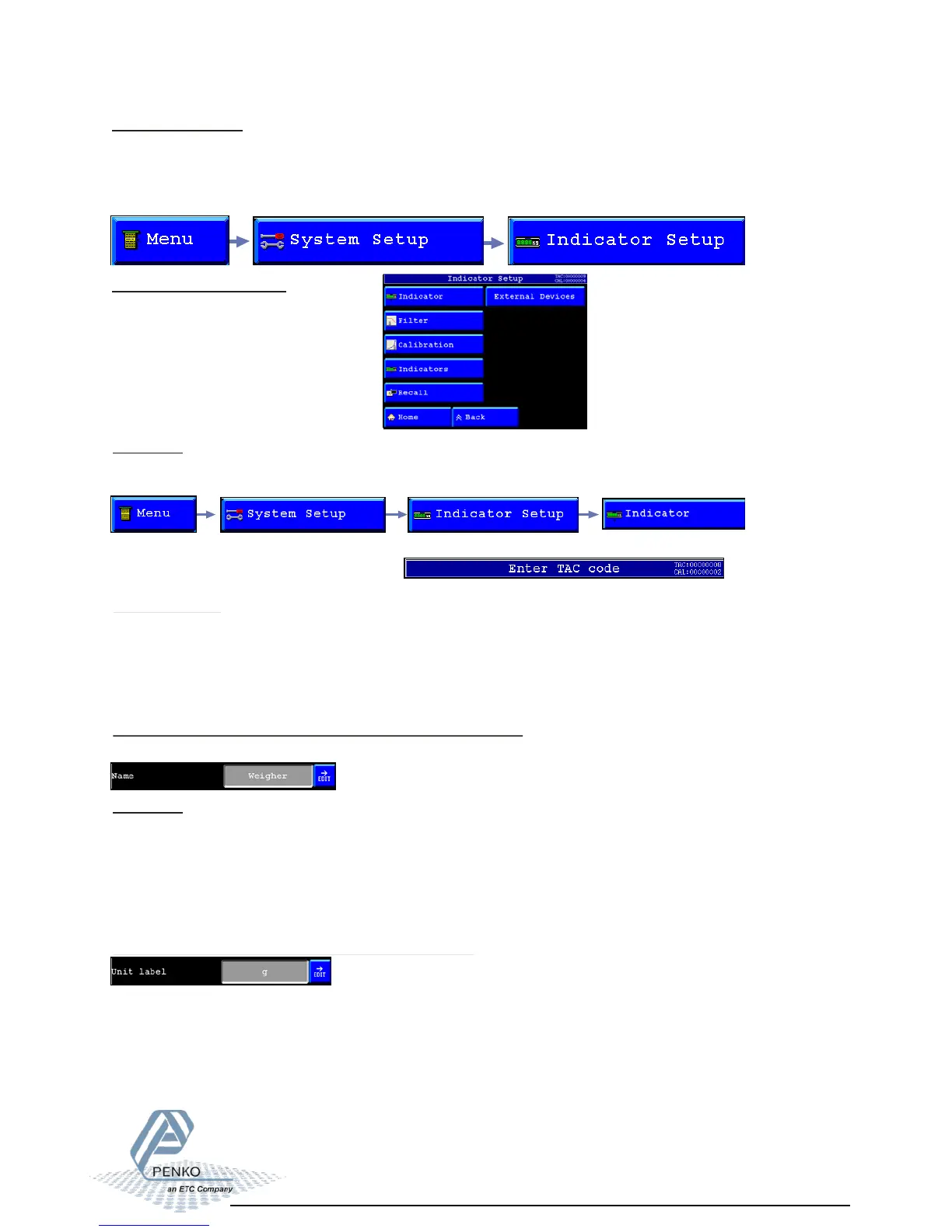
In the indicator setup it’s possible to set all indicator parameters to make sure the indicator
will act properly.
To reach this Setup see below
The different options are:
- Indicator
- Filter
- Calibration
- Indicators
- Recall
- External Devices
Unit label:
The unit label can have a maximum of 4 characters.
The unit label defines the unit of measurement.
The unit label is the value of a quantity, chosen by convention as a reference for
measuring quantities of the same kind.
For example:
,- t (ton) kg (kilo gram), g (gram), but can also be L (liter), lbs (pounds), etc.
Indicator name:
The indicator name can have a maximum of 16 characters.
With an indicator name, the indicator will be unique within the application.
So it's easy to recognize it in the process and/or in the factory.
For example:
Silo 1, Scale, etc.
To change the indicator name, press the “EDIT” button behind the name and change it.
Indicator:
To change the different settings, select “indicator” from the indicator setup
Before its possible to enter this menu, the indicator will ask for the “TAC” code. This “TAC”
code is shown in the upper right corner.



 To Next Page