117
Shooting Functions
4
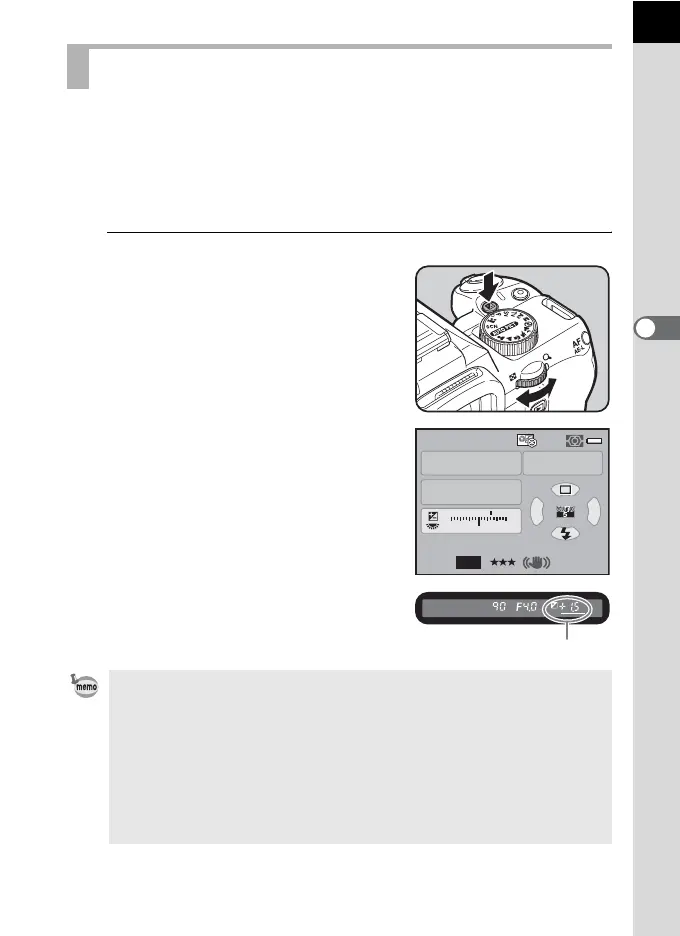
This allows you to deliberately overexpose (brighten) or underexpose
(darken) your picture.
The exposure steps can be selected from 1/3 EV or 1/2 EV in [1. EV Steps]
of the [A Custom Setting 1] menu.
You can adjust the EV compensation value from –3 to +3 (EV).
1
Turn the e-dial while pressing the
mc button.
The exposure is adjusted.
m is displayed in the status screen and
viewfinder during adjustment.
Adjusting the Exposure
• EV compensation is not available when the mode dial is set to a (Manual).
• The EV compensation is not canceled by turning the camera off or by
switching to another capture mode.
• If [Green Button] is assigned to the | button in [Green Button] of the [A Rec.
Mode 4] menu (p.197), the compensation value is reset to 0.0 when the |
button is pressed.
• EV compensation can also be changed by pressing the mc button once,
taking your finger off the button and turning the e-dial. In this case, EV
compensation is set when the mc button is pressed again or the exposure
metering timer (p.116) elapses.
button
Av
AF.A
1/
ISO
ISO
AUTO
30 4.5F
1122+3-3
AWB
12M
[
37
]
JPEG
400
Compensation value



 To Next Page
 Loading...











