48
Getting Started
2
3
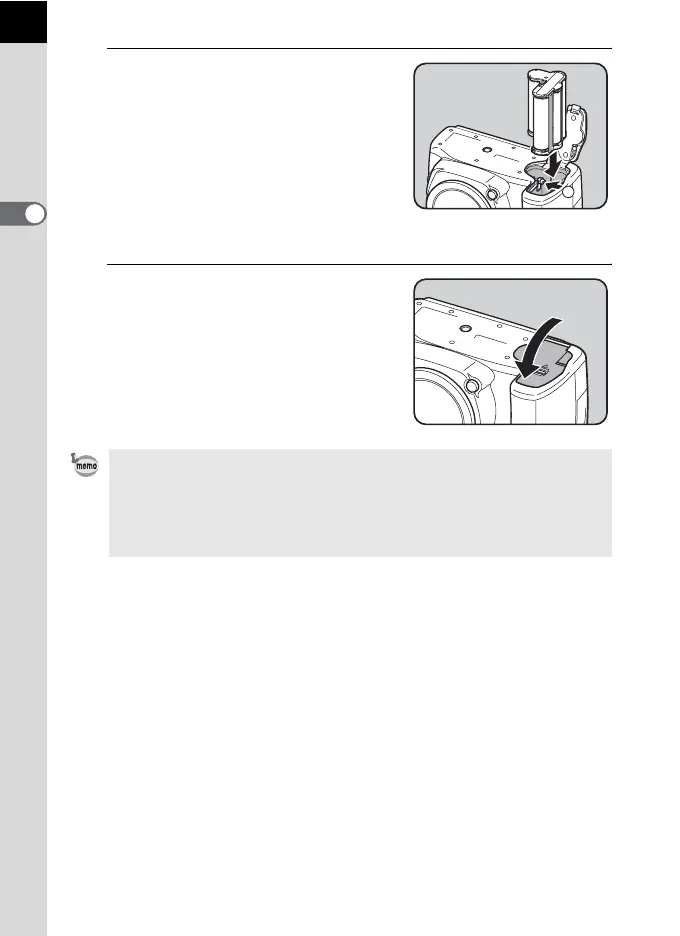
Insert the battery holder into the
battery chamber.
Push the battery lock lever in the
direction of the arrow (3) and insert the
battery holder until it locks.
To remove the battery holder, push the
battery lock lever in the direction of the
arrow (3) with your finger. Remove the
battery holder when it pops out slightly.
4
Close the battery cover.
• To use the AA batteries, set the AA battery type in [AA Battery Type] of the
[R Set-up 3] menu before use. (p.282)
• It is recommended to use the AC adapter kit K-AC109 (optional) when using
the camera for a prolonged period. (p.50)
• Check the orientation of the batteries if the camera does not operate
properly.
3



 To Next Page