Before Using Your Camera
1
25
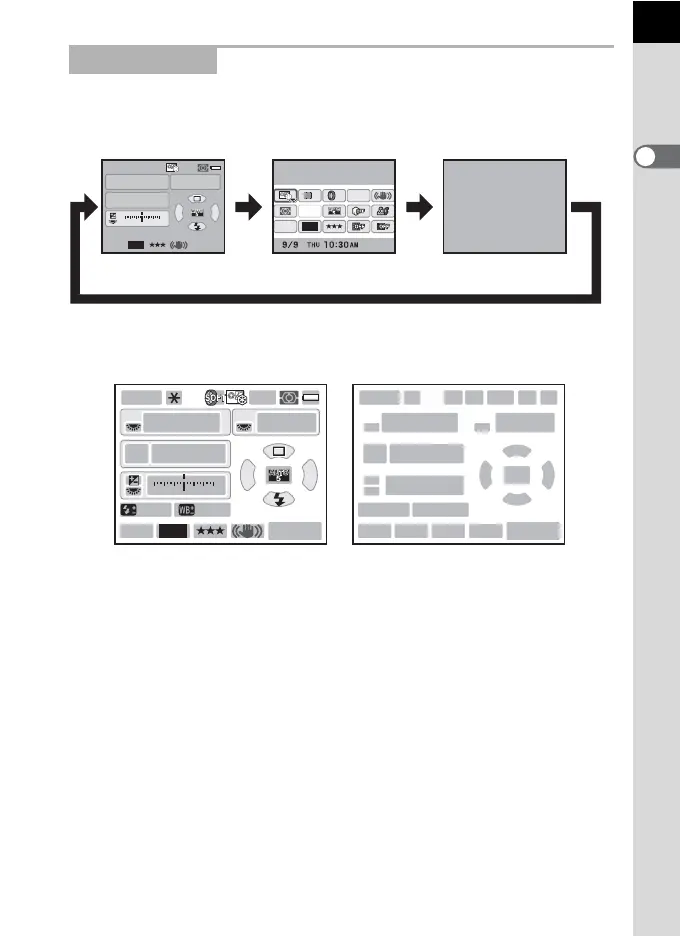
While shooting, the status screen is displayed showing the current
shooting function settings. You can change the type of the screen
displayed by pressing the M button.
Status screen
(All items are displayed here for explanatory purposes. The actual display may
differ.)
Capture Mode
1 Capture Mode (p.91) 13 EV Compensation (p.117)/
Exposure Bracketing (p.118)
2 AE Lock (p.120)
3 Interval Shooting (p.149)/Multi-
exposure (p.153)/Digital Filter
(p.155)/HDR Capture (p.209)
/Cross Processing (p.216)
14 EV bar
15
Flash Exposure Compensation (p.81)
16 White Balance fine-tuning (p.204)
17 Drive Mode (p.86)
4 Custom Image (p.213)/
Cross Processing (p.216)
18 White Balance (p.200)
19 Select AF point (p.129)
5 Focus Mode (p.122) 20 Sensitivity (p.98)
6 AE Metering (p.114) 21 Flash Mode (p.75)
7 Battery level (p.49) 22 File Format (p.195)
8 E-dial guide 23 JPEG Recorded Pixels (p.192)
9 Shutter speed 24 JPEG Quality (p.193)
10 Aperture value 25 Shake Reduction (p.141)
11 ISO AUTO 26 Remaining image storage
capacity/| button guide
12 Sensitivity (p.98)
P
AF.A
1/
ISO
ISO
AUTO
125 5.6F
1122+3-3
AWB
12M
[
37
]
200
JPEG
12M
[
37
]
Custom Image
Bright
JPEG
HDR
OFF
OFF
AF.A
OFF
Status screen
M
Control panel Blank
MM
12
910
88
11 12
14
8
15 16
22 23 24 25 26
17
18 19 20
21
13
34 5 67
P
SHIFT
AF.A
1/
ISO
ISO
AUTO
2000 2.8
±1.0
G1A1
F
1122+3-3
AWB
12M
[
37
]
1600
JPEG



 To Next Page