217
Shooting Settings
6
The outcome of cross processing varies each time a picture is taken. If you
are able to take a cross processed image that you like, you can save the
Cross Processing settings used in that image. A total of 3 Cross
Processing settings can be saved for still pictures and movies.
1
Select [Cross Processing] in the [A Rec. Mode 2] menu
and press the four-way controller (5).
The [Cross Processing] screen appears.
2
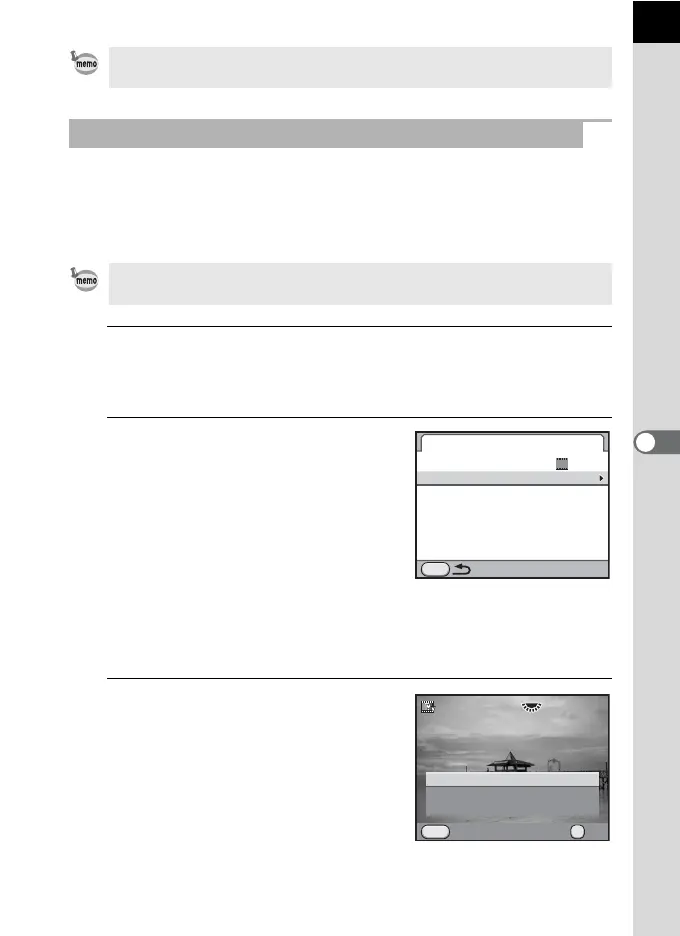
Use the four-way controller (23)
to select [Save Settings] and
press the four-way controller
(5).
The camera will search for cross
processed images starting from the most
recent image taken. (An hourglass icon is
displayed while searching.) When a cross
processed image is found, the screen to save the settings appears.
If there are no cross processed images, the message [No cross
processed image] appears.
3
Use the e-dial to select a cross
processed image.
You can also change the setting from the [A Rec. Mode 2] menu (p.87).
Saving the Cross Processing Setting of a Captured Image
To save Cross Processing setting for movies, set from [Movie] in the [A Rec.
Mode 3] menu with the mode dial set to C (Movie).
Cross Processing
Cross Processing
MENU
Save Settings
OFF
100-0001
1
MENU
Save as Favorite 3
Save as Favorite 2
Save as Favorite 1
Saves this image's Cross
Processing settings
Cancel OK
OK



 To Next Page
 Loading...











