230
Playback Functions
7
7
Use the four-way controller (23) to select [Backgrnd.]
and press the four-way controller (5).
8
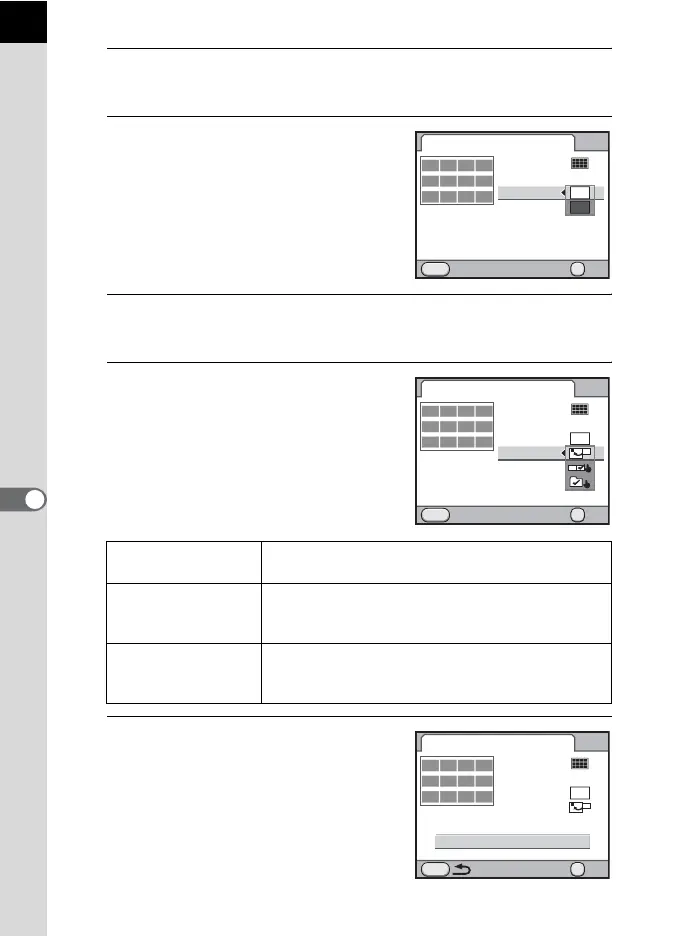
Use the four-way controller (23)
to select the background color
and press the 4 button.
You can select a white or black
background.
9
Use the four-way controller (23) to select [Selection] and
press the four-way controller (5).
10
Use the four-way controller (23)
to select a type of image
selection and press the 4
button.
11
Use the four-way controller (23)
to select [Create an index image]
and press the 4 button.
The index image is created and a
confirmation screen appears.
u All images
Picks images automatically from all of the images
saved.
w Manual
Individually select images you want to include in the
index. Continue by selecting [Select image(s)] and
select the individual images.
x Folder name
Picks images automatically from the folder
selected. Continue by selecting [Select a folder] and
select the folder.
MENU
12
OK
Index
Layout
Images
Backgrnd.
Selection
Cancel
Create an index image
OK
MENU
12
OK
Index
Layout
Images
Backgrnd.
Selection
Cancel
Create an index image
OK
MENU
12
OK
Index
Layout
Images
Backgrnd.
Selection
Create an index image
OK



 To Next Page