SettingtheClock(cont'd)13
4
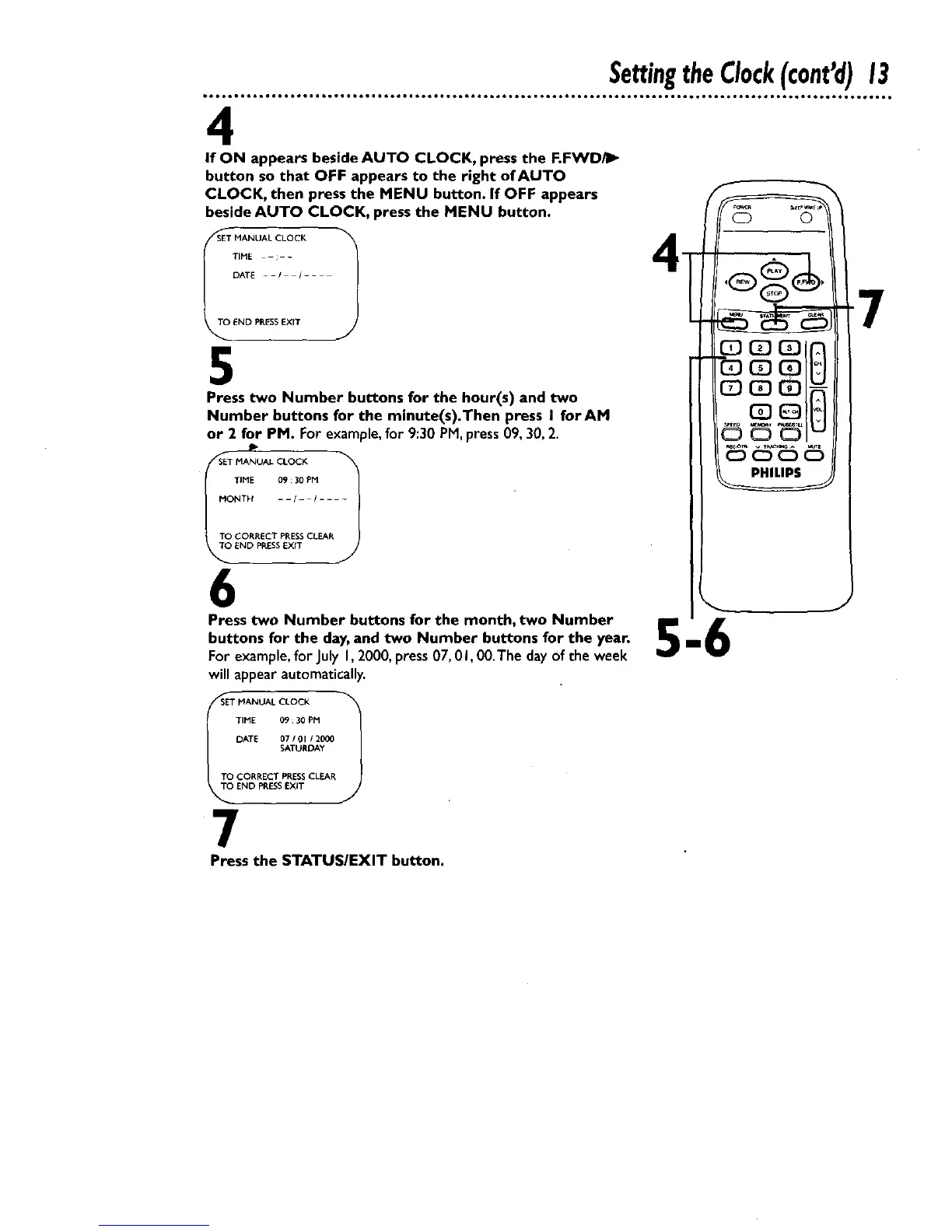
If ON appears beside AUTO CLOCK, press the F.FWD/I_
button so that OFF appears to the right of AUTO
CLOCK, then press the MENU button. If OFF appears
beside AUTO CLOCK, press the MENU button.
SET MANUAL CLOCK
_T_ TIME ; -
DATE - - / / - -
END PRESS EXIT
5
Press two Number buttons for the hour(s) and two
Number buttons for the minute(s).Then press I forAM
or 2 for PM. For example, for 9:30 PM, press 09, 30, 2.
P
MANUALCLOCK 1
TIME 09 : 30 PM
MONTH - - / / ....
TO CORRECT PRESSCLEAR
TO END PRESSEXfT
6
Press two Number buttons for the month, two Number I1_
buttons for the day,and two Number buttons for the year.
Forexample, for JulyI, 2000,press07, 0I, 00.The clayof the week
willappear automatically.
S_TT_O MANUAL CLOCK 1
TIME 09 ;30 PM
DATE 0710112000
SATURDAY
TO CORRECT PRESSCLEAR
END PRESSEXIT
7
Press the STATUS/EXIT button.










 To Next Page