36 DefeatRecording
• • • • • • • • • • • • • • • • • • • • • • • • • • • • • • • • • • • • • •• • • • • • I• • • • • •• • • • •o • • • ••1 • • • •co • • • • • • • • ••• • • • • • • • • • • • • • • • • • • • • • • • • • • • • • • •
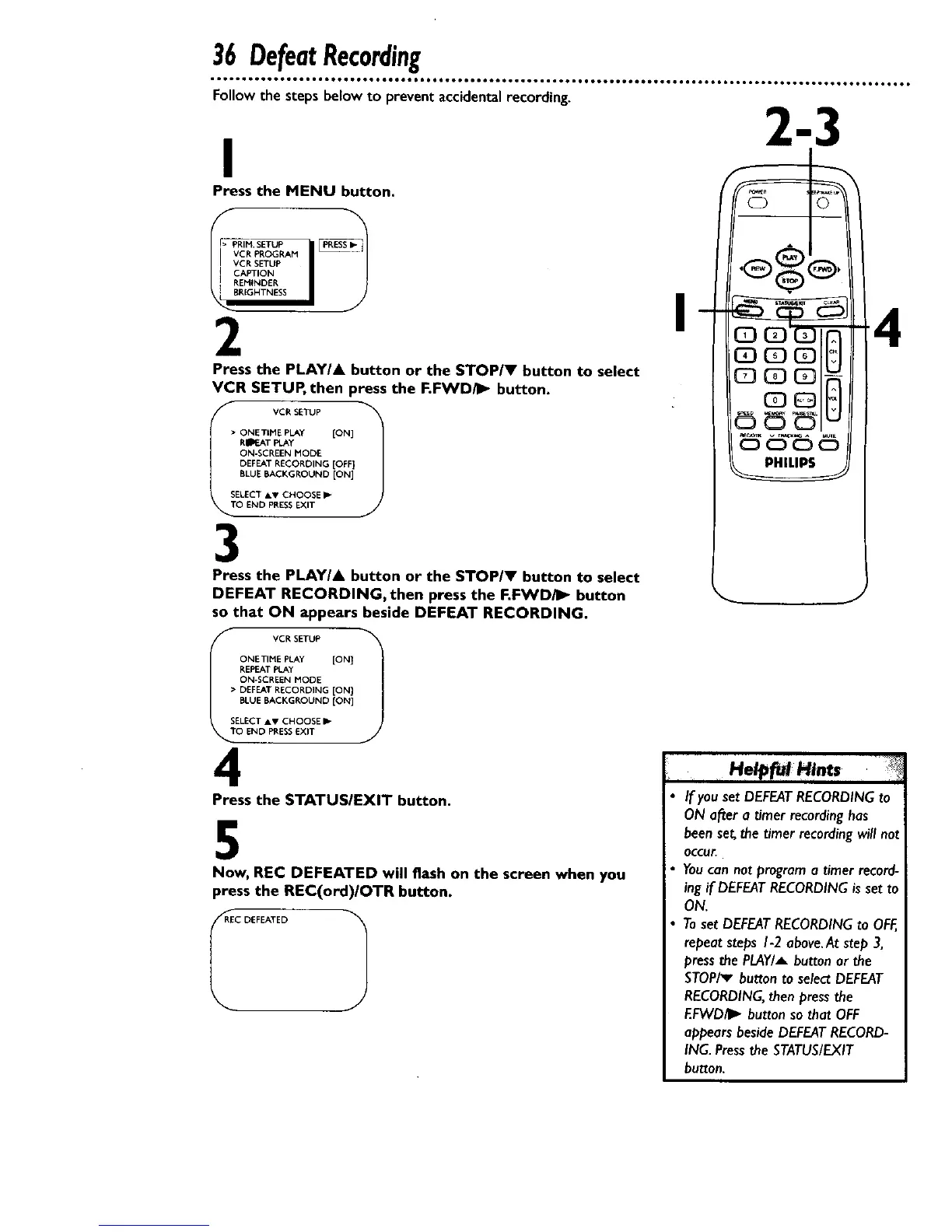
Follow the steps below to prevent accidental recording.
I
Press the MENU button.
VCR PROGRAM "_"
VCR SETUP
CAPTION
REMINDER
BRIGHTNESS
2
Press the PLAY/& button or the STOP/V button to select
VCR SETUP, then press the F.FWDAI_- button.
> ONE TIME PLAY [ON]
REPOT PLAY
ON-SCREEN MODE:
DEFEAT RECORDING [OFF]
BLUE BACKGROUND [ON]
SELECT A, CHOOSE _-
O END PRESS EXIT
3
Press the PLAY/A button or the STOPIV button to select
DEFEAT RECORDING, then press the F.FWD/_" button
so that ON appears beside DEFEAT RECORDING.
IT VCRSETUP ;
ONE TIME PLAy [ON}
REPEAT PLAy
ON-SCREEN MODE
• DEFEAT RECORDING [ON]
BLUE BACKGROUND [ON]
SELECT AV CHOOSE I_
O END PRESS EXIT
4
Press the STATUSIEXIT button.
5
Now, REC DEFEATED will flash on the screen when you
press the REC(ord)/OTR button.
,_RRECDEFEATED 1
J
, Ha.t,
If you set DEFEATRECORDINGto
ON after a timer recordinghas
beenset,thetimer recordingwill not
Occur.
You can not program a timer record-
ing if DEFEAT RECORDING is set to
ON.
Toset DEFEATRECORDINGto OFF,
repeatstepsI-2 above.Atstep 3,
press the PLAY/A button or the
STOPiv button to select DEFEAT
RECORDING, then press the
EFWD/I_ button so that OFF
appears beside DEFEAT RECORD-
ING. Press the STATUS/EXIT
button.










 To Next Page