20 FrontPanel
• Dot• tc, t • •tot oQt • tt•• oft • • too• • t•ott • too • •toot to•to •••tt • otto 1o1• • tt f • toil •tttt • • •°too lot*tom • tto••tt • t,r*,eo•tt
CCBI30
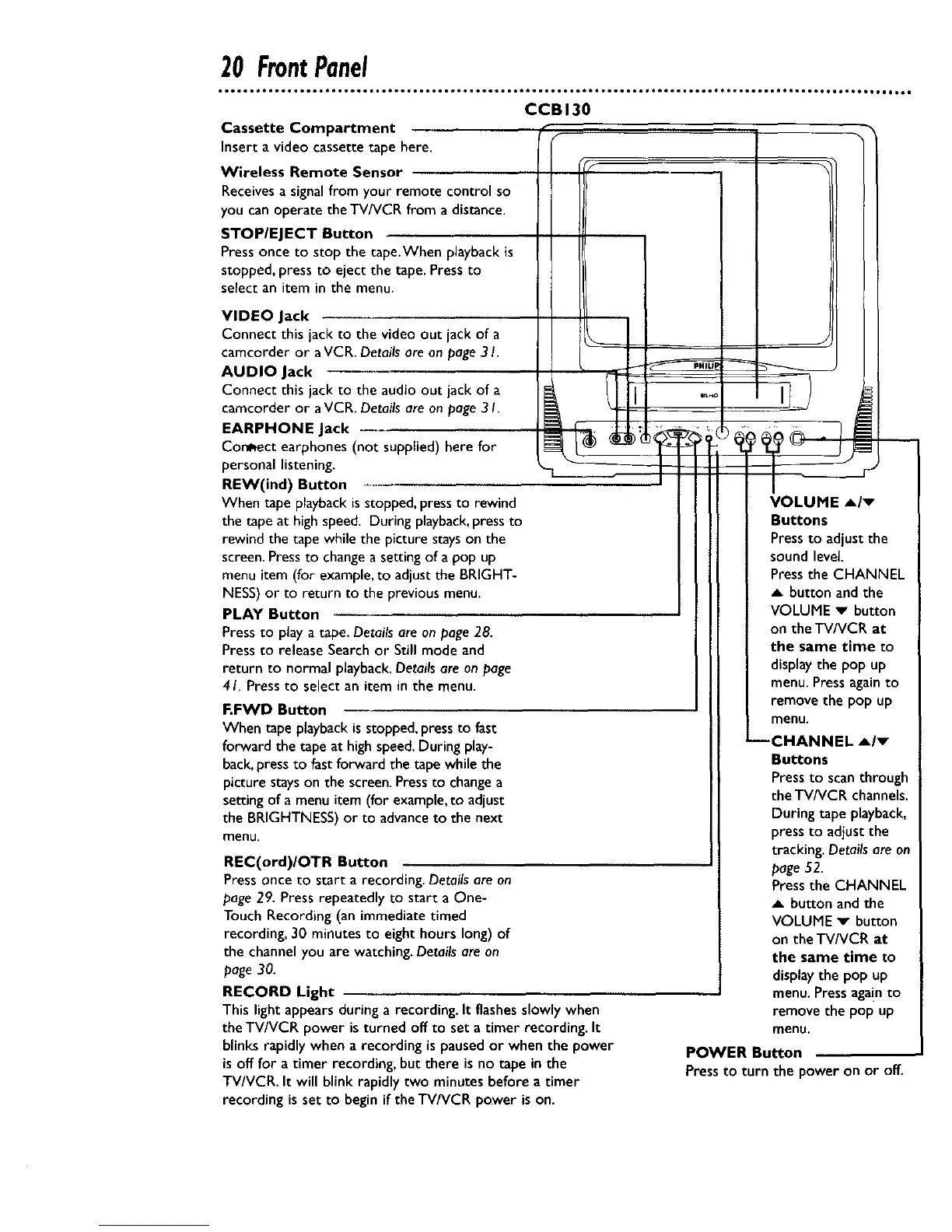
Cassette Compartment
Inserta video cassettetape here.
Wireless Remote Sensor
Receivesa signalfrom your remote controlso
you canoperate theTV/VCR from a distance.
STOP/EJECT Button
Pressonce to stop the tape,When playback is
stopped,press to eject the tape. Pressto
selectan item in the menu.
VIDEO Jack
Connect this jack to the video out jack of a
camcorder or aVCR. Detailsare on page 31.
AUDIO Jack
Connect this jack to the audio out jack of a
ca•corder or aVCR. Detailsare on page31.
EARPHONE Jack
Correct earphones (not supplied) here for
personal listening.
REW(ind) Button
When tape playbackisstopped,pressto rewind
the tape at high speed. During playback,pressto
rewind the tape while the picture stayson the
screen.Pressto changea setting of a pop up
menu item (for example,to adjust the BRIGHT-
NESS)or to return to the previous menu.
PLAY Button
Pressto playa tape. Detailsare on page 28.
Pressto release Searchor Still mode and
return to normal playback.Details are on page
41. Pressto select an item in the menu.
F.FWD Button
When tape playbackisstopped, pressto fast
forward the tape at high speed.During play-
back,pressto fastforward the tape while the
picture stayson the screen.Pressto changea
setting of a menu item (for example,to adjust
the BRIGHTNESS)or to advanceto the next
menu.
REC(ord)/OTR Button
Press once to start a recording. Detailsare on
page 29. Press repeatedly to start a One-
Touch Recording (an immediate timed
recording, 30 minutes to eight hours long) of
the channelyou are watching. Detailsare on
page 30.
RECORD Light
This lightappearsduring a recording. It flashesslowly when
the TV/VCR power isturned off to seta timer recording. It
blinksrapidly when a recording is paused or when the power
isofffor a timer recording, but there is no tape in the
TV/VCR. It will blinkrapidly two minutes before a timer
recording isset to beginif theTV/VCR power ison.
VOLUME A/v
Buttons
Pressto adjust the
sound level.
Pressthe CHANNEL
button and the
VOLUME v button
on the TV/VCR at
the same time to
displaythe pop up
menu.Pressagainto
removethe pop up
menu.
--CHANNEL Air
Buttons
Pressto scanthrough
the TV/VCR channels.
During tape playback,
pressto adjustthe
tracking. Detailsare on
page52.
Pressthe CHANNEL
A button and the
VOLUME v button
on the TV/VCR at
the same time to
displaythe pop up
menu.Pressaga!nto
remove the pop up
menu.
POWER Button
Pressto turn the poweron or off.










 To Next Page