VolumeBar51
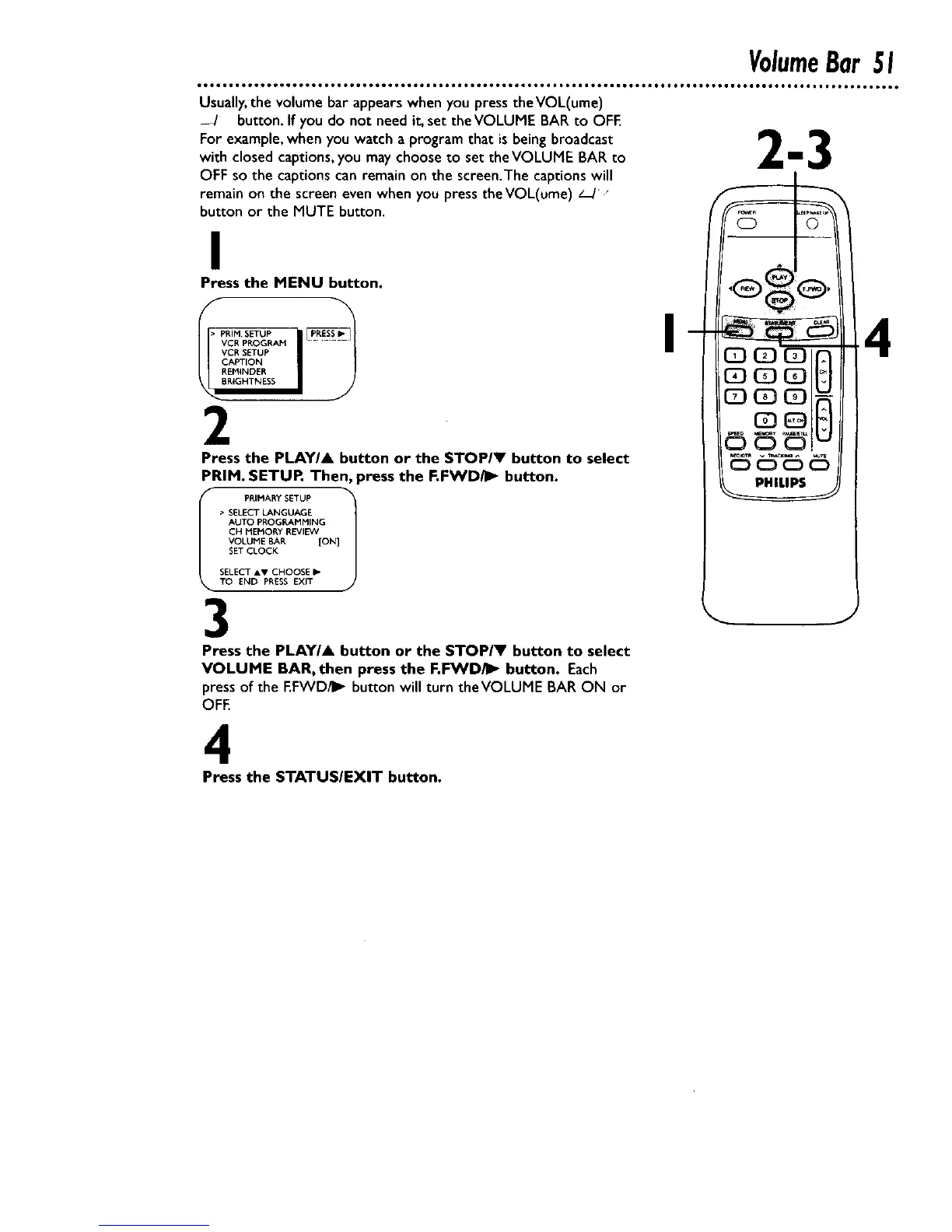
Usually,the volume bar appears when you press theVOL(ume)
_ / button.If you do not need it, set the VOLUME BAR to OFE
For example,when you watch a program that isbeing broadcast I_
with closed captions,you may choose to set the VOLUME BAR to L I J
OFF so the captions can remain on the screen.The captions will
remain on the screen even when you press theVOL(ume) _/"
button or the MUTE button.
I
Press the MENU button.
_R,MSETUP IIB CR PROGRAM
VCR SETUP
CAPTION
REIVIINDER
RIGHTNESS
2
Press the PLAYI& button or the STOPIV button to select
PRIM. SETUP, Then, press the F.FWD/I_" button.
I PRIMARY SETUP 1
• SELECT LANGUAGE
AUTO PROGP, AMMING
CH MEMOP, Y REVIEW
VOLUME BAR {ON]
SET CLOCK
SELECT .v CHOOSE I_
TO END PRESS EXIT
3
Press the PLAYIA button or the STOP/V button to select
VOLUME BAR, then press the F,FWD/II_ button. Each
press of the EFWD/II_ button will turn theVOLUME BAR ON or
OFE
I
4
4
Press the STATUSIEXIT button.










 To Next Page