22 RemoteControlButtons
•, .to • 16°° Jo,o °°_ • • °o° • ,*. • • • _o°, .t_ • _6t • • oot • J_o_ • • o,I • _o_m Jooo • .oQt • .tQ_t t.to_ • to°tl oooo. • _otoooo_ • • • i otooo,,
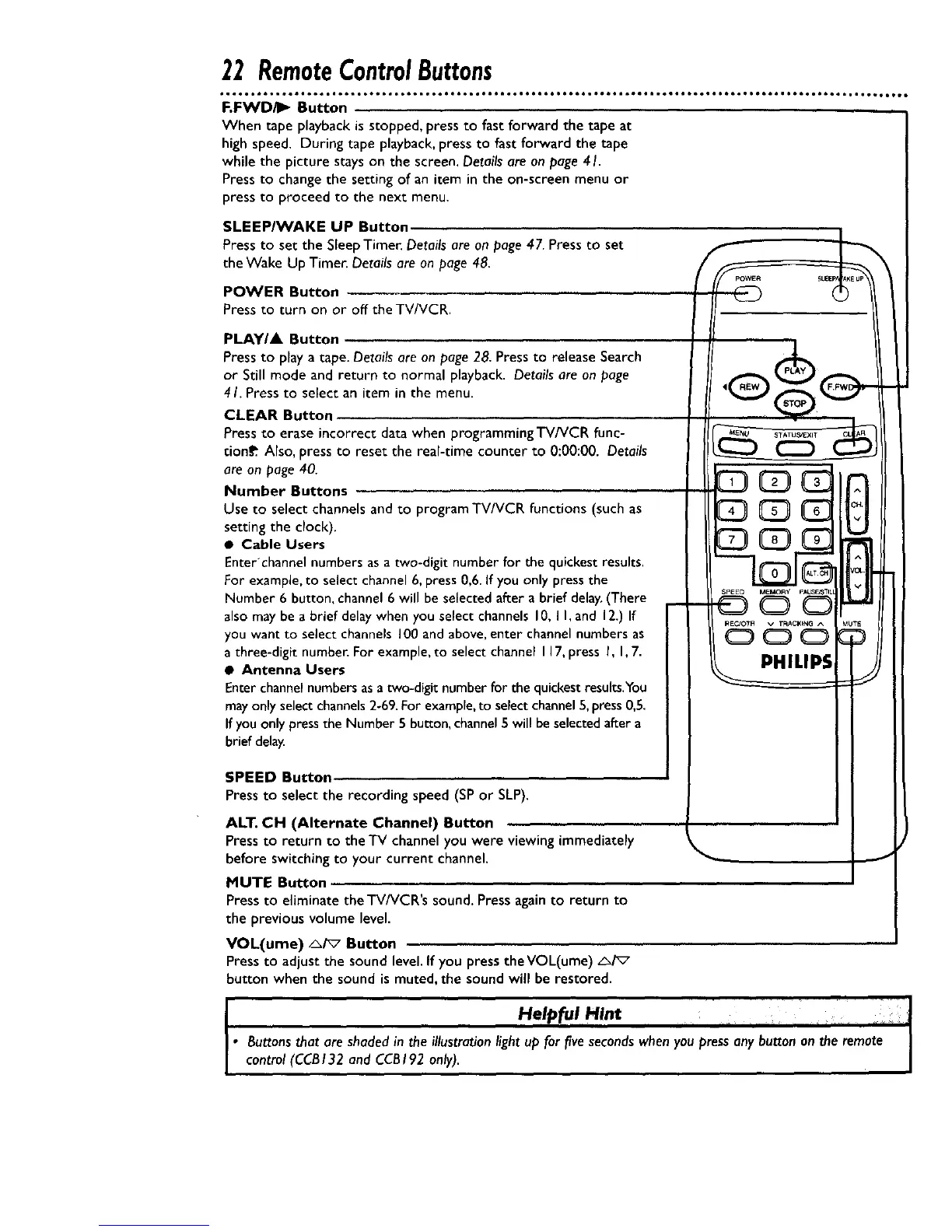
F.FWD/I_ Button
When tape playback is stopped, press to fast forward the tape at
high speed. During tape playback, press to fast forward the tape
while the picture stays on the screen. Details are on page 41.
Press to change the setting of an item in the on-screen menu or
press to proceed to the next menu.
SLEEPIWAKE UP Button
Pressto set the SleepTimer. Detailsare on page47. Pressto set
the Wake Up Timer. Detailsare on page 48.
POWER Button
Press to turn on or off the TV/VCR.
PLAY/A Button
Press to play a tape. Details are on page 28. Press to release Search
or Still mode and return to normal playback. Details are on page
4 I. Press to select an item in the menu.
CLEAR Button
Press to erase incorrect data when programming TV/VCR func-
tion_ Also, press to reset the real-time counter to 0:00:00. Details
are on page 40.
Number Buttons ....
Use to select channels and to program TV/VCR functions (such as
setting the clock).
• Cable Users
Enter'channel numbers as a two-digit number for the quickest results.
For example, to select channel 6, press 0,6. If you only press the
Number 6 button, channel 6 will be selected after a brief delay.(There
also may be a brief delay when you select channels I0, I I, and 12.) If
you want to select channels 100 and above, enter channel numbers as
a three-digit number. For example, to select channel I 17,press I, I, 7.
• Antenna Users
Enter channel numbers asa two-digit number for the quickest results.You
may only select channels 2-69. For example, to select channel 5, press 0,5.
If you only press the Number 5 button, channel 5 will be selected after a
brief delay.
SPEED Button
Pressto select the recording speed (SPor SLP).
ALT. CH (Alternate Channel) Button
Pressto return to the'IV channelyou were viewing immediately
before switching to your current channel.
MUTE Button ,,
Press to eliminate theTV/VCR's sound. Pressagainto return to
the previous volume level.
VOL(ume) _/_7 Button
Press to adjustthe sound level.If you press the VOL(ume) _/_
button when the sound is muted, the sound will be restored.
I
C3CDE
REG'OTH v TRACKING ^
CD C:) O
JTE
I
I .... J
Helpful Hint ,, , _ J
• Buttons that are shaded in the illustration light up for five seconds when you press any button on the remote
control (CCBI32 and CCBI92 only).










 To Next Page