38 A.BRepeatPlay
Follow the steps below to program the TV/VCR to playthe mater-
ial between two specified points (A and B) on a tape over and II
over again.
I
I
Insert a tape in the TV/VCR.
2
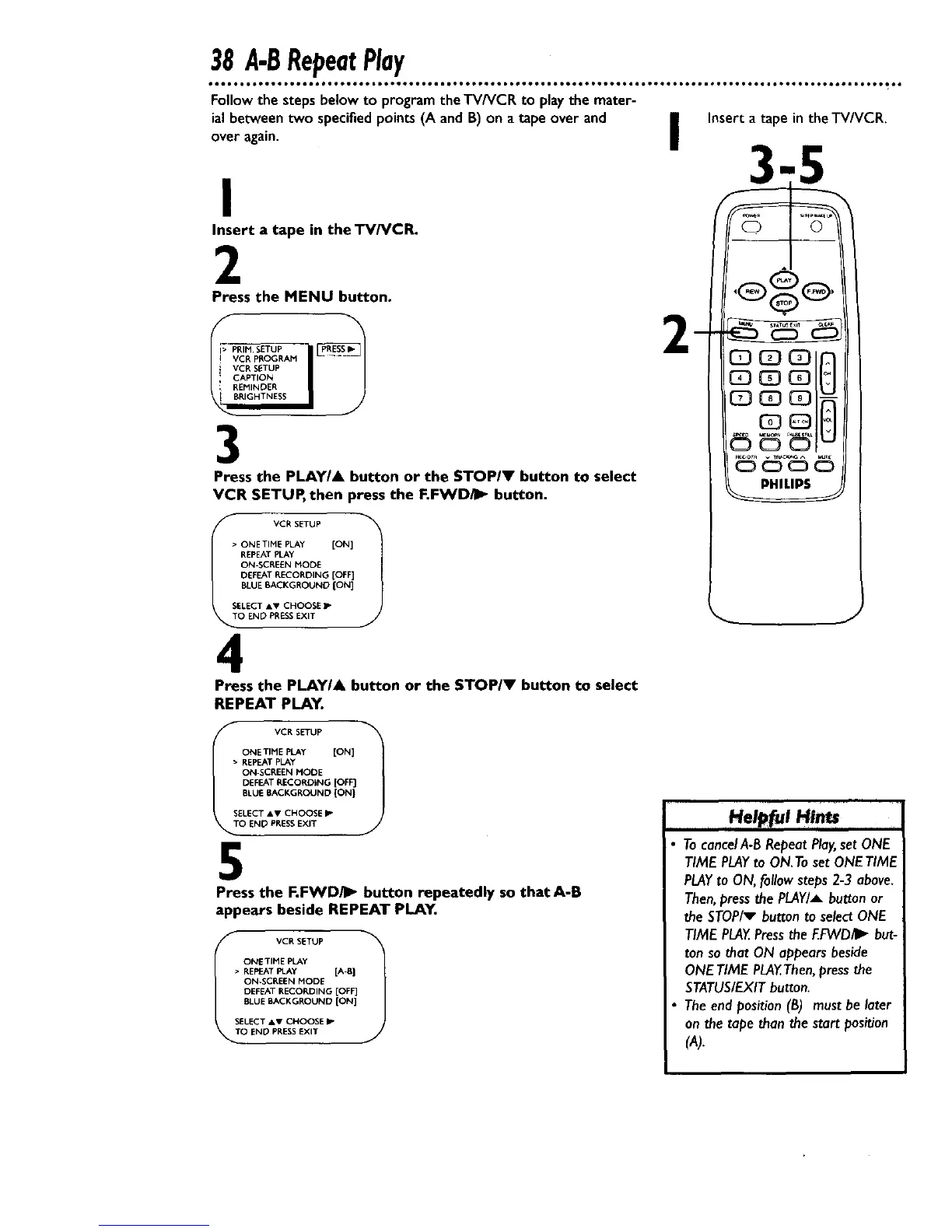
Press the MENU button.
I;-PR_M.SETUP i
I_BCR PBOGRAM
i VCR SETUP
; CAPTION
REMINDER
RIGHTNESS
3
Press the PLAYIA button or the STOPIV button to select
VCR SETUP, then press the F.FWD/I_ button.
• ONETIME PLAY [ON]
REPEAT PLAY
ON-SCREEN NODE
DEFEAT RECORDING [OFF]
BLUE BACKGROUNO {ON]
SELECT AV CHOOSE IP
O END PRESSEXIT
4
Press the PLAYI& button or the STOP/V button to select
REPEAT PLAY.
_
Insert atape in theTV/VCR.
PHILIPS
J
VC R SETUP 1
ONETIME PLAy [ON]
• REPEAT PLAY
ON-SCREEN MODE
DEFEAT RECORDING [OFF]
BLUE BACKGROUND (ON}
S\ SELECT AV CHOOSE P
O END PRESSEXIT
5
Press the F.FWD/I_ button repeatedly so that A-B
appears beside REPEAT PLAY,
fO VCR SET_JP 1
ONETIME PLAy
• REPEAT FLAy [A-B}
ON-SCREEN MODE
DEFEAT RECORDING [OFF]
BLUE BACKGROUND [ON]
SELECT &V CHOOSE I_"
END PRESSEXIT
He I
H/ms
TocancelA-BRepeatPlay,setONE
TIMEPLAYto ON.TosetONETIME
PLAYto ON,followsteps2-.3above.
Then,pressthe PLAY/_button or
the STOP/v button to selectONE
TIME PLAY.Pressthe EFVVD/I_but-
ton sothat ON appearsbeside
ONETIME PLAY.Then,pressthe
STATUS/EXITbutton.
Theend position(B) musthe later
on the tape thanthe start position
(A).










 To Next Page