42 SmartLock
SmartLock enablesparents to preventtheir childrenfrom watch- i_
inginappropriate material on
h
SmartLockreadsthe ratings for programming (except for news
and sports programs, unedited movies on premium cable channels,
and EmergencyBroadcast System signals),then denies accessto
programming if the program's rating meets or exceedsthe limita-
tions you select.The ratings are defined on page45.
To block ratings,follow the steps below.
I
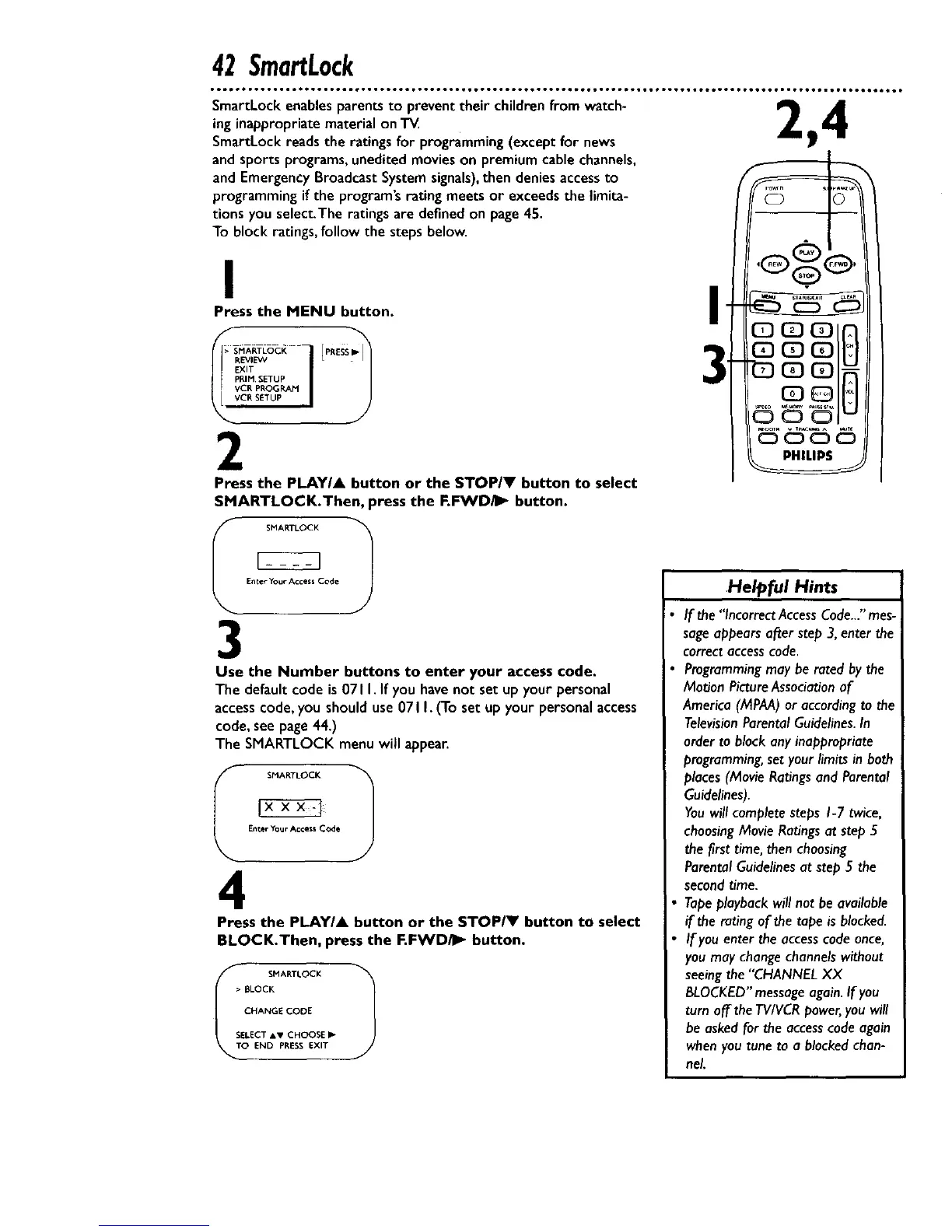
Press the MENU button.
>_ SI_ARTLOCI_VcF,P_.,MEXITR_' E'VVPROGRA_ETU__1 [ P_ESS_
VCR SETUP |
2
Press the PLAYIA button or the STOP/V button to select
SMARTLOCK.Then, press the F.FWDiI_ button.
I
SMARTLOCK 1
Enter Your Access Code
3
Use the Number buttons to enter your access code.
The default code is071 I. If you havenot set up your personal
accesscode,you should use071I. (To set up your personal access
code,seepage44.)
The SMARTLOCK menu will appear.
I SMARTLOCK 1
Enter Your Access Code
4
Press the PLAYIA button or the STOPIY button to select
BLOCK.Then, press the F.FWD/_ button.
_T SMARTLOCK 1
• BLOCK
CHANGE CODE
SELECT AV CHOOSE
O END PP,ESS EXIT
!
:o
Helpful Hints
If the'*IncorrectAccessCode..."mes-
sageappearsafter step 3,enterthe
correctaccesscode
Programmingmay be rated bythe
Motion PictureAssociationof
America(MPAA)or accordingto the
TelevisionParentalGuidelines.In
order to block anyinappropriate
programming,set yourlimitsin both
places(MovieRatingsand Parental
Guidelines).
Youwill completesteps I-7 twice,
choosingMovieRatingsat step5
the first time,then choosing
ParentalGuidelinesat step 5 the
second time.
Tapeplayback will not be available
if the ratingof the tape isblocked.
If youenter theaccesscodeonce,
you maychangechannelswithout
seeingthe"CHANNELXX
BLOCKED"messageagain.If you
turn off the TV/VCRpower,you will
be askedforthe accesscodeagain
whenyou tuneto a blockedchan-
nel










 To Next Page