Rerecording(TapeDuplication)31
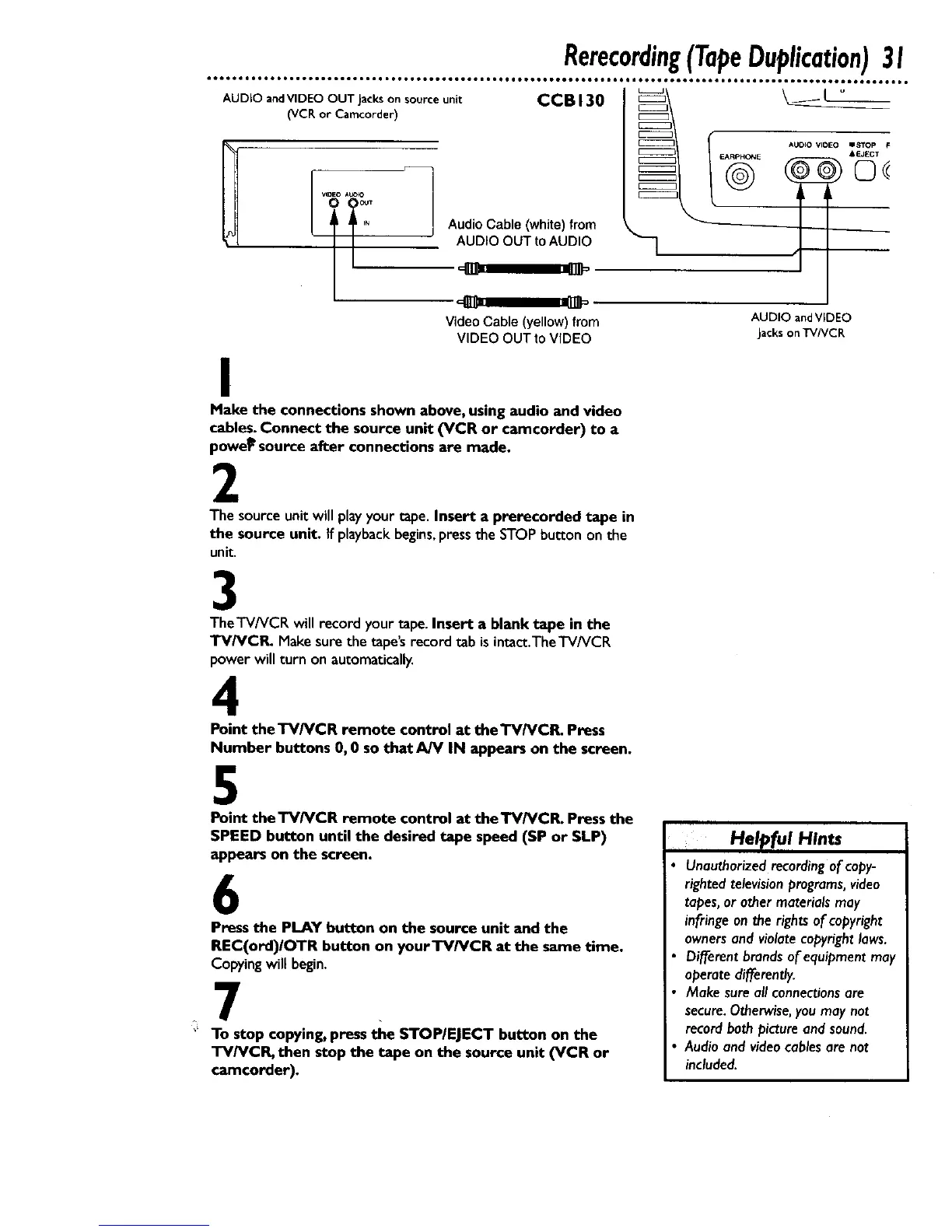
AudioCable (white) from
AUDIO OUT to AUDIO
AUDIO andVIDEO OUT Jackson source unit
(VCR or Camcorder)
VIDEO A_O
CCBI30 _\ _ _-
@
t
Video Cable (yellow) from
VIDEO OUT to VIDEO
AUDIO andVIDEO
Jackson TVNCR
I
Make the connections shown above, using audio and video
cables.Connect the source unit (VCR or camcorder) to a
powe_source after connections are made.
2
The sourceunit will playyour tape.Insert a prerecorded tape in
the source unit. If playbackbegins,pressthe STOPbu_conon the
unit.
3
TheTV/VCR will record your tape.Insert a blank tape in the
TV/VCR. Makesure the tape'srecord tab isintact.TheTV/VCR
powerwill turn on automatically.
4
Point the TV/VCR remote control at the TV/VCR. Press
Number buttons 0, 0 so that AJV IN appears on the screen.
5
Point theTV/VCR remote control at the'rV/VCR. Press the
SPEED button until the desired tape speed (SP or SLP)
appears on the screen.
6
Press the PLAY button on the source unit and the
REC(ord)IOTR button on yourTV/VCR at the same time,
Copying will begin,
7
'* To stop copying, press the STOP/EJECT button on the
TV/VCR, then stop the tape on the source unit (VCR or
camcorder).
Help[ul Hints
Unauthorized recording of copy-
righted television programs, video
tapes, or other materials may
infringe on the rights of copyright
owners and violate copyright laws.
Different brands of equipment may
operate differently.
Make sure all connections are
secure.Otherwise,you may not
recordboth picture and sound.
Audio and videocables ore not
included.










 To Next Page