40 Real-TimeCounterMemory
• ootT,,.oe6ol • ooot,etlo••• •••eoo_otll••Ql. JoooettolJ,oloeot ooeeooeetiDjelgoeeeoll jIQogloeeeoegoooeeeeo.eeo
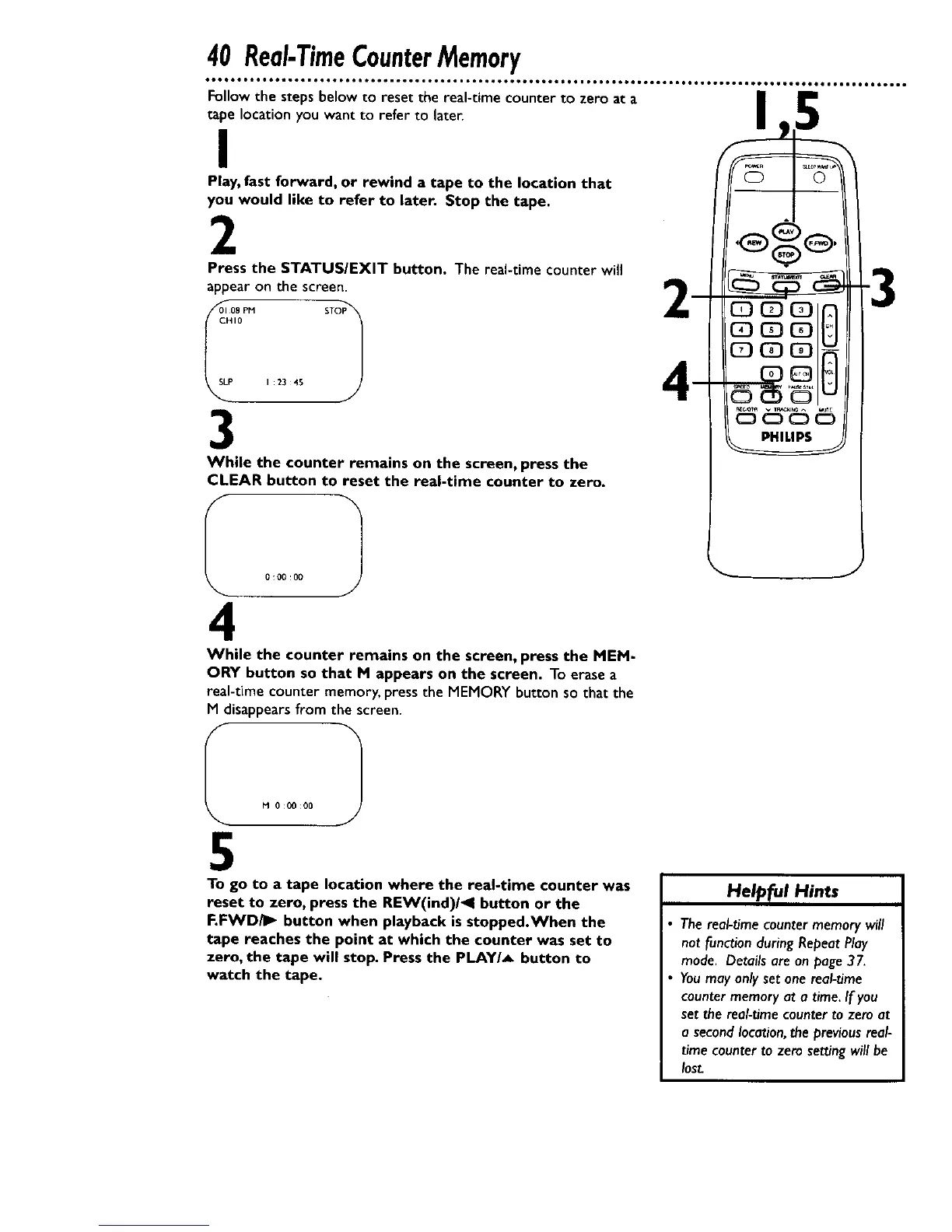
Follow the steps below to reset the real-time counter to zero at a
tape location you want to refer to later.
I
Play, fast forward, or rewind a tape to the location that
you would like to refer to later. Stop the tape.
2
Press the STATUS/EXIT button. The real-time counter will
appear on the screen.
oI00o1
P I 23 45
3
While the counter remains on the screen, press the
CLEAR button to reset the real-time counter to zero.
4
While the counter remains on the screen, press the MEM-
ORY button so that M appears on the screen. To erasea
real-time counter memory, press the MEMORY button so that the
M disappearsfrom the screen.
5
To go to a tape location where the real-time counter was
reset to zero, press the REW(ind)/_l button or the
F.FWD/I_ button when playback isstopped.When the
tape reaches the point at which the counter was set to
zero, the tape will stop. Press the PLAY/_ button to
watch the tape.
Helpful Hints
• The real-time counter memory will
not function during Repeat Play
mode. Details are on page 37.
• Youmay only set one real-time
counter memory at a time. If you
set the real-time counter to zero at
a second location,the previous real-
time counter to zero set_ng will be
lost.










 To Next Page