12 SettingtheClock
There are three ways to set the clock: Manually,with Automatic
PBSChannel Selection, or with Manual PBSChannel Selection.
With manualclock setting,you tell the TV/VCR the current time.
With Automatic or Manual PBSChannel Selection,the TV/VCR
gets the time from your local PBSstation.
If you use either ManualPBSChannel Selection or Automatic PBS
Channel Selection,follow the steps on page 19to havethe
TV/VCR maintain the clock according to your Time Zone.
Cable Box users must set the clock manually.
To set the clock manually,follow the steps on pages 12-13.To set
the clock usingAutomatic PBSChannel Selection,follow the steps
on pages 14-15.'1"oset the clock using ManualPBSChannel
Selection,folloW the stepson pages 16-17.
Before you begin, make sure:
_:TheTV/VCR is hooked up and turned on.
Channels are set up.
You make each entry within 60 secondsof the previous entry.
Manual Clock Setting
I
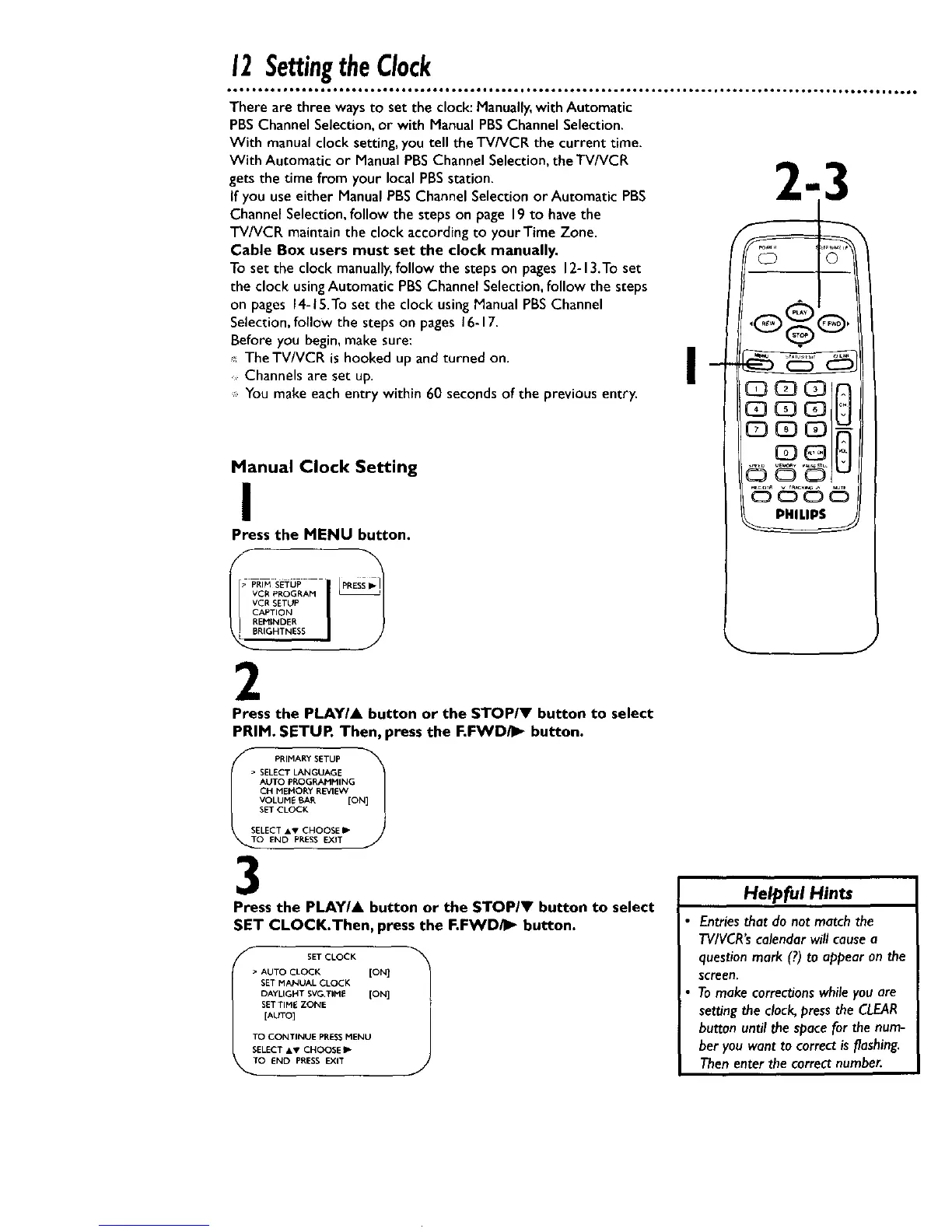
Press the MENU button.
VCR PROGRAM
VCR SETUP
CAPTION
[_REMINDER
BRIGHTNESS
2
Press the PLAYIA button or the STOP/V button to select
PRIM. SETUR Then, press the F.FWD/I_ button.
• PRIMARY SETUP
AUTO PROGRAMMING
CH MEMORY REVIEW
VOLUME BAR [ON]
SET CLOCK
SELECT &V CHOOSE IJ"
0 END PRESS EXIT
3
Press the PLAY/& button or the STOPII' button to select
SET CLOCK.Then, press the F.FWD/_ button.
f
SET CLOCK
• AUTO CLOCK [ON]
SET MANUAL CLOCK
DAYLIGHT SVG TIME [ON]
SETTIME ZONE
[AUTO]
TO CONTINUE PRESSMENU
SELECT &v CHOOSE P
TO END PRESS EXIT
J
9,
Helpful Hints
Entriesthat do not matchthe
TV/VCR'scalendarwill causea
questionmark (?)to appearon the
screen.
Tomake correctionswhileyouare
se_ng the clock,pressthe CLEAR
button until the spacefor the num-
ber youwant to correctis flashing.
Thenenter the correct number.










 To Next Page