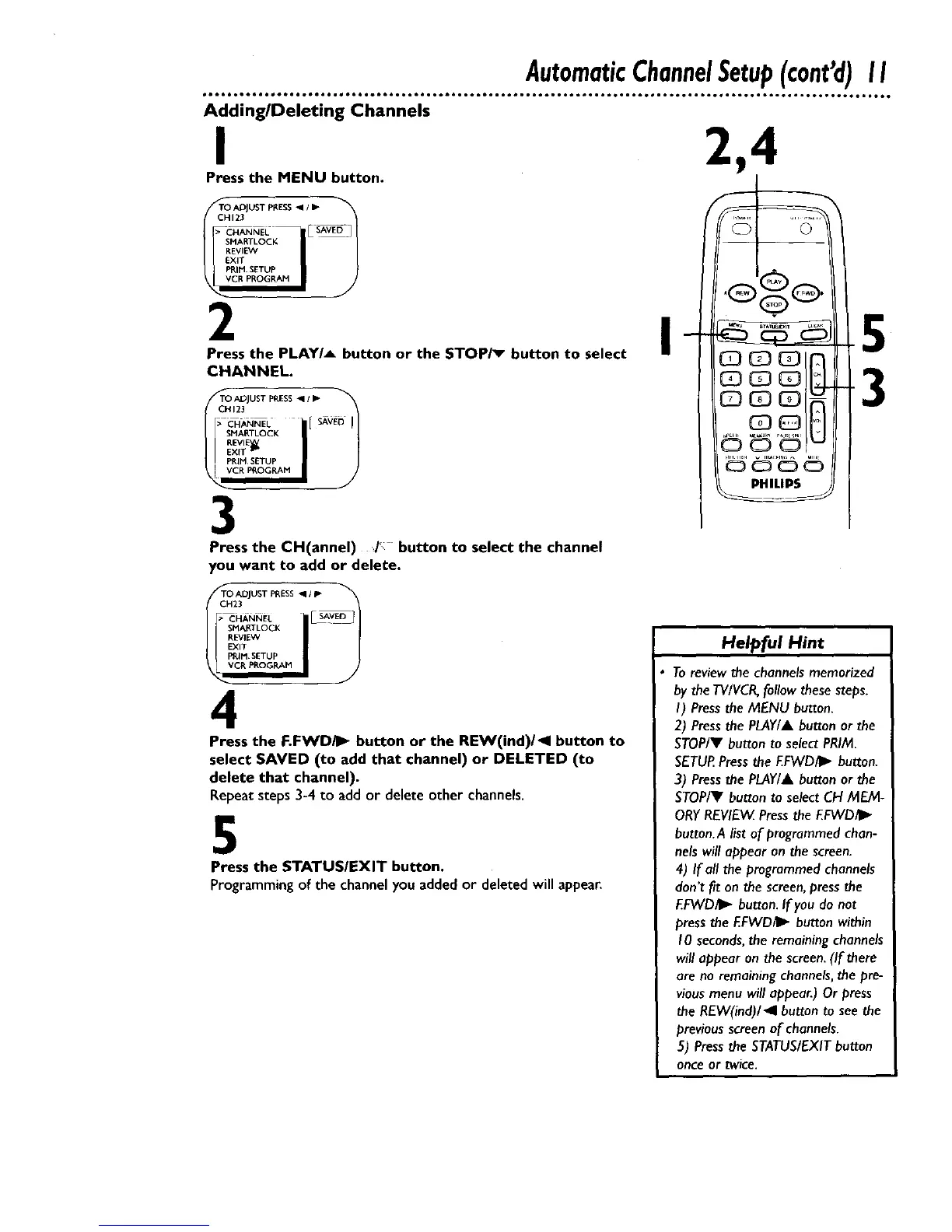
Adding/Deleting Channels
I
Press the MENU button.
TO ADJUST PI_ESS "911•
SMARTLOCg
REVIEVV
EXIT
PRIM. SETUP
2
Press the PLAY/_ button or the STOP/_ button to select
CHANNEL.
_NNEL i[ SAV
sM ll I !
PRIM SETUP I S
3
Press the CH(annel) J*, button to select the channel
you want to add or delete.
TO ADJUST PRESS
CH23
SMAP,TLOCK
REVIEW
EXIT
PRIM SETUP
CR PROGRAM
4
Press the F.FWD/I_ button or the REW(ind)/_ll button to
select SAVED (to add that channel) or DELETED (to
delete that channel).
Repeatsteps3-4 to add or delete other channels.
5
Press the STATUSIEXIT button.
Programming of the channel you added or deleted will appear.
©
PHILIPS
5
3
Helpful Hint
To review the channels memorized
by the TV/VCR,follow these steps.
I) Press the MENU button.
2) Press the PLAY/A button or the
STOP/V button to select PRIM.
SETUR Press the F.FWDII_ button.
3) Press the PLAY/& button or the
STOP/V button to select CH MEM-
ORY REVIEW Press the EFWD_.
button. A list of programmed chan-
nels will appear on the screen.
4) If all the programmed channels
don't fit on the screen, press the
F.FWD/I_ button. If you do not
press the EFWD_ button within
10 seconds,the remaining channels
will appear on the screen. (If there
are no remaining channels, the pre-
vious menu will appear.) Or press
the REW(ind)/_l button to see the
previous screen of channels.
5) Press the STATUS/EXIT button
once or twice.










 To Next Page