6 H00kingUptheTV/VCR
I
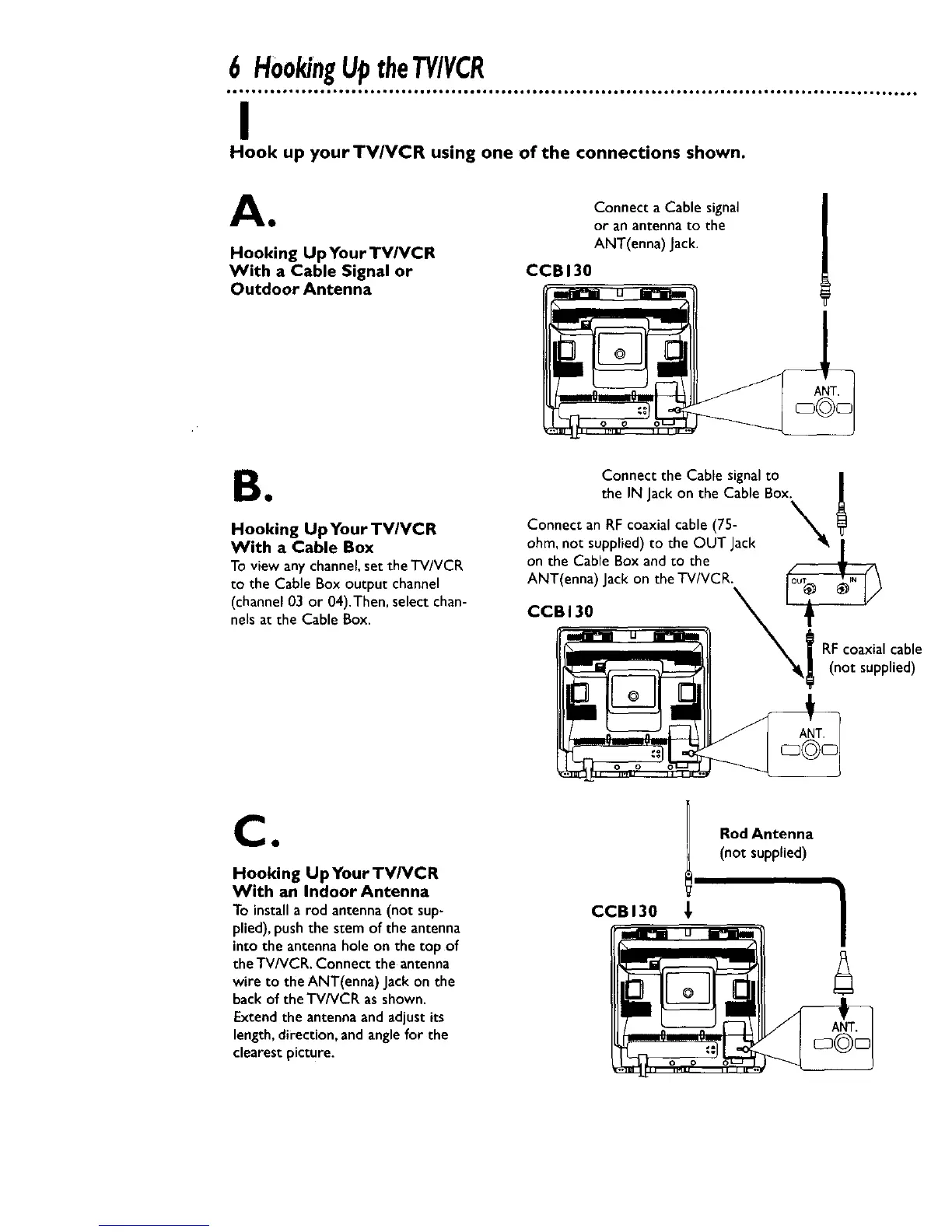
Hook up yourTV/VCR using one of the connections shown.
A Connect a Cable signal
• or an antennato the
Hooking Up Your TVIVCR ANT(enna) Jack.
With a Cable Signal or CCBI30
Outdoor Antenna
B•
Hooking Up Your TV/VCR
With a Cable Box
To view any channel,set the TV/VCR
to the Cable Box output channel
(channel03 or 04).Then, select chan-
nelsat the Cable Box.
Connect the Cable signalto |
the IN Jackon the Cable Box. |
Connect an RF coaxial cable (75- _
ohm, not supplied) to the OUT Jack • I
on the Cable Box and to the
ANT(enna) Jackon theTV/VCR. _ \
CCBI30 _L___ ___
j RFcoaxialcable
_lk_ (not supplied)
Ca
Hooking Up Your TV/VCR
With an Indoor Antenna
To installa rod antenna(not sup-
plied),pushthe stem of the antenna
into the antennahole on the top of
the TV/VCR. Connect the antenna
wire to the ANT(enna) Jackon the
backof the TV/VCR asshown.
Extendthe antennaand adjustits
length,direction,and anglefor the
clearestpicture.
CCBI30 _,
Rod Antenna
(not supplied)










 To Next Page